

Hospitals and healthcare centers are often sprawling, complex venues with multiple floors, departments and buildings—many of which change location every few months as construction, renovations, and department reorganizations reshape the facility.
For patients, this complexity arrives at what's often a stressful moment. Someone arriving for a chemotherapy infusion, a pre-operative consultation, or an urgent radiology appointment doesn't have time to get lost.
In a healthcare setting, that wasted time has a direct cost: patients arrive late or miss appointments entirely, staff field direction requests that pull them away from clinical work, and first-time visitors arrive at their first hospital interaction already stressed.
Hospital wayfinding is key to effective and positive patient, staff and visitor experiences. In fact, over a third of patients say clear wayfinding significantly improves their feelings of safety.
Implementing a hospital wayfinding system that actually works—one that stays accurate, meets accessibility requirements, and serves patients reliably across every channel—requires more than installing some kiosks.
In this blog, we'll cover what a hospital wayfinding system is, the key components involved, a framework for evaluating your options, and what the implementation process looks like in practice.


What is a hospital wayfinding system?
A hospital wayfinding system is the set of tools, technologies, and physical infrastructure that helps patients, visitors, and staff navigate a healthcare facility from arrival to their destination. It typically includes a combination of physical signage, digital interactive directories, mobile navigation tools, and the content management infrastructure needed to keep all of these accurate and up to date.
The fundamental purpose is straightforward: reduce navigation friction so that the right people reach the right place at the right time.
But the scope of a modern hospital wayfinding system extends further than that. A well-implemented system also serves operational functions like supporting security, emergency management, and space utilization analytics, while meeting the accessibility and compliance obligations that healthcare environments carry.
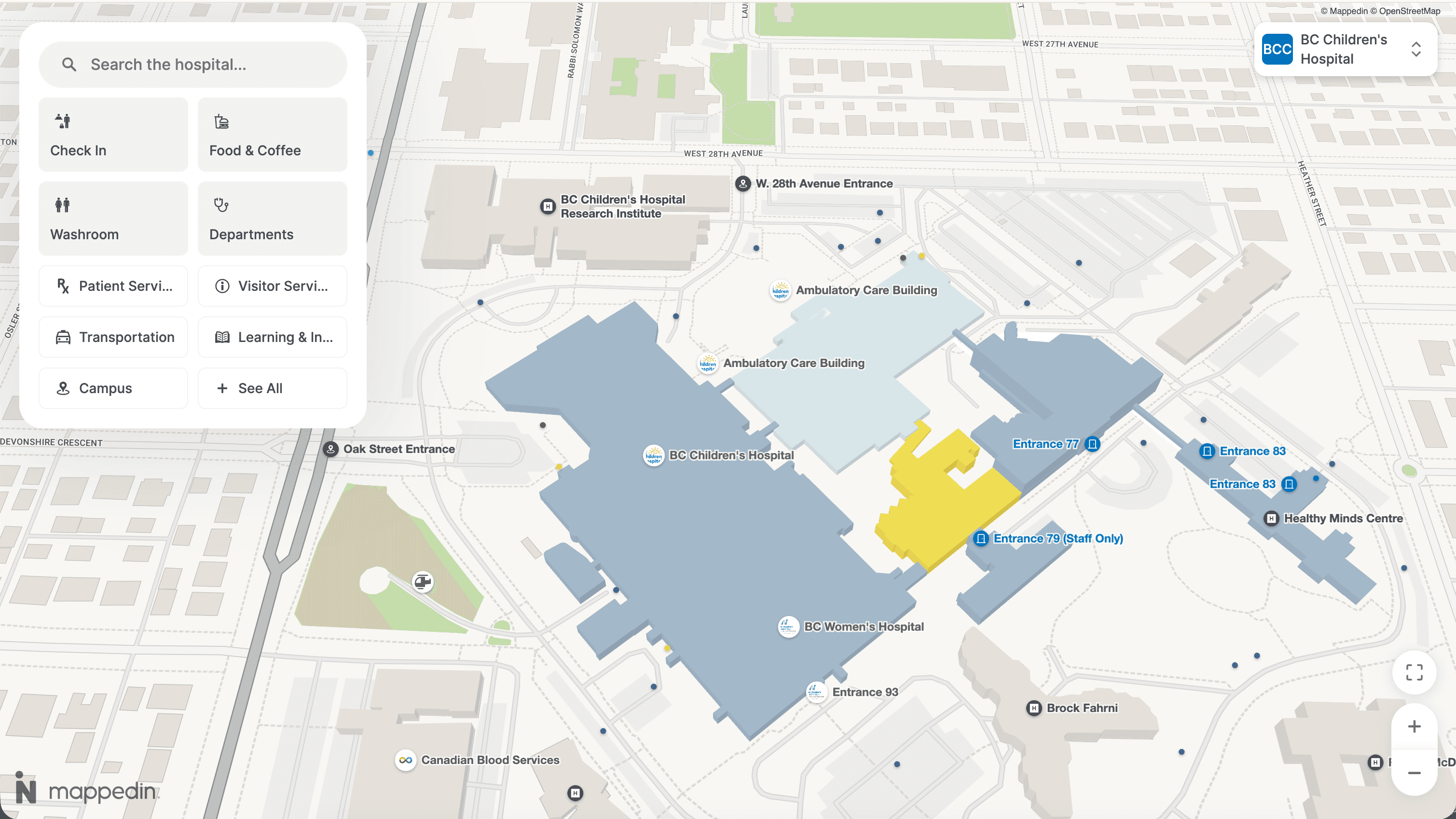
What distinguishes hospital wayfinding from wayfinding in other venue types is the stakes. In a shopping mall, a navigation failure means a visitor doesn't find a store.
In a hospital, it can mean a patient misses a time-sensitive scan, a family member can't locate the surgical waiting room, or a staff member in an unfamiliar wing spends ten minutes finding a piece of equipment. Every category of navigation failure carries a cost in healthcare that simply doesn't exist in other environments.
Ready to see how Mappedin serves patients and operations teams in healthcare environments? Get a demo →
Why is hospital wayfinding so difficult?
Understanding the specific challenges of healthcare navigation helps define what a wayfinding system needs to handle and where simpler solutions tend to break down.
Hospital layouts change constantly
Unlike airports or shopping malls, where physical changes are relatively infrequent, hospital campuses are in a near-constant state of evolution. Department relocations, construction projects, wing renovations, seasonal service changes, and the opening of new clinical areas can alter navigation routes significantly — sometimes on timelines as short as weeks. A wayfinding system that depends on static printed maps or vendor-managed GIS workflows will be inaccurate more often than it is current.
The patient population is unusually diverse in its needs
Hospitals serve patients with mobility impairments, visual disabilities, cognitive challenges, and diverse languages. A hospital wayfinding system that works well for an ambulatory, English-speaking adult but fails for someone in a wheelchair, someone with a visual impairment, or someone who reads Spanish as their primary language isn't serving a meaningful portion of the patient population. In healthcare, accessibility is a design requirement with regulatory backing.
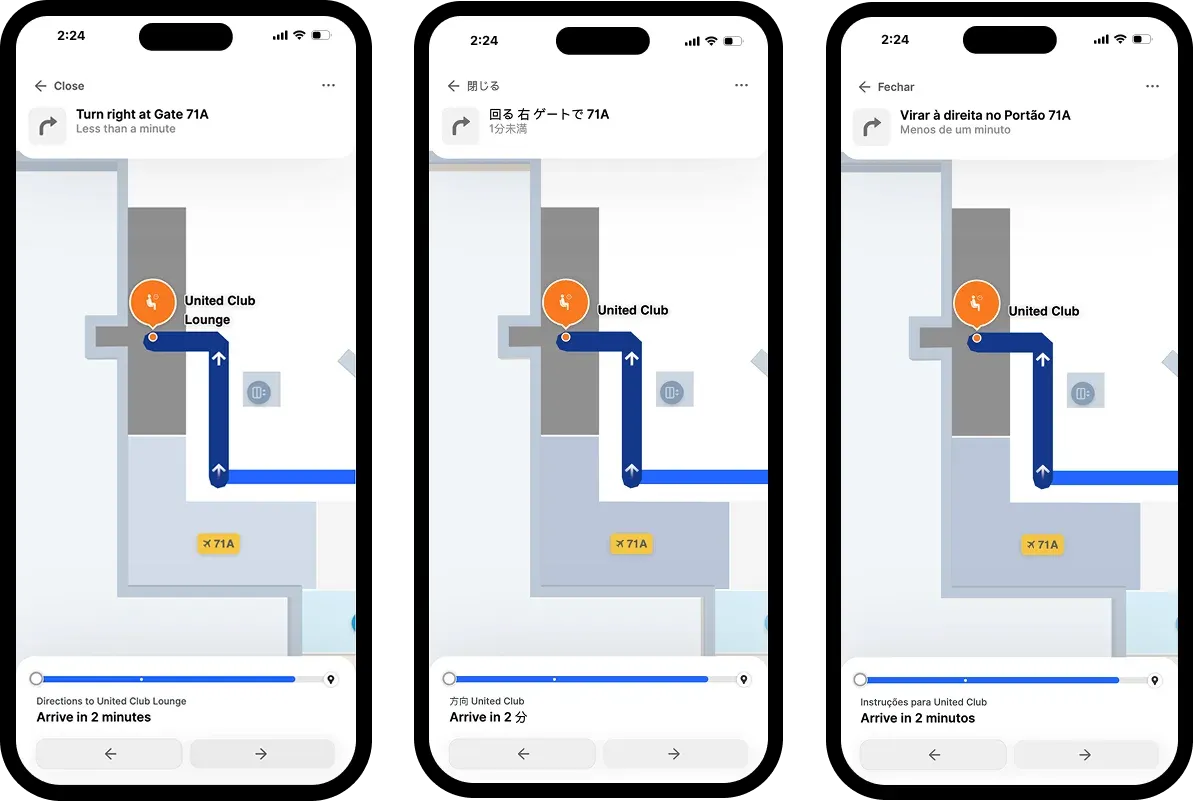
Navigation spans multiple channels and touchpoints
A patient's navigation experience doesn't start at the kiosk inside the entrance. It starts when they look up directions on their phone the night before. It continues in the parking garage, the lobby, the elevator bank, and the corridor leading to the clinical area.
A wayfinding system that functions at the kiosk but isn't consistent with what the patient saw on the website, or doesn't account for the multi-floor journey from the car to the appointment, creates handoff failures that erode trust at exactly the wrong moment.
Staff time spent giving directions is a real and measurable cost
In hospitals without effective wayfinding, clinical staff routinely spend time answering navigation questions from visitors. The time spent giving directions is time is pulled away from the clinical work those staff are hired to do.
For large campuses, the aggregate cost is significant, and it's one of the clearest business cases available for facilities teams making the argument for wayfinding investment.


What are the core components of a hospital wayfinding system?
Physical signage and overhead directional signs
The foundation of any wayfinding system is physical infrastructure:
- Overhead hanging signs
- Directional signs at decision points
- Identification signage at department entrances
Physical signage has the advantage of working without technology: it's visible to everyone, requires no device, and doesn't depend on a network.
While phsyical signage is an important part of any hospital wayfinding program, it has its limitations. Physical signage becomes inaccurate the moment anything changes, is expensive to replace, and can't adapt dynamically to new routing requirements or temporary closures. Most healthcare facilities use physical signage as a baseline layer, not a complete solution.
Interactive digital kiosks
Digital kiosk directories like touchscreen displays installed at high-traffic decision points such as building entrances, elevator lobbies, and major intersections allow patients to search for a destination and receive visual walking directions. At well-equipped facilities, kiosks generate a QR code that transfers the route to a patient's phone for turn-by-turn navigation through the rest of the journey.
For facilities managers, the critical question with kiosk deployments is accuracy maintenance. A kiosk showing a department that has moved is more frustrating than no kiosk at all, because it creates a false expectation. The value of a digital kiosk depends entirely on the map data behind it being current.

Mobile and web-based wayfinding
Patients increasingly arrive at healthcare facilities having already looked up their destination on their phone. A mobile or web-based hospital wayfinding tool like Mappedin that's integrated into the hospital's patient portal, website, or dedicated app extends the navigation experience outside the building and allows patients to plan their route before arrival.
For large campuses with complex parking structures and multiple entry points, pre-arrival navigation support can significantly reduce the time and stress of the initial arrival experience.
With indoor positioning, mobile wayfinding also enables indoor turn-by-turn navigation during the patient's actual journey. This is where the technology becomes most valuable for first-time visitors or those navigating between departments they've never visited.
The content management system (CMS)
The CMS is the operational backbone of any digital wayfinding deployment. It's the system that stores the floor plan data, department information, points of interest, and routing logic and it's what determines how easy it is to keep all of that current as the hospital changes.
For healthcare facilities teams, the CMS is one of the most important evaluation criteria when selecting a wayfinding platform.
A CMS that requires a vendor to make changes, or that needs specialized GIS expertise to update, creates a bottleneck that guarantees the maps will fall out of date. Facilities managers who can update routes, add new departments, and close corridors directly (in real time, without filing a support ticket) maintain wayfinding accuracy as a standard part of their operations rather than as a periodic project.
How to implement a hospital wayfinding system
Implementing hospital wayfinding effectively involves five broad phases. The sequence matters; skipping steps tends to produce systems that work at launch but degrade quickly.
Phase 1: Audit your current state and define success
Before selecting a technology, map your current wayfinding gaps. Where do patients most frequently get lost? Which departments generate the most staff direction requests? What does your current signage inventory look like, and how current is it? Are there specific accessibility failures — no step-free routing information, no multilingual support — that need to be remediated?
Define what success looks like in measurable terms: reduced call center contacts for directions, improved patient satisfaction scores, a specific reduction in late arrivals attributable to navigation failures. Without defined success criteria, you can't evaluate whether your implementation worked or justify investment to leadership.
Key questions to ask at this stage:
- What are the top five locations where patients regularly get lost?
- How many staff hours per week are spent answering navigation questions?
- What percentage of our patient population speaks a primary language other than English?
- What accessibility obligations are we currently failing to meet?
- How frequently do our floor plans change, and what's our current process for updating signage?
Phase 2: Define your scope and channel strategy
Decide which touchpoints your wayfinding system needs to cover. For most large hospitals, this includes at minimum: the facility website or patient portal, physical kiosk installations at key decision points, and a mobile-compatible navigation experience. Larger multi-building campuses typically also need outdoor-to-indoor handoff navigation — a patient following GPS directions from their car who then loses navigation when they enter the building faces a significant experience gap.
Critically, all touchpoints should draw from a single, shared data source. If your website map and your kiosk map are maintained separately, they will eventually disagree — and a patient who receives conflicting directions from two systems in the same facility loses all confidence in the navigation environment.
Phase 3: Select a wayfinding platform
Evaluating wayfinding platforms for healthcare involves assessing five areas:
1. Map accuracy and maintenance.
How are floor plan updates made? Can facilities staff update routes, add departments, and close corridors directly in the CMS or does every change require a support ticket to the vendor? What's the typical turnaround time for a map update? For a hospital that reorganizes departments multiple times a year, this is often the most important factor.
2. Accessibility and inclusivity depth.
Does the platform offer step-free routing that automatically prioritizes elevator routes for patients with mobility impairments? Is it compliant with WCAG standards, and is that compliance independently verified or self-declared? How many languages does it support? Does it offer screen reader compatibility? In healthcare, these capabilities determine whether a significant share of your patient population can actually use the system.
3. Indoor positioning approach.
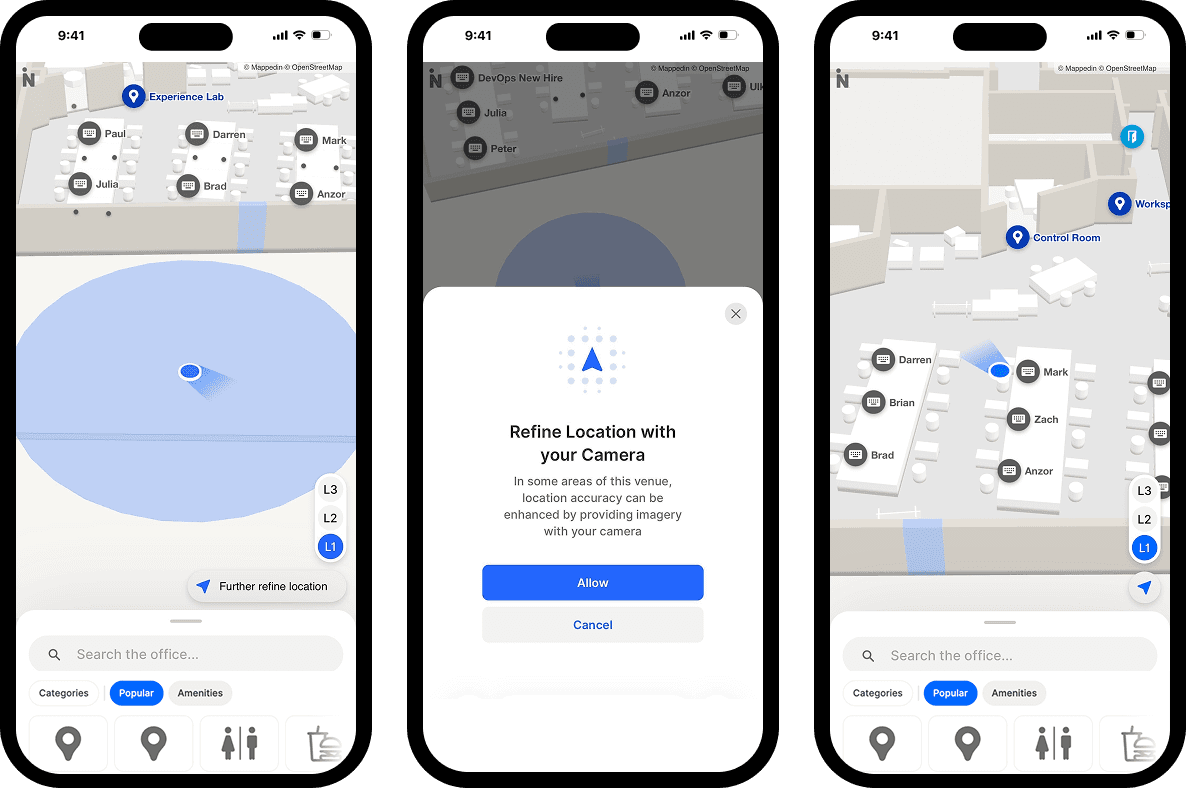
Turn-by-turn indoor navigation requires a method for determining a user's location inside the building. Beacon-based systems deliver accurate positioning but require hardware procurement and ongoing maintenance across hundreds of locations—a significant operational burden for most healthcare facilities teams.
Beacon-free approaches use existing Wi-Fi infrastructure and device sensor data to determine indoor location without hardware installation.
4. Multi-touchpoint coverage.
Does the platform publish consistent navigation data across web, mobile, and kiosk simultaneously from a single data source? Or does each touchpoint require separate management?
5. Operational use cases.
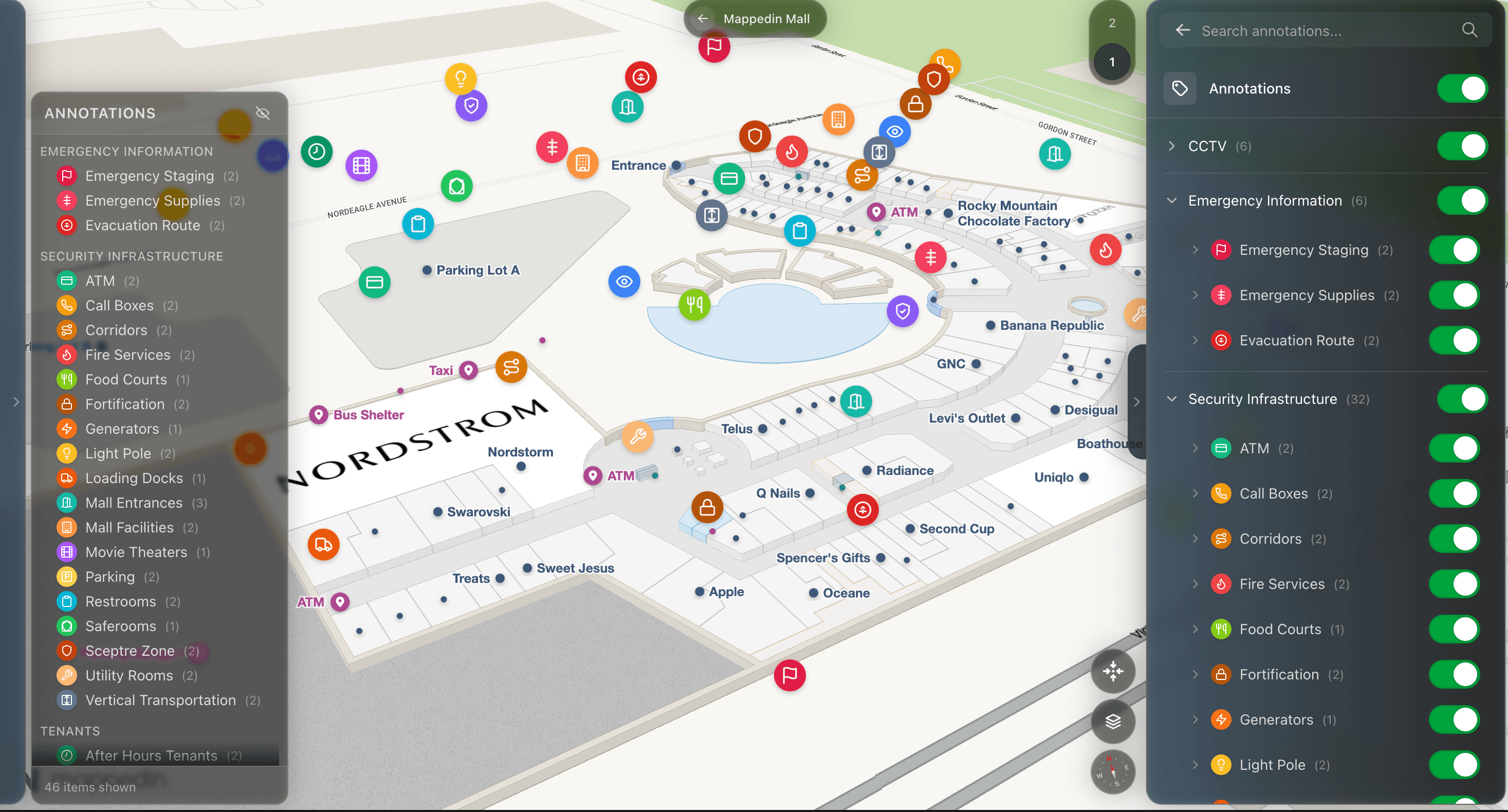
Can the same platform support internal operational needs like emergency management, space utilization, asset tracking in addition to patient-facing navigation? A dual-purpose platform reduces the number of systems facilities teams need to maintain.
Phase 4: Build, configure, and test before launch
Converting physical floor plans to the data layer the wayfinding platform uses is often the most time-consuming part of implementation. For large hospital campuses, this process can take weeks or months with traditional GIS approaches.
Some platforms have compressed this significantly with AI-assisted map creation tools that accelerate the initial build.
Before launch, test with representative users across the full range of patient populations: first-time visitors unfamiliar with the facility, patients using mobility aids or assistive devices, and non-English speakers. Navigation failures that are invisible to staff who know the building intuitively often surface immediately in user testing.
Plan for the first round of corrections: no wayfinding deployment launches perfectly, and building in a post-launch review window allows you to catch and fix the issues that testing didn't reveal.
Phase 5: Establish ongoing maintenance processes
The most common reason hospital wayfinding systems degrade over time isn't technology failure—it's that no one owns the process of keeping them current.
Before launch, establish who is responsible for updating the wayfinding CMS when a department moves, a wing closes for renovation, or a new service area opens. Assign that responsibility explicitly, and make sure that person has the access and training to make updates directly without routing through a vendor.
Connect your wayfinding CMS to your facility's operational data sources where possible. If your facilities management system records department moves, and that information can automatically update the wayfinding map, the human error rate in maintenance drops dramatically.
What does success look like for hospital wayfinding systems?
Healthcare facilities that have invested in modern wayfinding infrastructure have reported consistent categories of improvement:
Reduced staff time answering navigation questions
When patients can find their way independently, clinical staff spend less time as informal wayfinding guides. For large campuses where direction requests are frequent, this represents real hours returned to clinical work each week.
Improved patient experience scores
Navigation confidence is a meaningful driver of overall patient satisfaction. Visitors who feel supported through the physical environment of a hospital—who arrive at appointments on time, without frustration, without feeling lost—rate their experience more positively.
In healthcare, where patient experience scores affect both institutional reputation and reimbursement rates, that effect is material.
Better accessibility compliance outcomes
Facilities that invest in genuinely deep accessibility implementation rather than just "checkbox" compliance serve a larger share of their patient population effectively and reduce the risk of compliance-related issues under ADA and WCAG requirements.
Operational benefits beyond patient navigation
The map data that powers patient wayfinding has uses beyond the patient experience. Facilities teams with access to detailed, accurate floor plan data can use it to support emergency management, space utilization analysis, and asset tracking, multiplying the return on the original investment.
How hospitals are solving this with digital wayfinding platforms
A growing number of healthcare facilities are consolidating patient navigation, kiosk management, web wayfinding, and operational mapping onto a single indoor mapping platform rather than managing a separate system for each channel.
The logic is straightforward: when all touchpoints draw from the same map layer, a department move or construction closure only needs to be updated once.
The change propagates to the website, the kiosk, and the mobile experience simultaneously. Accuracy becomes a function of a single update process rather than a multi-system coordination effort.
Mappedin is one platform built on this architecture. Its indoor mapping platform is deployed at large healthcare campuses, airports, and multi-building facilities, powering patient-facing navigation across web, kiosk, and mobile from a single CMS while also supporting operational use cases including emergency management and space utilization.
— Daniel Lombardi, VP Donor Success & Revenue, Grand River Hospital Foundation
Mappedin's WCAG 2.2 AA certification is independently tested through Level Access and includes mobility-first routing, 40-language support, and screen reader compatibility. Its beacon-free indoor positioning removes the hardware procurement and maintenance burden that has historically made turn-by-turn indoor navigation cost-prohibitive for large campuses.
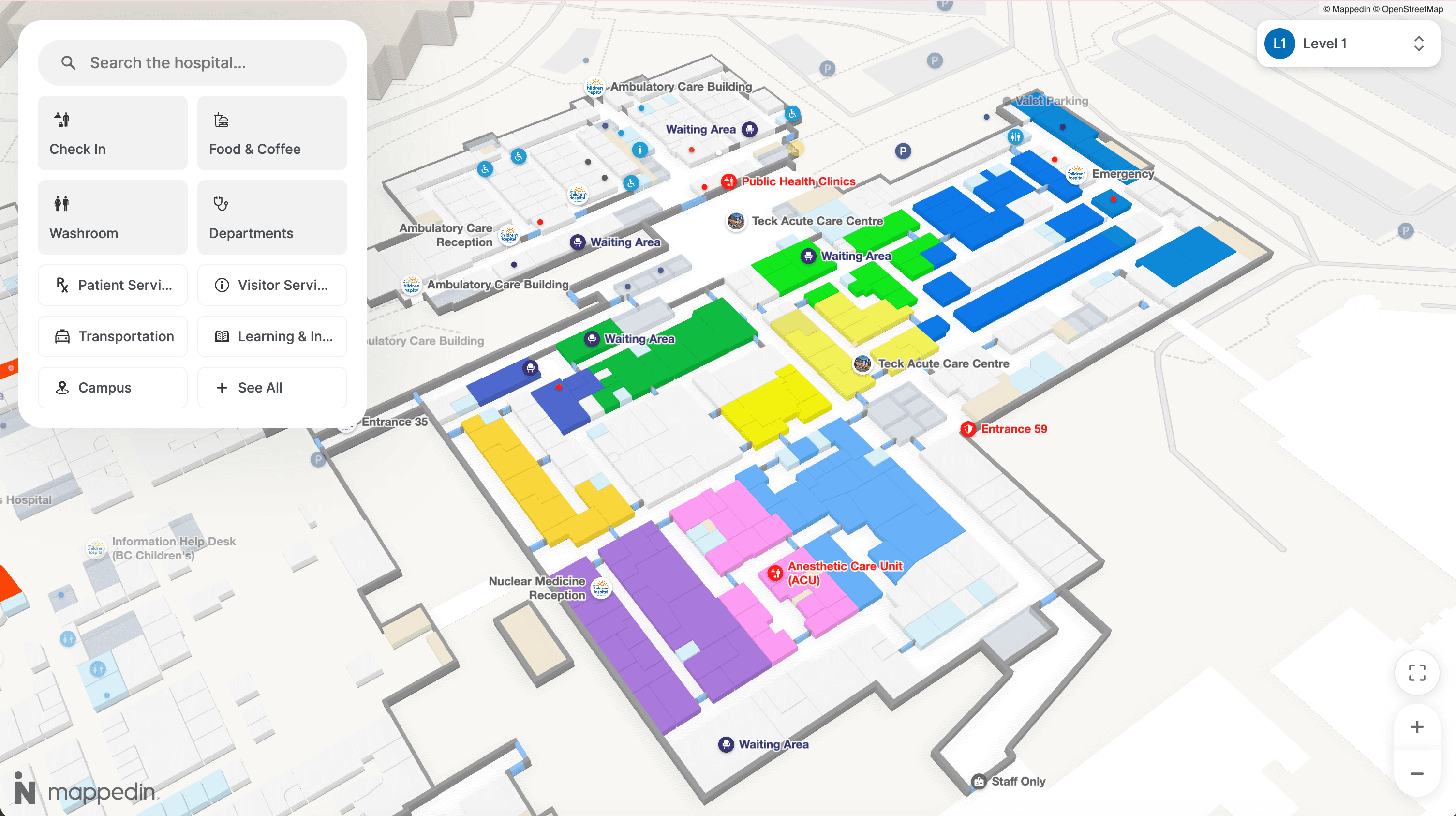
For facilities teams evaluating the market, Mappedin serves as an example of a platform that covers the full scope of what modern hospital wayfinding requires, but the evaluation criteria above apply regardless of which vendor you're assessing.
Ready to see how Mappedin serves patients and operations teams in healthcare environments? Get a demo →
Getting started with your hospital wayfinding strategy
Hospital wayfinding is a facilities investment with direct consequences for patient experience, staff efficiency, and compliance.
A well-implemented system reduces the navigation friction that affects more than half of large-venue visitors, returns staff time to clinical work, and ensures that patients with mobility, sensory, or language access needs receive the same quality of navigation support as anyone else.
The implementation decisions that matter most aren't which kiosk hardware to buy. They're about:
- How the map data is maintained over time
- How accessibility is built into the system from the start
- Whether the platform can serve all touchpoints consistently from a single source of truth
For healthcare facilities teams working through this evaluation, the framework covered here applies regardless of which solution you choose.
Share