Your airport processes millions of airport passengers every year, with the busiest hubs exceeding 100 million annually.
With traffic returning to pre-pandemic levels, airports are still operating with the same staffing constraints, physical limitations, and budget pressures that existed before. The only difference is now passengers now expect the same seamless digital experience they get everywhere else, from rideshare apps that guide them door-to-door to retail apps that show real-time inventory.
This creates a fundamental operational problem: your passengers struggle to navigate your airport, costing you revenue and operational efficiency, but traditional solutions—more staff, more signage, physical expansion—aren't financially viable.
Source: The State of Venue Experience
This directly impacts dwell time and commercial engagement: when passengers can't find what they need, they don't shop, don't eat, and leave dissatisfied.
The hidden cost of airport navigation problems
Before exploring solutions, it’s important to first look at the full financial impact of navigation challenges.
Staff time represents the most significant hidden cost of poor passenger experience
If 8,000 daily passengers each need three minutes of wayfinding assistance, that's 400 hours of staff time daily. At typical loaded labor costs, this translates to $3.65 million annually—dedicated entirely to answering "Where is Gate B12?"
That's personnel who could be managing complex situations, supporting accessibility needs, or handling operational issues that require human judgment.
Missed commercial opportunities impact non-aeronautical revenue
Non-aeronautical revenue represents roughly 40% of airport income, making passenger discovery critical to financial performance. When passengers can't confidently navigate to concessions or don't know what retail options exist beyond their gate, you lose impulse purchases and extended dwell time.
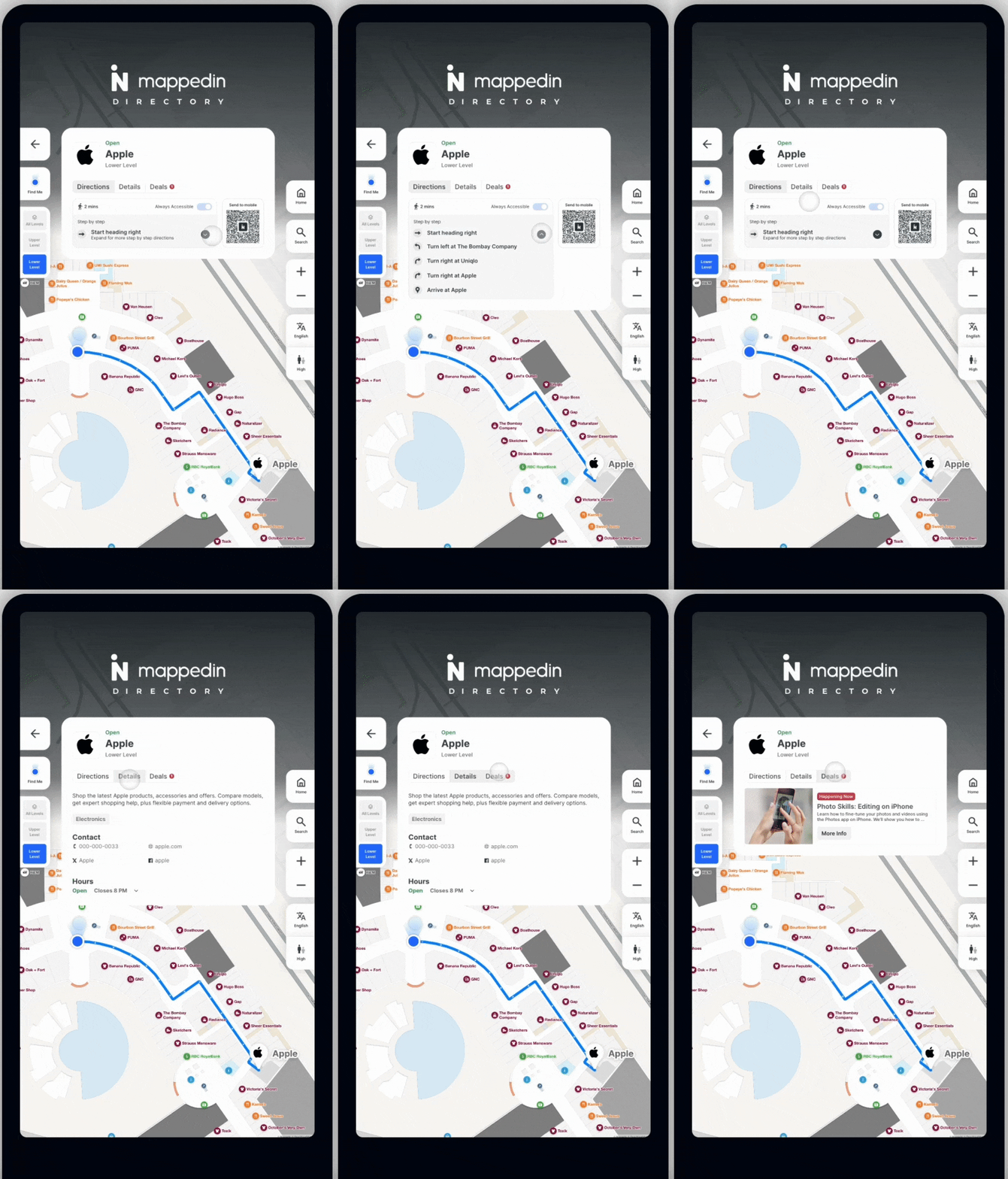
Navigation anxiety undermines overall satisfaction
Research reveals that 20% of venue visitors feel anxious navigating large spaces, with airports performing worse due to time pressure and high-stakes consequences of getting lost.
This anxiety colors the entire airport experience. When digital wayfinding tools enhance safety perception, passengers become 28% more likely to recommend the venue—a correlation showing how foundational navigation confidence is to overall satisfaction scores.
Accessibility compliance can’t be solved solely through staffing
The European Accessibility Act (EAA) and Americans with Disabilities Act (ADA) create compliance requirements that demand 24/7 availability across multiple terminals. Airports can’t staff information desks in every location at all hours. Wheelchair users, passengers with visual impairments, and those with other accessibility needs require independent navigation capabilities that scale across your entire facility.
4 ways effective & scalable passenger experience strategies differ from superficial improvements
Not all passenger experience investments deliver comparable returns. Before evaluating specific approaches, you need a framework for distinguishing solutions that address root causes from those that create new problems.
Factor #1: Unified infrastructure vs. fragmented systems
Your passengers don't care that your flight information displays run on one vendor's system, your kiosks on another, and your website on a third. They expect consistent, accurate information regardless of how they access it.
Fragmented systems create three distinct operational problems:
- Different vendors mean inconsistent passenger interfaces. When your web experience shows different information than your kiosks, or when your mobile app doesn't match physical displays, passengers lose confidence in all channels. They still come to your information desk because they can't trust what digital tools tell them.
- Multiple systems require multiple update processes. When a gate changes, or a restaurant closes early, or construction blocks a pathway, updates must propagate across disconnected systems. This creates delay, increases error rates, and consumes staff time managing manual synchronization.
- Unified analytics are impossible. If wayfinding data lives in one system, flight information in another, and commercial data in a third, you lack visibility into how passengers actually move through your airport and where they struggle. Without this insight, you're making decisions based on assumptions rather than passenger behavior data.
Unified digital infrastructure solves this by connecting all passenger touchpoints—web, mobile, kiosks, digital signage—to a single authoritative map foundation. Updates happen once and propagate everywhere automatically. When gate assignments change, walking routes recalculate instantly across all channels. When you understand passenger flow patterns, you can optimize everything from retail placement to staffing allocation.
Factor #2: Passenger self-service scale vs. labor-intensive solutions
Staff assistance will always be necessary for complex situations, but routine wayfinding queries don't require human intervention. The question is whether your systems enable true self-service or simply shift burden without reducing it.
Effective self-service means passengers can independently find answers to routine questions 24/7 without staff intervention. When someone needs directions to their gate at 5:00 AM, or wants to locate a specific restaurant during a late-night layover, or needs to find accessible routes between terminals, the system handles this without requiring an information desk to be staffed.
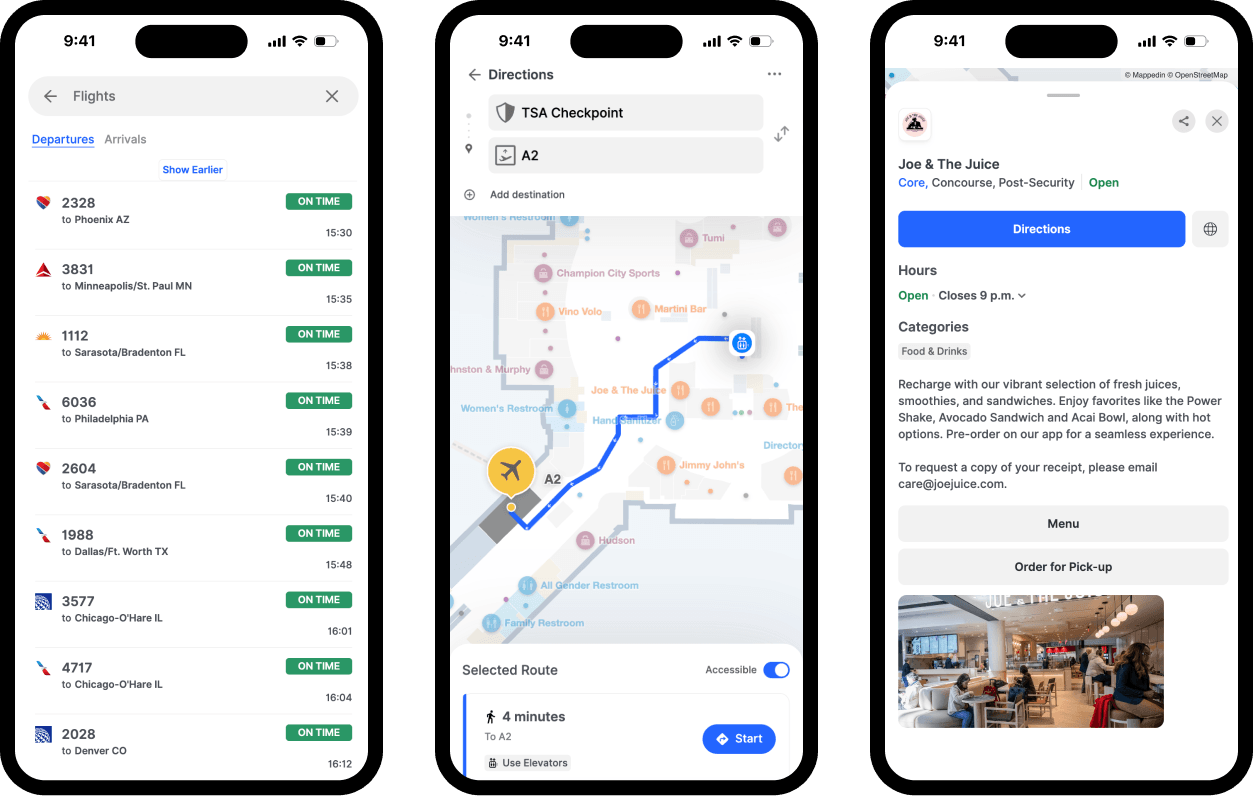
This doesn't eliminate the need for staff – it opens the door to engage with passengers more meaningfully and effectively. Instead of answering hundreds of directional questions daily, your team focuses on passengers who need personalized assistance: crisis management and complex situations that benefit from human empathy and judgment.
The operational test is simple: if you implement a solution and your information desk still gets the same volume of routine queries, you haven't achieved self-service scale. You've just added another channel that passengers don't trust or can't use effectively.
Factor #3: Discovery engine vs. passive information display
Traditional airport signage directs passengers to destinations they already know they're seeking. Discovery capabilities help passengers find opportunities they didn't know existed, driving incremental commercial engagement and extended dwell time.
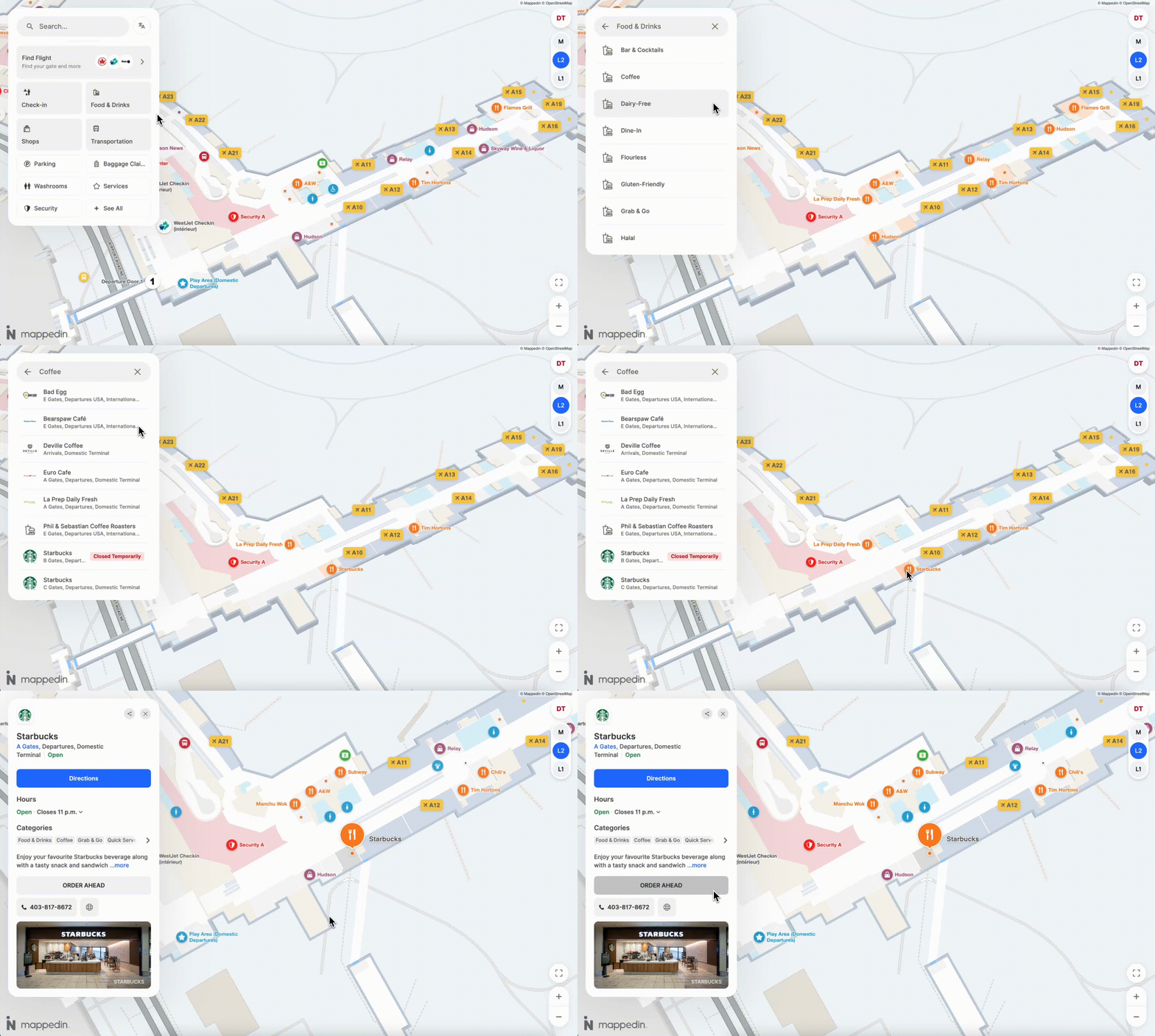
Consider the difference: directional signage pointing to "Food Court" requires passengers to already want food and know it exists. On the other hand, a discovery engine can show hungry passengers their gate, how much time they have, what restaurants are between here and there, what menu options they offer, and estimated wait times, transforming passive queries into actionable information that drives revenue opportunities.
Discovery impacts revenue across multiple categories. Parking reservations increase when passengers can see availability and pricing before arriving. Retail visits improve when passengers discover stores along their route they didn't know existed. Service utilization rises when passengers understand what amenities are available during extended layovers.
The data supports this:
When passengers can easily discover what's available, dwell time converts into revenue. When they can't, they sit at their gate scrolling their phones.
Factor #4: Operational intelligence vs. set-and-forget
The most sophisticated airport wayfinding systems become outdated the moment passenger behavior changes or facility layouts evolve. Operational intelligence means your systems continuously learn from actual usage, revealing where passengers struggle and validating whether interventions work.
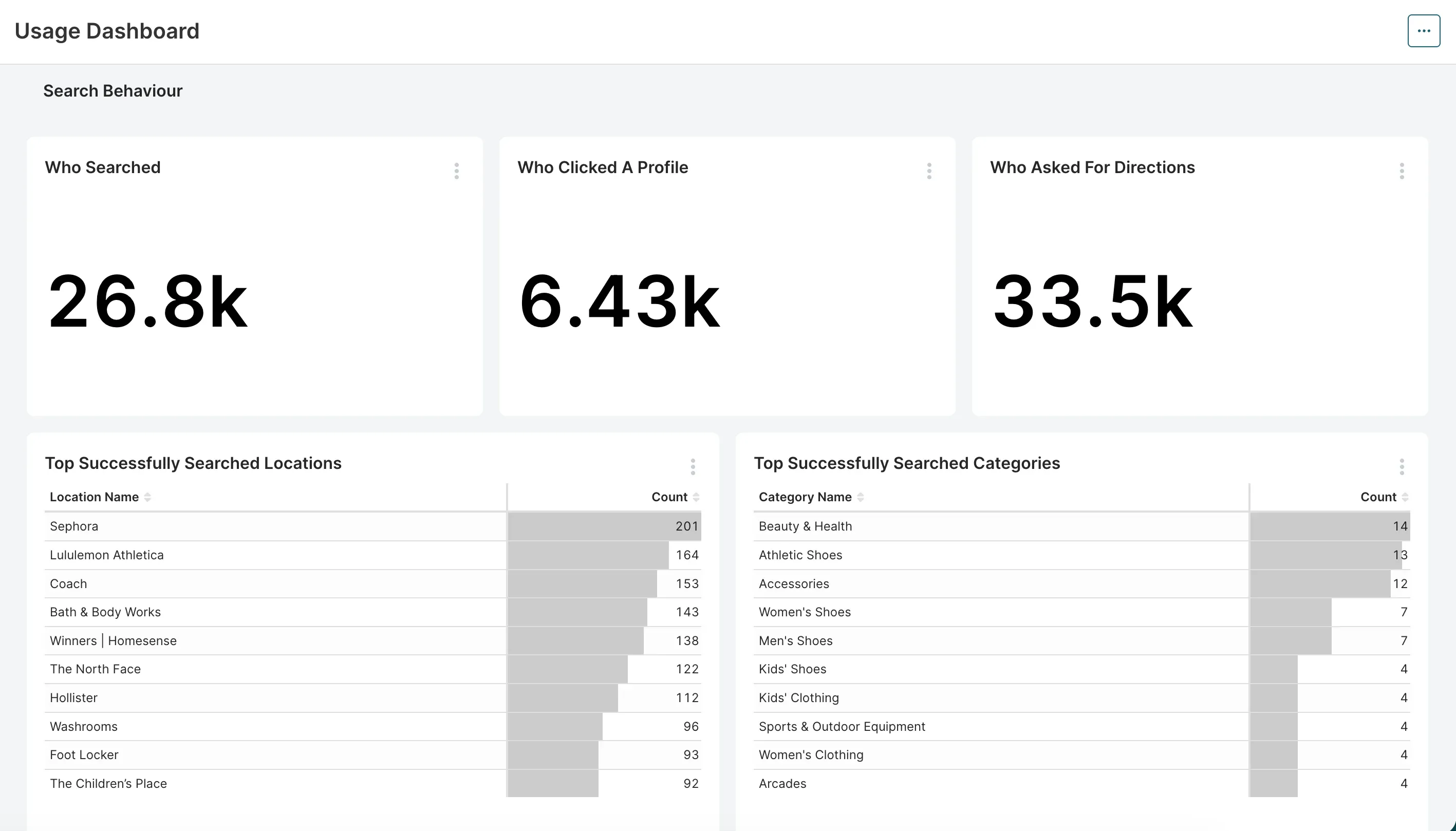
Analytics dashboards should answer operational questions your team actually needs:
- Which terminals see the most traffic?
- What time of day do passengers get lost most frequently?
- Which food & beverage vendors are passengers seeking most often?
- Does digital signage drive commercial behavior and revenue?
Without this intelligence, you're making decisions based on assumptions. With it, you can optimize continuously: adjust signage placement based on observed confusion points, validate that construction detours are effective, demonstrate ROI to stakeholders with concrete data on reduced staff burden and increased commercial engagement.
3 approaches to creating optimal airport passenger experiences
With the framework established, let's evaluate the most common strategies airports use to improve passenger experience. Each has contexts where it makes sense and limitations you should understand before committing resources.
1. Enhancing the “status quo”
This approach involves incremental improvements to existing systems, such as:
- adding more static signage
- increasing information desk staffing
- training ambassadors to roam terminals
- updating printed maps
- improving physical wayfinding cues like colored lines on floors
When this approach makes sense
Improving pre-existing physical wayfinding and experience elements might be a good option if:
- Your airport has simple layouts with limited terminal complexity
- Passengers are primarily repeat visitors who know the facility
- You serve a relatively homogeneous passenger demographic without significant language diversity
- Labor costs are low relative to technology infrastructure investment.
Limitations of this approach
This approach provides extremely limited scalability as passenger volume grows and expectations change.
Passenger Experience and Airport Operations teams get no operational intelligence about where passengers struggle or what interventions work. Physical signage becomes outdated immediately when tenants move or layouts change, with replacement cycles taking weeks and costing $500-5,000 per sign update. Language barriers remain unsolved—staff can't provide assistance in 50+ languages cost-effectively.
Most significantly, this approach can’t meet accessibility mandates without proportional staffing increases. You need coverage at every checkpoint, every hour, every day—which isn't financially sustainable.
2. DIY development: Building custom in-house passenger experience solutions
Airports might benefit from a DIY solution if they’re not opposed to:
- hiring developers
- creating custom mapping infrastructure
- building web and mobile interfaces
- integrating with existing airport systems
- maintaining everything internally
When this approach makes sense
- You have available IT capacity with developers who have time for a 12-18 month build project.
- Your requirements are truly unique in ways that no commercial solution addresses.
- You need complete control over every aspect of the technology stack.
- You have a budget allocated for both initial development and ongoing maintenance.
Limitations of this approach
Indoor mapping complexity is almost always underestimated. Creating accurate multi-floor maps, handling complex geometries, calculating accessible routes, managing turn-by-turn directions—these are specialized capabilities that take years to develop properly. Most internal teams underestimate this by 3-5x.
Ongoing maintenance burden consumes resources indefinitely. Every iOS update, every Android change, every browser update, every integration point that evolves—all require development attention. As layouts change, maps must be updated and as passenger needs evolve, features must be added.
Source: IATA Global Passenger Survey
Opportunity cost represents your largest hidden expense. Those development resources could be building revenue-generating capabilities, improving operational systems, or addressing other strategic priorities.
3. Purpose-built airport wayfinding platforms
Purpose-built platforms like Mappedin specialize entirely in indoor mapping and wayfinding, offering web, mobile, and kiosk experiences connected to a single map foundation. These solutions integrate with your existing systems—flight information displays, parking management, commercial directories—while handling all the specialized mapping complexity.
When this approach makes sense
You need unified multi-channel experience across web, mobile, and physical kiosks. Self-service scale is critical for handling peak demand without peak staffing. Discovery capabilities drive your non-aeronautical revenue strategy. You want operational intelligence showing where passengers struggle and what interventions work. Your IT team focuses on core airport operations rather than consumer-facing applications.
Utilizing a single map as the platform for travelers, employees, and first responders enables the airport to do faster turnarounds, service facilities, and drive increases in both aeronautical and non-aeronautical revenue.”
— Yuval Kossovsky, Managing Director of Transportation
3 core benefits of airport wayfinding software
- Specialized development means features specifically built for large venue wayfinding: multi-floor routing, accessibility-aware directions, real-time updates that propagate across all channels, integration patterns proven across dozens of implementations, ongoing feature enhancements that all customers benefit from without additional development cost.
- Faster implementation gets you to passenger-facing value quickly. While DIY builds take 12-18 months before passengers see anything, purpose-built platforms typically deploy in 1-3 months from contract to launch. This matters when you're under pressure to improve satisfaction scores or meet accessibility compliance deadlines.
- Predictable total cost of ownership makes budgeting straightforward. Annual subscription fees are known upfront, implementation services are clearly scoped, and you avoid the ongoing uncertainty of internal development estimates and maintenance burden.
Limitations of this approach
Not all purpose-built platforms are equivalent. Some offer only basic mapping without the operational intelligence or commercial discovery capabilities that drive ROI. Others lack the integration flexibility needed to connect with your specific flight information displays or parking systems.
See a full breakdown of airport wayfinding systems →
Consider evaluating factors like:
- unified infrastructure across all channels
- self-service capabilities that reduce staff burden
- discovery engine that drives commercial engagement
- operational analytics that answer your specific questions
- proven integration with airport systems at comparable scale
- customer references from airports similar to yours
Proven tactics to improve passenger experience at airports
While every airport has unique circumstances, certain patterns emerge from implementations that deliver measurable improvements in satisfaction and operational efficiency.
Real-time integration to build passenger trust
Airports struggle when passengers don't trust digital tools because information doesn't match reality. The solution isn't better design—it's better data. When your wayfinding system connects directly to your FIDS, parking management, and commercial directory systems, updates propagate automatically without manual intervention.
Multi-channel navigation to serve diverse passenger needs
Not every passenger navigates the same way. Some prefer visual maps showing their complete route. Others want step-by-step turn-by-turn directions. Many need audio guidance for accessibility. The most effective implementations offer multiple navigation modes that passengers can switch between based on preference.
This means more than just having a web version and an app. Within each channel, passengers should be able to choose how they receive information: overview map, detailed directions, estimated walking time, landmark-based guidance, accessible route alternatives.
For example, at YYC Calgary International, passengers can start navigation on a kiosk, transfer seamlessly to mobile, and switch between different guidance modes based on what works best for them at that moment.

Commercial integration that drives discovery and revenue
The highest-performing implementations don't treat wayfinding as separate from commercial operations—they integrate deeply with retail and dining to drive discovery. This means more than showing where restaurants are located.
Effective commercial integration includes:
- menu browsing and ordering directly within the wayfinding interface
- current wait time estimates
- operating hours with real-time updates
- promotional content from commercial partners
- parking reservations with pricing and availability
- loyalty program integration
LAX's parking reservations are integrated into their digital map platform, demonstrating what's possible when discovery combines with frictionless conversion.
Passenger analytics that offer experience insights
The best implementations include robust analytics dashboards revealing exactly where passengers struggle and validating whether interventions work. This goes beyond generic metrics like "10,000 searches last month" to actionable operational intelligence.
Useful analytics answer specific questions:
- Which search queries most frequently fail to find results?
- What terminals have the most instances of navigational searches?
- After gate changes, how long does it take passengers to adjust routes?
- When you add new signage, does concession revenue increase?
Accessibility features that go beyond compliance minimums
Meeting ADA and EAA requirements is the baseline, not the goal. The airports with highest accessibility satisfaction scores implement features that provide dignity and independence beyond legal minimums.
This means wheelchair-accessible routes that actually optimize for distance and convenience, screen reader support that works fluidly with navigation features, audio guidance that provides helpful detail without being overwhelming, high-contrast visual modes for passengers with visual impairments, multilingual conversational AI chatbots for international passenger wayfinding, and simple interfaces that work for passengers with cognitive disabilities.
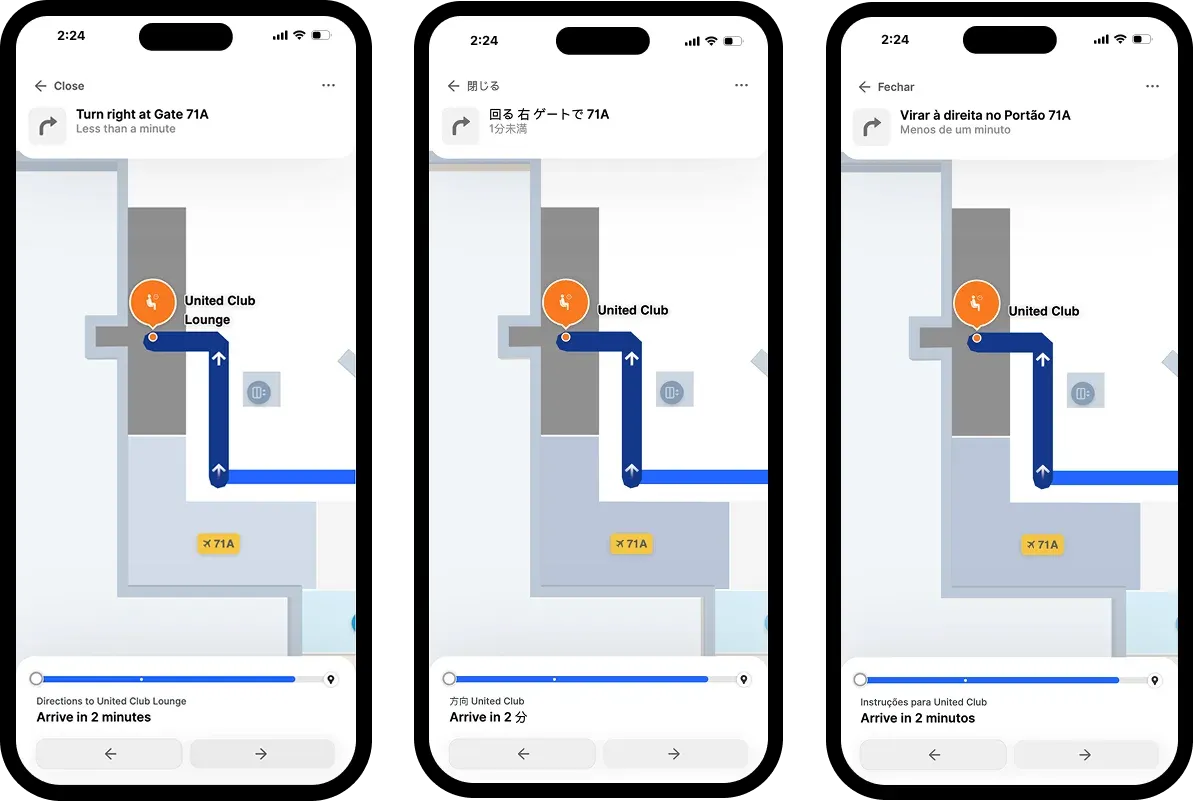
When these features are built into the core platform rather than bolted on afterward, they benefit all passengers. Clear interface design, simple language, helpful audio cues—these accessibility features create better experiences for everyone, not just those with disabilities.
Improve passenger experience with modern digital infrastructure
The gap between current experience and passenger expectations creates both risk and opportunity.
Airports that close this gap through strategic investment will differentiate themselves as airlines evaluate which airports provide the best passenger experience—influencing route decisions and growth opportunities. Those that don't will fall behind as satisfaction scores reflect the frustration of struggling to navigate facilities designed for a different era.
Related resources:
- 7 surprising venue experience statistics
- Guide to airport wayfinding systems
- How to help passengers navigate an airport and drive more revenue


Share