

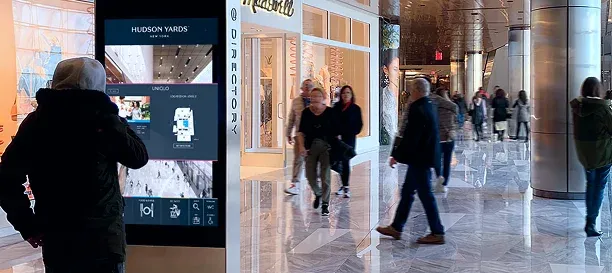
There is a kiosk in the lobby of nearly every large mall, airport terminal, and hospital campus. Most of them display a static map image with significant user experience issues:
- Pinch-to-zoom disabled
- Nonexistent search or filtering
- Out of date data
Visitors glance at it, pull out their phones, and walk away.
The problem is rarely the hardware. It is almost always the software behind it. Most interactive kiosk software was built for digital signage. And while that is an essential and common use case, digital signage alone doesn't necessarily help someone navigate a 1+ million sq. ft. airport terminal or find a clinic on the third floor of a hospital they have never visited.
If your team is evaluating kiosk software for a venue where visitors need to find their way, you need a different set of criteria. This article walks through what to look for and what most buyers miss.


General purpose kiosk software vs. purpose-built digital wayfinding software
General-purpose kiosk platforms do the basics well, like content scheduling, media playback, lockdown mode, and interactivity. They can be a great choice for use cases like menu boards, self-check-in flows, retail promotions, and lobby displays where the content is visual and the interaction is simple.
Purpose-built wayfinding kiosk software, on the other hand, adds a fundamentally different layer: interactive maps with real-time venue data, turn-by-turn routing across multiple floors, live tenant or gate sync, and accessibility compliance designed for spatial navigation. The data model behind a wayfinding kiosk is not a playlist of images, but rather, a structured, always-accurate map of a physical space that changes constantly.
The distinction matters because choosing a general-purpose CMS for a wayfinding use case means your team will spend months trying to replicate capabilities that purpose-built platforms ship out of the box. Knowing which category you actually need is the first decision.
5 capabilities of interactive kiosks most buyers overlook
Most vendor evaluations focus on screen resolution, hardware compatibility, and upfront cost. Those matter. But the capabilities that determine whether a kiosk deployment still works months and years after launch are less obvious.
Can non-technical staff update content without filing a support ticket?
The main reason kiosk content goes stale is that nobody owns the update. Marketing often can't touch the system without a developer. Facilities may not even know the login. The result is a tenant that closed weeks ago still appearing on every screen in the building.
The real question is whether the content editor is simple enough that the person who actually knows the ground truth can make a change in minutes without escalating.
Does the kiosk, website, and mobile app show the same data?
This is the problem operators feel acutely, even if they don't always name it. For example, a new tenant opens on level 2. Someone updates the website, someone else updates the directory app, and the kiosk still shows the old tenant. Three systems, three versions of the truth — and zero confidence that any of them are right.
As venue operators and guest experience teams know, the moment a map is inaccurate, it's pointless. Effective digital kiosk software should pull from a single data source so that every touchpoint (kiosk, web, mobile) reflects the same information without manual duplication. The alternative is a staffing problem disguised as a software problem: someone is always behind on one of the four places the same data lives.
How deep is the accessibility compliance and features?
ADA, AODA, and WCAG 2.1 AA are not optional for public-facing kiosks in most jurisdictions, but compliance depth varies enormously across platforms. Some vendors check the box with font scaling. Others support screen reader compatibility, step-free routing that avoids stairs and escalators, and adjustable interface heights for wheelchair users.
A kiosk that can't serve visitors with mobility, vision, or cognitive needs is not serving the venue.

Building inclusive stadiums to drive fan engagement and revenue
Your stadium already has accessible seating. But is that enough to create a truly inclusive experience that every fan can enjoy with confidence? Watch on-demand and get the winning strategy for creating unforgettable and inclusive fan experiences for every game.
Can you deploy updates across your entire portfolio without a site visit?
Ten kiosks across two buildings is a project. Two hundred kiosks across a properties is a portfolio management problem, and most interactive kiosk software on the market today was not built for it.
The question to ask: when you update a store listing, a gate assignment, or an event promotion, does that change propagate to every device automatically? Or does someone need to remote into each unit, restart a service, or physically visit the location?
At portfolio scale like a mall operator with dozens of properties or a hospital system with multiple campuses, remote management from a single dashboard is the difference between a system that scales and one that decays over time.
Does analytics go beyond screen touches?
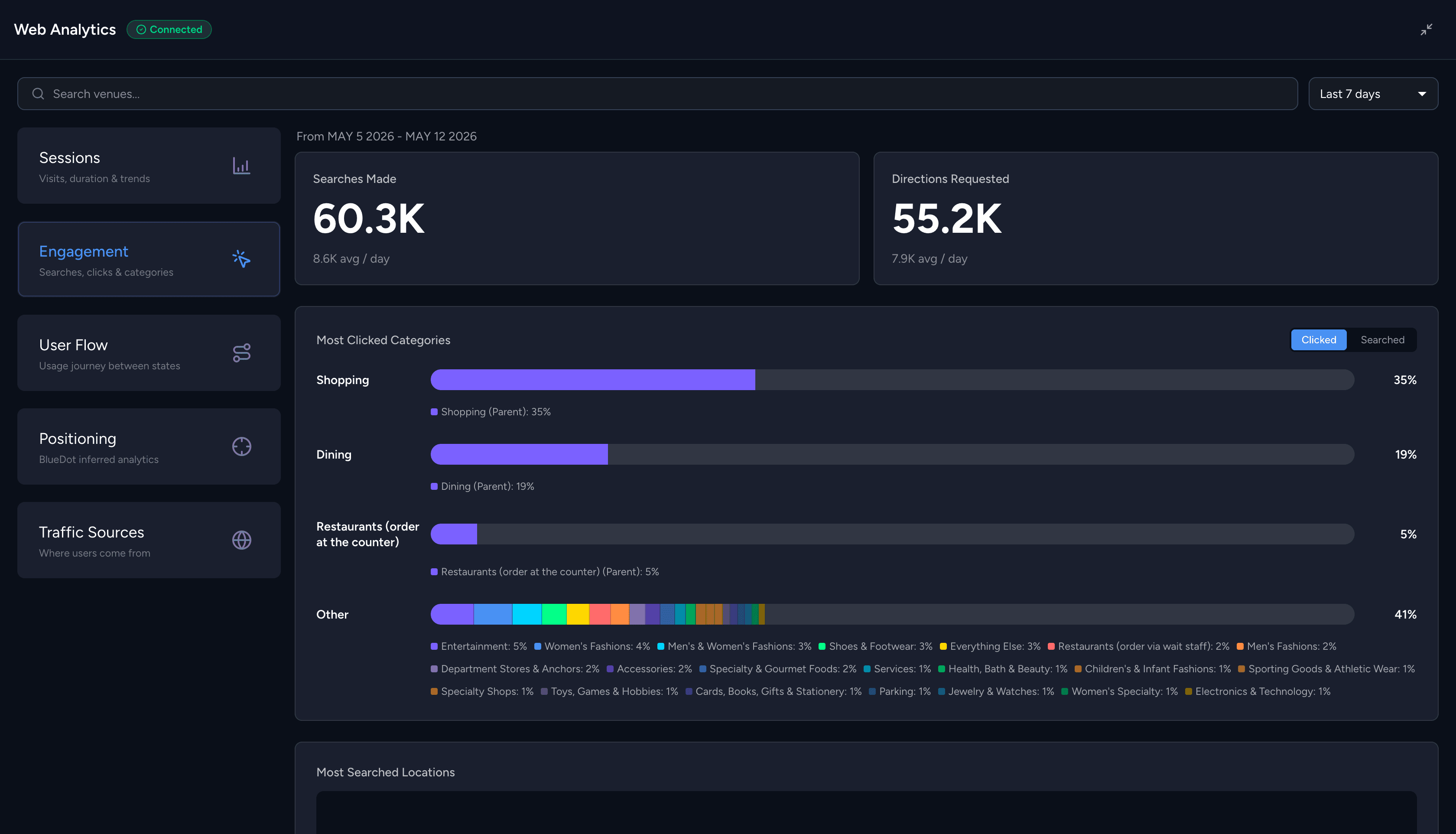
Most kiosk platforms report taps, session duration, and maybe a heatmap overlay. That tells you people used the screen. It does not tell you what they were looking for, whether they found it, or where they went next.
For venues where 77% of visitors now actively use digital wayfinding tools, analytics should surface:
- Search queries
- Most-requested destinations
- Popular routes
- Wayfinding drop-off points
That data feeds real operational decisions, including where to place signage, which concessions to relocate, and how to staff information desks. The next generation of kiosk analytics is moving toward AI-driven insight layers that can identify patterns across visitor behavior and surface recommendations without requiring a dedicated analyst to dig through dashboards.
Questions to ask during an interactive kiosk software vendor evaluation
Take these into your next demo call. The answers will separate platforms built for your use case from those adapted for it.
- Can a non-technical team member update a store listing and see it reflected across all kiosks within the hour?
- Does the kiosk pull from the same data source as our website and mobile app, or does each channel require separate updates?
- Does the software support WCAG 2.1 AA on kiosk displays, including screen reader compatibility and step-free routing?
- How does the system handle multi-floor routing with elevator, escalator, and stair preferences?
- What visitor behavior data does the analytics layer capture beyond taps and session counts?
- If we scale from 5 kiosks to 500, what changes in the deployment and update workflow?
Where purpose-build venue wayfinding platforms fit in
Mappedin is one example of a platform built specifically for venue wayfinding across kiosks, web, and mobile. Its architecture maps directly to the five criteria above.
The Map CMS gives non-technical staff direct control over venue content, with changes syncing automatically across kiosks, mobile app, and the venue's own website. Mappedin is WCAG 2.1 AA compliant, supports 40+ languages, and includes step-free routing and screen reader compatibility as core features, not add-ons.
Premier property management companies and brands like Simon Property Group, Calgary International Airport and PetSmart run Mappedin across thousands of venues.

Blanchardstown Centre in Dublin uses Mappedin's kiosk deployment to showcase ads and events alongside interactive wayfinding, turning what was a static directory into an ad-supported, revenue-generating touchpoint.
In addition to the mapping element, we are so happy that we can advertise our event details and locations, and allow our tenants to advertise on the directories situated throughout the malls. The mapping solutions are really multi-beneficial.”
— Kim McNulty, Head of Marketing & Communications, Blanchardstown Centre


Frequently asked questions
What is interactive kiosk software?
Interactive kiosk software is the application layer that controls what visitors see and interact with on a touchscreen kiosk. It can range from simple content scheduling platforms to full wayfinding systems with live maps, search, and turn-by-turn directions. The right choice depends on whether your kiosk needs to display media or help people navigate a physical space.
What's the difference between digital signage software and wayfinding kiosk software?
Digital signage software manages content playback: scheduling images, videos, and promotional loops across screens. Wayfinding kiosk software adds spatial intelligence: interactive maps, real-time directory data, multi-floor routing, and accessibility features. A venue that only needs to display promotions can use digital signage. A venue where visitors need to find a gate, a store, or a clinic needs wayfinding.
Does interactive kiosk software need to be ADA compliant?
In most jurisdictions, yes. Public-facing kiosks in the United States must meet ADA requirements, and WCAG 2.1 AA is the widely accepted standard for digital accessibility. This includes screen reader support, adjustable text size, sufficient color contrast, and—for wayfinding kiosks—step-free routing options for visitors who cannot use stairs or escalators.
Can kiosk software sync with a venue's mobile app and website?
It depends on the platform. General-purpose kiosk tools often operate as standalone systems. Purpose-built wayfinding platforms like Mappedin typically use a single data source that feeds the kiosk, mobile web, and the venue's website simultaneously. This is the difference between updating tenant information once and updating it in four separate places.
What hardware do I need for an interactive wayfinding kiosk?
Most wayfinding kiosk software runs on standard commercial-grade touchscreens. The key requirements are a reliable internet connection for real-time data sync, a screen large enough for map interaction (typically 32 inches or larger for public kiosks), and a device that supports modern web browsers. Some platforms are hardware-agnostic; others require specific operating systems or proprietary devices.
How do I keep kiosk content up to date across multiple locations?
A centralized CMS with automatic sync is the only scalable approach. If your platform requires manual updates per device or per location, content freshness will erode as you scale. Look for a single-source-of-truth architecture where one update propagates across every kiosk, web page, and mobile app connected to the same venue data.


Share