Passenger Experience teams spend hours daily helping passengers get to the right gate at the right time.
Meanwhile, airport changes or communication gaps make it difficult for travelers to self-serve:
- Construction projects or concessionaire changes render PDF and printed maps obsolete overnight
- Passengers miss connections because gate changes aren't communicated consistently
- Accessibility compliance deadlines loom with potential fines for non-compliant wayfinding
Your airport's signage infrastructure directly impacts operational efficiency, passenger satisfaction, and revenue generation.
Source: Adoreboard
This guide examines how airport operations teams are transforming wayfinding from a necessary expense into measurable business value. You'll see how real-time data integration maintains accuracy through years of construction, how multilingual conversational AI can support deflects repetitive staff inquiries, and how commercial integration captures parking and concession revenue that traditional signage approaches leave on the table.
Looking for a solution to power passenger experience, drive non-aeronautical revenue, and simplify operations? Book a custom demo of Mappedin →
Why Passenger Experience and Operations teams are replacing static signage
Your current signage infrastructure likely includes separate systems for your website, mobile apps, digital kiosks, printed directories, and airline partner applications. Each vendor uses different data formats. When gate 42B becomes 42C during overnight maintenance, your teams coordinate updates across 5+ disconnected systems—or worse—passengers see conflicting information that erodes trust and increases staff inquiries.
The costs compound quickly:
- Reprinting terminal maps for a major construction project runs $10,000-$15,000
- Each passenger who can't find a store or restaurant represents lost concession revenue
- Unclear accessible routes or limited language navigation trigger ADA compliance violations with significant penalty exposure
- Staff hours spent providing repetitive directions reduce capacity for complex passenger assistance that genuinely requires human intervention
European Accessibility Act and ADA requirements have made compliance non-negotiable, yet most static signage systems can't support screen readers, high contrast modes, or wheelchair-friendly routing. When audit deadlines arrive, airports face expensive retrofits or potential fines.
Your signage infrastructure needs to maintain accuracy in real-time across all channels, generate measurable revenue that justifies the investment, comply completely with accessibility mandates, and reduce operational burden instead of increasing it.
Power modern airport signage with Mappedin
Mappedin transforms airport wayfinding from isolated displays into comprehensive digital infrastructure that integrates passenger experience, operations management, and commercial revenue generation.
The platform serves 35+ major airports including Los Angeles International, Amsterdam Schiphol, Calgary International, and Pittsburgh International Airport, guiding millions of travelers annually.
Traditional signage vendors lock airports into proprietary systems with expensive change orders for every modification. Mappedin’s digital signage software provides open APIs and standardized data formats that airports can extract via Snowflake or REST APIs. If you decide to switch vendors, your data comes with you.
– Bart Smith, General Manager, Corporate Services and IT Business Partner, Calgary Airport Authority
Learn about Mappedin for Airports →
Built for Airport Operations and Passenger Experience teams
The platform addresses the specific challenges Passenger Experience and Operations teams face when managing complex airport facilities. Mappedin is a unified digital infrastructure that reduces staff burden while generating measurable revenue across parking, concessions, and advertising.
Transform passenger wayfinding into a revenue-generating platform while maintaining accuracy at scale across all touchpoints—web, mobile, kiosks, airline apps, and operations systems. Your teams update information once through a self-service interface, and changes propagate automatically across every channel where passengers interact with your facility.

Feature #1: Multilingual conversational AI for airports
Your information desk staff spend significant portions of their shifts answering directional questions that follow predictable patterns. International terminals face language barriers that slow assistance and frustrate travelers. During peak periods, information desk lines grow while passengers miss connections because they couldn't locate their gates efficiently.
Staff are forced to memorize complex routing through multi-terminal facilities or spend valuable time looking up current gate locations, amenity hours, and walking distances. The repetitive nature of these inquiries prevents your teams from focusing on complex passenger issues that genuinely require human expertise.
How Mappedin AI Navigator conversational chatbot transforms passenger experience
Mappedin's AI Navigator provides 24/7 multilingual conversational AI wayfinding that handles complex queries in 50+ languages, meeting passengers where they are.
YYC Calgary International Airport deployed the system to instantly answer questions like "I'm on the next flight to Pittsburgh. Where can I get coffee near my gate and show me directions to both?"
The AI generates personalized QR codes that position passengers on the map to exactly where they need to be to get to their intended destination effortlessly.
Passengers interact with the voice assistant through your airport website, kiosks, or physical holographic units deployed at key decision points. The AI understands natural language, accesses real-time flight data, integrates with your parking systems and concession information, then provides intelligent responses with interactive map links.

How conversational AI improves airport wayfinding
- Staff efficiency gains: Guest services teams redirect passengers to AI-powered self-service rather than spending 10 minutes per interaction explaining complex routes
- 24/7 multilingual passenger support: Provide wayfinding assistance in 50+ languages without hiring multilingual staff or translating content manually
- Reduced missed connections: Passengers receive instant, accurate directions to their gates regardless of last-minute changes
- Accessibility enhancement: Voice interfaces serve passengers with visual impairments or reading difficulties who struggle with traditional signage
Feature #2: Automated real-time updates
Your operations teams might be currently spending thousands annually maintaining static directory systems that require vendor calls for every change.
When retailers relocate or new concessions open, signage across terminals shows conflicting information until expensive update cycles complete weeks later.
Airlines control map data in passenger-facing apps, forcing you to maintain duplicate systems and coordinate airline vendor updates separately. In many cases, you're paying for both your airport license and the airline license while doing the update work yourself.
How Mappedin provides single-source, automated accuracy
Mappedin's real-time integration connects directly to your:
- Digital Communications Management System (DCMS)
- Flight information displays
- Airport parking system
- Point-of-sale data
- Concession management platforms
You update information once through a self-service web interface, and changes propagate automatically across every passenger touchpoint.
How Mappedin’s digital map infrastructure improves airport wayfinding
- Easy content management for Airport Ops and Passenger Experience teams: Your teams update information directly through web interface without coordinating external contractors
- Instant multi-channel updates: Change gate numbers once and see updates across website, mobile, kiosks, and airline integrations simultaneously
- Construction project continuity: Maintain wayfinding accuracy through years of renovations without expensive reprint cycles
- Data ownership: Extract your mapping data anytime via Snowflake or REST APIs for integration or vendor switchingFeature #3: Revenue-generating commercial integrations
Feature #3: Revenue-generating commercial integrations
Research shows airports generate up to 40% of non-aeronautical revenue from parking alone, yet most airport signage systems don't capture this opportunity.
When passengers can't discover concessions, retailers lose foot traffic. When parking reservations aren't integrated into passenger journeys, you miss direct revenue attribution. When advertisers can't target specific passenger segments with contextual messaging, premium advertising placements go unfilled.
Traditional signage approaches treat wayfinding as a necessary expense with no revenue expectations. Meanwhile, commercial tenants complain that passengers walk past their locations without knowing they exist, and your finance teams struggle to demonstrate ROI on wayfinding investments.
Drive repeatable non-aeronautical revenue with Mappedin integrations
- Parking revenue attribution: When passengers search for parking availability from home, the system contextually suggests pre-booking parking with direct reservation links embedded in the experience.
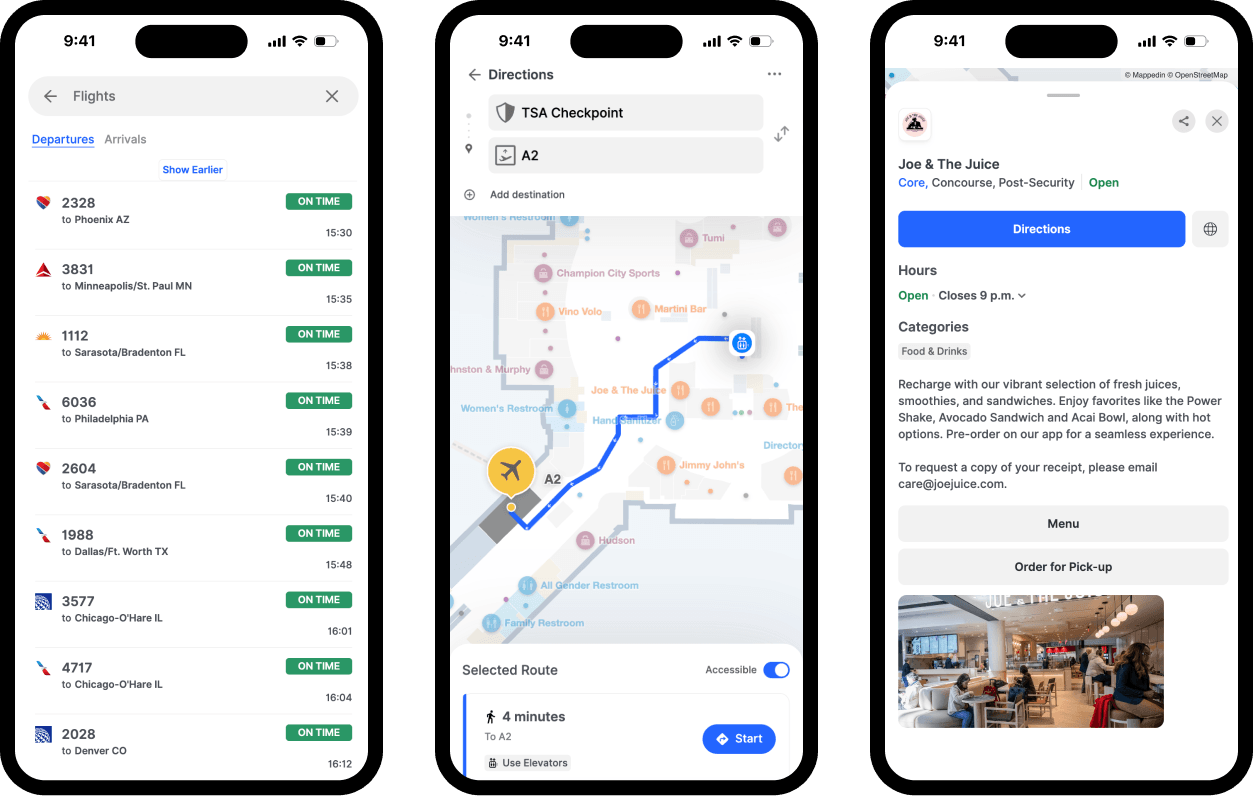
- Concession discovery: Passengers searching for "coffee near Gate C15" see relevant retailers with walking times, current wait times, and menu information. They can even order directly from the map.
- Contextual DOOH advertising: Premium advertising placements target specific passenger segments based on location, dwell time, and journey stage.
- Retail foot traffic: Commercial tenants receive analytics on discoverability, route traffic, and passenger engagement with their locations.
Los Angeles International Airport integrated their parking reservation system within Mappedin's wayfinding platform with their parking reservation system, generating enough parking referrals to cover the annual cost of the entire platform.
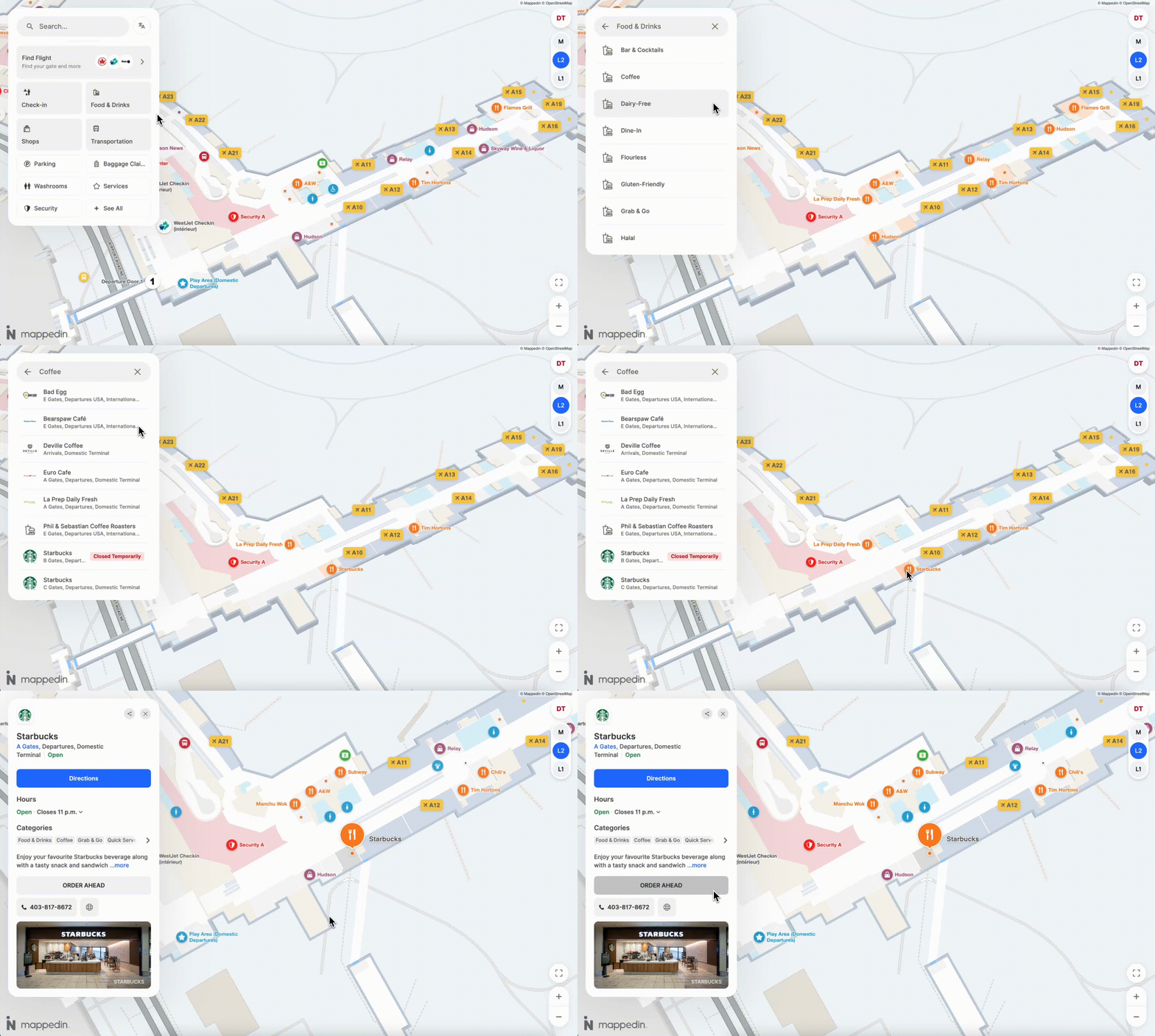
With Mappedin, your finance teams can demonstrate clear ROI through parking reservation conversion tracking, concession revenue lift attribution, and premium advertising placement monetization, while commercial tenants see measurable foot traffic increases when passengers can discover their locations efficiently.
Feature #4: Complete accessibility compliance purpose-built for the modern airport
European Accessibility Act mandates and ADA requirements have made compliance non-negotiable, with enforcement deadlines creating significant penalty exposure for non-compliant facilities.
Your current signage infrastructure likely can't support screen readers that blind passengers rely on, high contrast modes for visually impaired travelers, or wheelchair- and stroller-friendly routing that accounts for elevator access and grade changes.
When accessibility audits arrive, airports face expensive retrofits to achieve compliance—often discovering that static signage and basic digital displays fundamentally can't deliver the required functionality without complete replacement.
Mappedin’s built-in WCAG 2.1 AA Compliance
Mappedin's platform achieves complete WCAG 2.1 AA compliance through comprehensive accessibility features integrated into the core architecture:
- Screen reader support and high contrast mode provides full navigation for visually impaired passengers
- Wheelchair-accessible routing accounts for elevator locations, grade changes, and barrier-free paths.
- Inclusive passenger experience with multilingual conversational AI for navigation
Accessibility is about serving all passengers equally while meeting regulatory requirements that are increasingly enforced. When compliance audits arrive, you need documentation proving your wayfinding infrastructure meets WCAG 2.1 AA standards. Mappedin provides that documentation and the technical implementation backing it up.
— Sigurður Pé tur Oddsson, Commercial & Airport Development, Keflavík International Airport
Alternative airport signage options for airport wayfinding
As an Operations or Passenger Experience team evaluating digital signage solutions, you're comparing fundamentally different approaches to passenger wayfinding. Some vendors focus exclusively on hardware displays, while others prioritize precise positioning technology through beacon infrastructure. Understanding these differences helps you evaluate which approach aligns with your operational priorities and budget constraints.
Alternative #1: Static signage
Traditional approaches include printed terminal maps, static digital displays showing fixed images, and basic directory systems that require professional design and printing services for updates. Represents the established baseline that most airports still maintain alongside or instead of digital solutions.
Benefits of static signage for airport wayfinding:
- No ongoing software or subscription costs beyond printing
- Familiar passenger experience with physical maps and directories
- No technical infrastructure requirements or WiFi dependencies
- Simple implementation without IT coordination or vendor management
- Permanent installations that don't require device charging or system maintenance
Who should use static airport signage?
Small regional airports with minimal facility complexity, infrequent changes, limited budgets, and passenger populations comfortable with traditional wayfinding methods. Static signage works in environments where accessibility compliance isn't yet actively enforced and operational efficiency isn't a primary concern.
Alternative #2: 22Miles
22Miles is a digital signage content management system focused on controlling what displays show across your facility. 22Miles serves corporate, healthcare, higher education, aviation and entertainment venue customers including several airport installations where they manage signage displays and content scheduling.
Who should use 22Miles for airport signage?
Airports that already operate extensive digital display networks and need content management systems to control what those displays show. 22Miles works well when your primary goal is managing promotional content, advertising, and wayfinding on existing hardware.
Where Mappedin differs
22Miles focuses on display content management, rather than comprehensive wayfinding infrastructure. Their platform doesn't provide multilingual conversational AI navigation, real-time flight integration, or parking reservation capabilities. For airports seeking display content management, 22Miles fits well.
For airports needing complete wayfinding infrastructure that reduces staff burden and generates revenue, Mappedin addresses broader operational requirements.
Alternative #3: Pointr
Pointr is an indoor positioning software provider delivering precise blue dot navigation through hardware infrastructure. They primarily support retail, workplace, healthcare, and airport customers.
Who should use Pointr for airport signage?
Airports prioritizing precise blue dot positioning and willing to invest in beacon hardware infrastructure plus ongoing maintenance. Pointr fits environments where native mobile app development resources are already available and positioning accuracy justifies hardware expense.
Where Mappedin differs
Pointr requires purchasing and maintaining beacon hardware throughout facilities, which requires significant upfront costs plus ongoing maintenance expenses.
Mappedin's Blue Dot approach provides equivalent passenger experience without hardware dependency, while platform capabilities extend beyond positioning to revenue generation, complete accessibility compliance, and comprehensive operations use cases. See the full comparison.
How to evaluate and choose an airport signage solution
Your airport faces a strategic choice about wayfinding infrastructure: continue treating it as a necessary expense with static approaches, or transform it into dynamic digital infrastructure that generates measurable revenue while reducing operational burden.
The airports achieving the strongest results are building a scalable digital infrastructure that transforms wayfinding into measurable business value.
Comparing different approaches to airport signage programs
Comprehensive integration vs. point solutions
Some vendors provide map displays. Others focus on positioning technology. Airports seeing the greatest success implemented holistic platforms that unify passenger experience, operations management, accessibility compliance, and commercial revenue generation into single systems maintained through self-service interfaces that reduce operational burden.
Open data ecosystem vs. vendor lock-in
Can you extract your mapping data? If you decide to switch vendors, does your data come with you? More than 30 leading airports choose Mappedin to power their airport indoor map partly because open APIs and standardized formats prevent vendor lock-in situations where changing providers means recreating years of mapping work.
Proven revenue generation
Can your wayfinding infrastructure demonstrate direct revenue attribution through parking conversion tracking, concession revenue lift, and advertising monetization? By using Mappedin, LAX captured revenue from integrated parking reservations alone, covering the entire annual platform investment.
Automated maintenance at scale
Does your signage approach require expensive reprinting cycles and vendor calls for every change, or can your teams update information directly through web interfaces?
Multilingual conversational AI support
Does your wayfinding infrastructure deflect repetitive staff inquiries through AI assistance in 50+ languages?
Airport signage software evaluation checklist
When comparing airport signage approaches, these questions reveal which solutions address your operational priorities:
- Can you track parking reservation conversions directly attributable to wayfinding infrastructure?
- Does concession discovery integrate with journey planning to drive retail foot traffic?
- Can you monetize premium advertising placements with contextual passenger targeting?
- How many vendor calls does your team make monthly for signage updates?
- What's the cost and timeline for updating maps when construction closes a corridor?
- How many staff hours are spent daily answering repetitive directional questions?
- Does your current signage support screen readers for blind passengers?
- Can wheelchair users receive routes accounting for elevator access and grade changes?
- Do you have documentation proving WCAG 2.1 AA compliance for accessibility audits?
- Can you extract mapping data via APIs if you decide to switch vendors?
- Does real-time integration maintain accuracy across website, mobile, kiosks, and airline apps simultaneously?
- Are you locked into proprietary data formats that require vendor coordination for every change?
Frequently asked questions about airport signage
What is digital signage software?
Digital signage software is a content management system that enables users to create, schedule, and manage multimedia content across one or more digital displays. Think of it as the control center that powers everything you see on digital screens in airports, retail stores, restaurants, corporate offices, and public spaces.
Unlike static printed signs that require physical replacement for updates, digital signage software allows for dynamic and real-time content updates, often controlled remotely through content management systems.
How does airport digital signage integrate with existing flight information displays?
Modern platforms connect directly to DCMS and FIDS systems via APIs, automatically updating gate information and flight status across all wayfinding touchpoints without manual coordination. When gate assignments change, the integration propagates updates to website, mobile, kiosks, and airline partner apps simultaneously.
Can digital wayfinding work without passengers downloading native mobile apps?
Yes, web-based wayfinding works through standard browsers without app downloads. QR code approaches provide Blue Dot positioning that functions identically to GPS-based navigation from passenger perspective, eliminating app download friction while maintaining equivalent user experience.
How do airports maintain wayfinding accuracy during major construction projects?
Real-time integration platforms allow operations teams to update closure information, temporary routing, and facility changes through web interfaces. The system automatically recalculates affected routes and maintains consistency across all passenger touchpoints without vendor coordination or expensive reprinting cycles.
What accessibility compliance requirements apply to airport wayfinding systems?
European Accessibility Act and ADA regulations require screen reader support, keyboard navigation, high contrast modes, and wheelchair-accessible routing. WCAG 2.1 AA compliance specifically mandates alternative text, proper heading structure, sufficient color contrast, and keyboard-only navigation capabilities.
Get started with Mappedin for Airports
LAX, Amsterdam Schiphol, YYC Calgary International and 35+ other major airports chose Mappedin to guide millions of travelers annually.
These organizations discovered that digital signage infrastructure delivers the greatest value when it extends beyond basic wayfinding to become the central platform connecting passenger services, operations management, accessibility compliance, and commercial revenue—all maintained through single self-service interfaces that reduce operational burden.
The airports proving the strongest ROI implemented platforms that generate parking revenue attribution, reduce staff burden through AI assistance, maintain accuracy through automated data integration, and meet accessibility mandates through comprehensive compliance—while retaining complete control through open APIs and standardized data formats.
Ready to get started? Contact us today to get a custom demo.


Share