

Large venues have a mapping problem, and most haven't solved it yet.
Airports, hospitals, corporate campuses, malls, and stadiums all share the same friction point: they're enormous, they change constantly, and their visitors have no reliable way to navigate them. Static signage becomes outdated the moment a renovation starts, PDF floor plans can't be searched, and staff fields the same directional questions on loop. And when something goes wrong, first responders are often working from floor plans that haven't been updated in years.
For a long time, the solution to this problem was simply too expensive and too labor-intensive to pursue at scale. Mapping an indoor space accurately required armies of specialists, months of effort, and ongoing manual maintenance to stay current.
AI changed that equation.
This article breaks down what AI-powered indoor mapping software actually does, where it's being applied across complex enterprise environments, and what separates capable platforms from tools that won't scale with your needs.


What made indoor mapping so hard (until now)
The indoor environment has historically been the final unmapped frontier. Outdoors, a map you create today is probably still accurate in five years. Indoors, it might be outdated in five days.
What once required a team and months can now be accomplished in minutes.
The harder challenge remains on the other side:
— Hongwei Liu, Founder & CEO, Mappedin
That insight shapes how leading indoor mapping platforms are built today: not just as a digitization tool, but as an ongoing system for maintaining accurate, actionable spatial data at scale.
What AI-powered indoor mapping software actually does
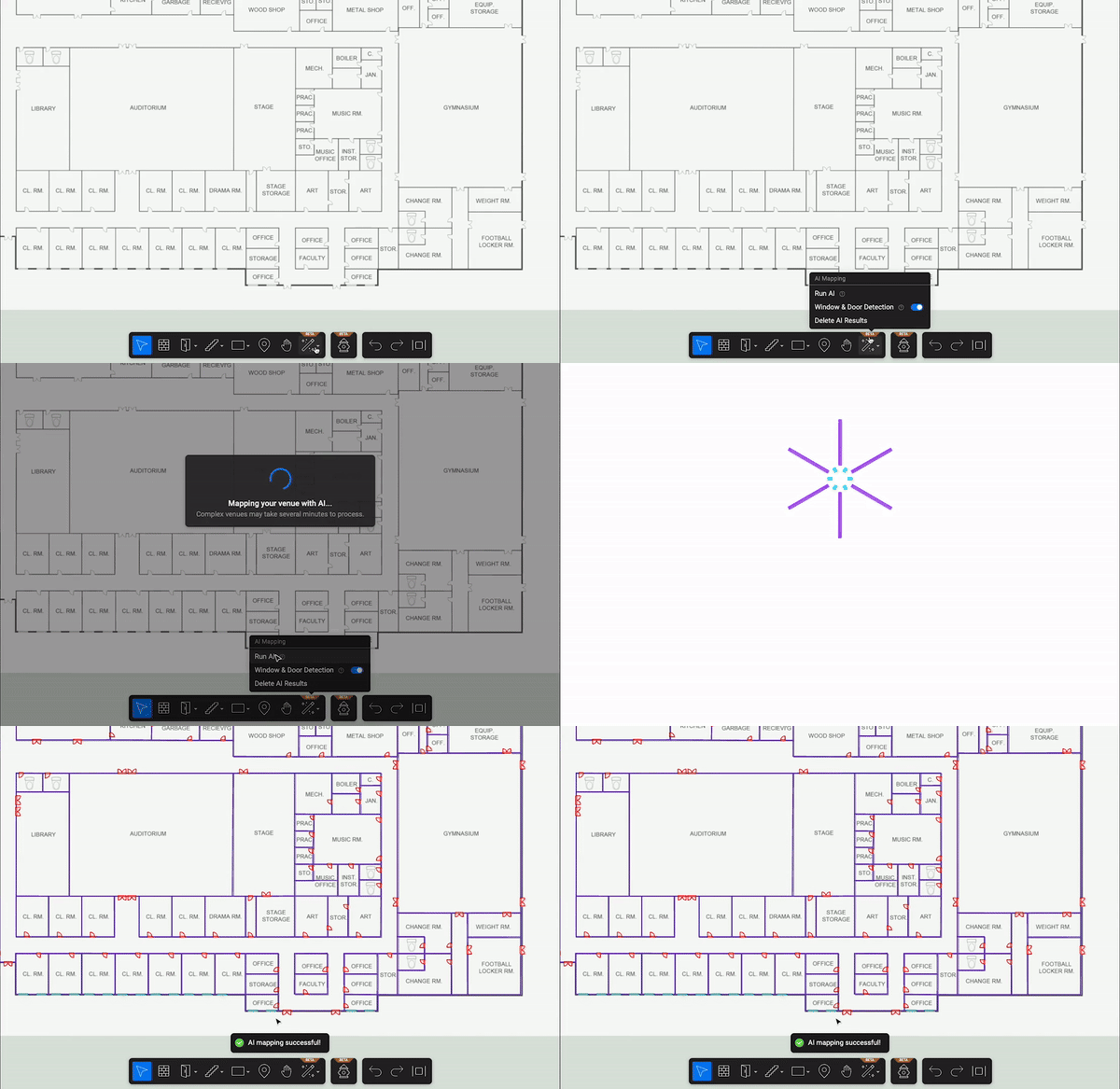
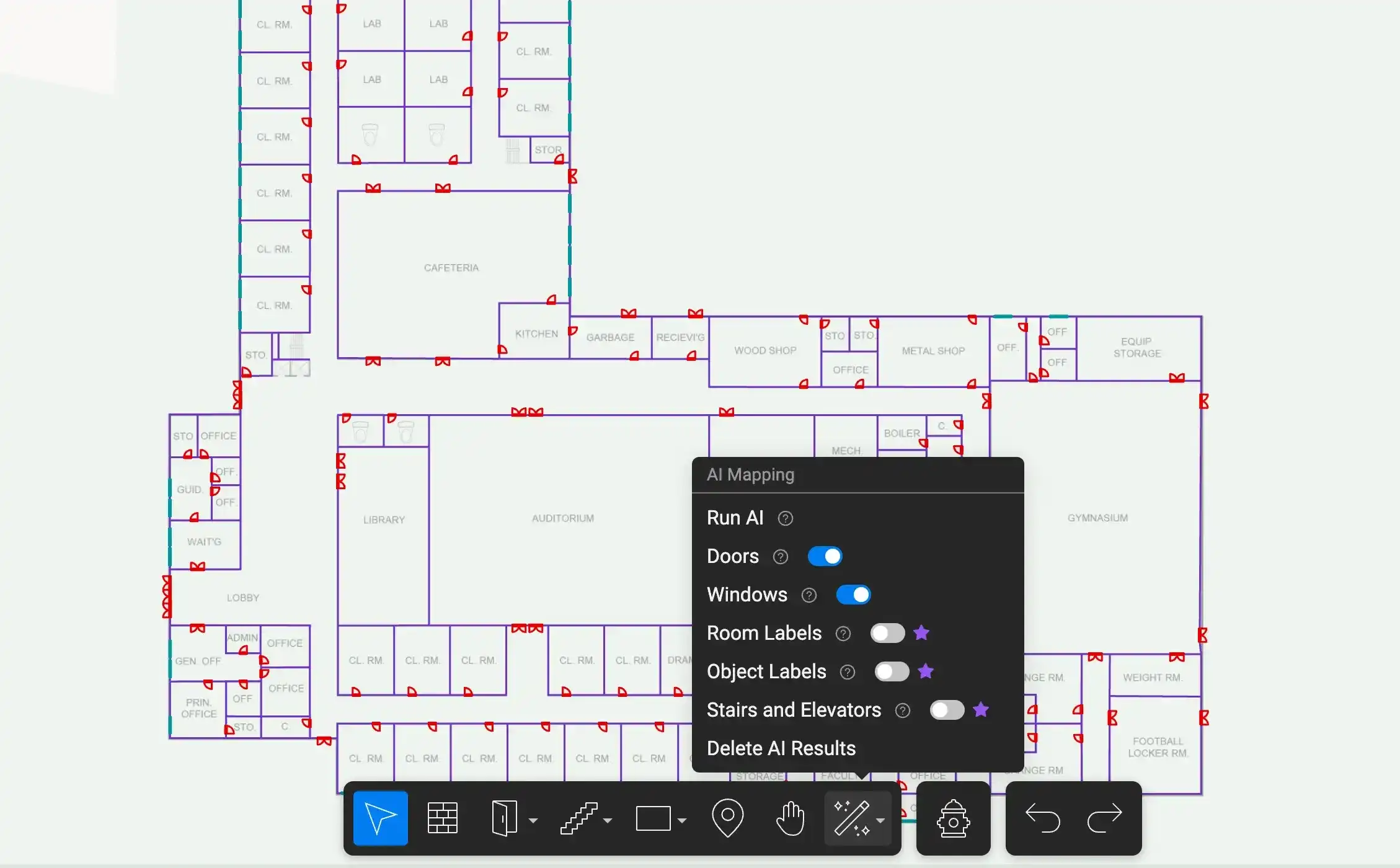
At its core, AI-powered indoor mapping software converts existing floor plans on PDFs, CADs, or hand-drawn documents into dynamic, interactive digital maps. The AI does the heavy lifting that previously required manual input:
- Detecting walls, doors, windows, stairs, elevators, and room labels
- Building a 3D navigable model from a flat document
- Applying spatial logic to connect floors, routes, and features into a coherent map
For enterprise teams, the practical capabilities break down into four areas:
Automated floor plan digitization
Upload an existing floor plan and the AI detects structural features automatically. Walls, entry points, vertical connections, and room labels are identified and rendered into a usable digital map in minutes, not weeks. This is the capability that makes indoor mapping commercially viable for large organizations with multiple buildings or locations.
3D model generation
The resulting map is a navigable 3D environment that can be embedded in kiosks, mobile apps, websites, and digital signage. Visitors see a spatial representation of the building they're in, with turn-by-turn directions and searchable destinations.
Scalable multi-location management
Enterprise-grade platforms allow operations teams to manage maps across a portfolio of venues from a single interface. For a healthcare system with twelve campuses, or a retailer operating hundreds of locations, this is the difference between indoor mapping being a pilot project and being part of actual operations infrastructure.
Ongoing map accuracy
The capability that separates enterprise platforms from one-time digitization tools is the ability to keep maps current. When a floor layout changes (i.e., a retail tenant moves, a clinical wing is reconfigured, a new security checkpoint is added) the map can be updated by the people who already know about that change: the facility manager, the operations coordinator, the building owner. AI assists with that update workflow, reducing reliance on specialized mapping contractors for every change.
Applications of AI indoor mapping by venue type
The underlying technology is the same across environments; what changes is which operational outcomes matter most.
Airports and transit hubs
Passenger experience in an airport is almost entirely a wayfinding problem. Connections between terminals, distances to gates, locations of lounges, security lanes, retail, and ground transportation all depend on a visitor being able to orient themselves in a complex, multi-level environment they've likely never been in before.
AI-powered indoor mapping gives airport operators a navigable, searchable map layer that can surface directions, surface points of interest, and connect to real-time data like gate assignments and queue lengths. The downstream effect is tangible for passenger experience: reduced missed connections, higher retail dwell time, and fewer staff hours lost to directional questions.
For operations teams managing vendor fragmentation across large transit environments, a unified map layer also provides a single spatial reference point for multiple systems.


Healthcare campuses
A hospital is typically a collection of buildings, wings, towers, and departments built across decades, connected by corridors that can feel like a maze. For patients navigating to a first appointment, or families trying to find a surgical waiting area, the map experience directly affects anxiety levels before anyone has even seen a clinician.
For staff, indoor mapping supports operational efficiency: knowing where a department is, where equipment is stored, or how to route between buildings in a large system. For facilities and security teams, accurate floor plans are the foundation of emergency response planning, a capability that depends entirely on the map being current.
Healthcare represents one of the clearest cases where mapping isn't a visitor experience amenity. It's infrastructure.
Corporate campuses and offices
Hybrid work has reintroduced a navigation problem that organizations thought they'd solved. Employees who come to the office two or three days a week often don't know where anything is, especially in large multi-building campuses or recently reconfigured open-plan offices. New hires, contractors, and visitors face the same orientation challenge every visit.
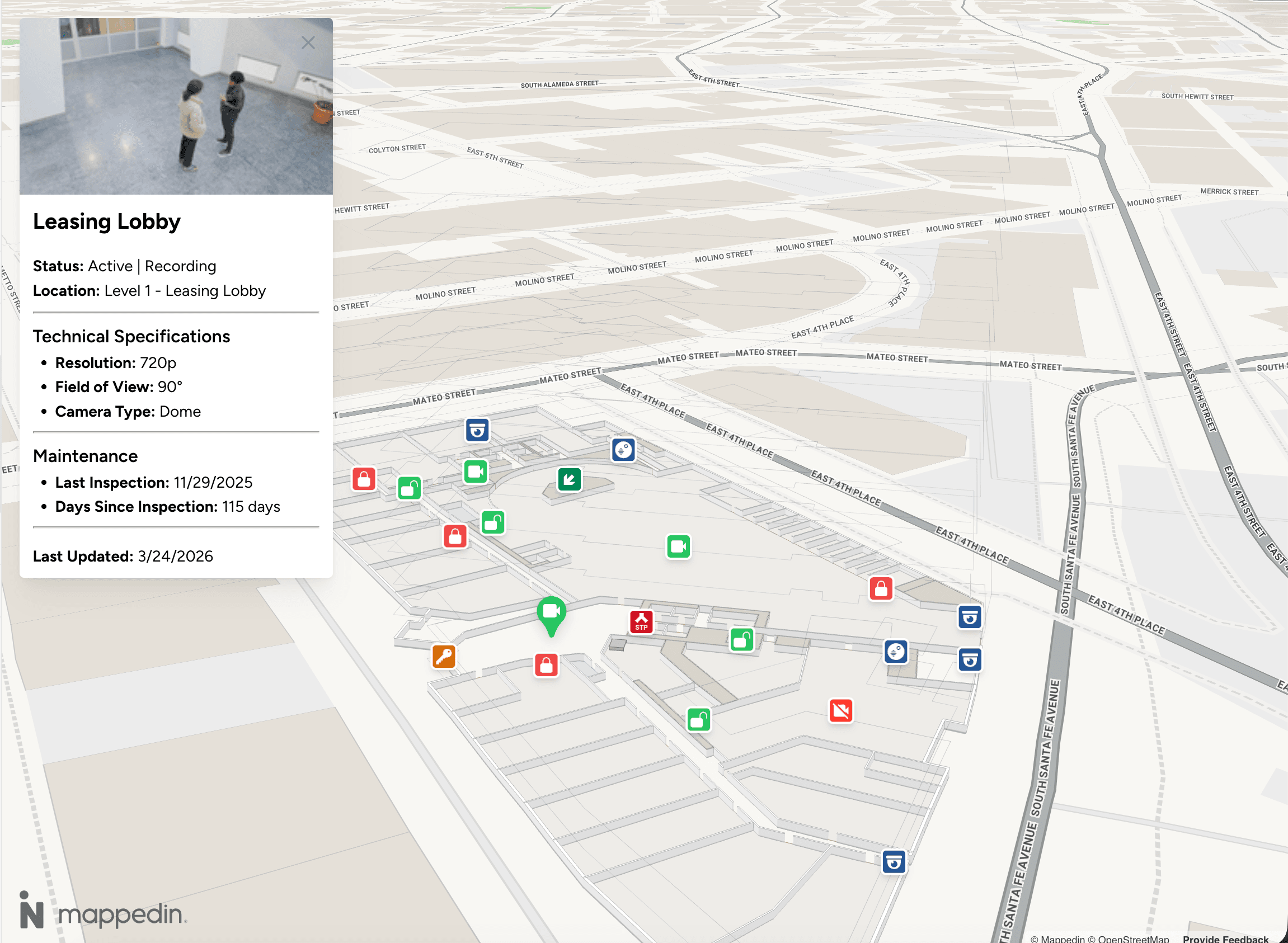
Beyond employee experience, corporate campuses have a security application that's increasingly central to why facilities teams evaluate indoor mapping software. Accurate, current floor plans are foundational to emergency response planning: evacuation routing, incident command protocols, and first responder pre-planning all depend on maps that reflect how the building actually looks today.
Retail and mixed-use properties
Navigation is one of the clearest revenue levers in retail environments. Visitors who can find what they're looking for spend more time on property, and research consistently shows that dwell time correlates with spend.
According to Mappedin's State of Venue Experience Report:
A map that helps visitors navigate, discover, and explore translates directly into foot traffic for tenants and revenue for operators. Indoor mapping also gives property management teams the analytical layer to understand which zones are driving engagement and which aren't, moving tenant performance conversations from anecdote to evidence.
Stadiums and entertainment venues
Event-day operations at a stadium involve moving tens of thousands of people through a defined space in a compressed window. Parking, entry gates, concessions, seating sections, restrooms, accessibility routes all need to be navigable, especially for visitors who've never been to this specific venue.
AI-powered indoor mapping gives guest experience teams a tool that scales to event-day traffic: accessible via QR code or app, searchable, and updatable between events when configurations change.
What separates a capable enterprise platform from a basic AI mapping tool
Not all indoor mapping software is built for the same use case. Self-service tools designed for small or single-location deployments often look attractive at the feature level but might not be suitable (or scalable) for enterprise environments.
Here's what to evaluate:
1. Accuracy of AI detection across diverse floor plan types
Enterprise organizations don't have standardized floor plans. Older buildings have hand-drawn blueprints. Acquired properties have different CAD standards. Multi-tenant buildings have floor plans from multiple sources.
A capable indoor mapping platform handles this diversity. It doesn't require pre-processed, standardized inputs to produce accurate outputs. Evaluate how the AI performs across different floor plan formats, quality levels, and ages. A map that's even mostly accurate is not usable for navigation.
2. Scalability across a portfolio
If your organization has more than one location, you need a platform that can manage multiple venues from a single interface, with consistent data standards across all of them. Ask specifically: how does the platform handle map management at 10, 50 and 500 locations?
Platform architecture that uses AI to accelerate human decision-making, not replace it, matters especially when map accuracy has operational consequences.
3. Integration capabilities
A map that exists in isolation from your other operational systems is a kiosk, not infrastructure.
- Airports need integration with FIDS (flight information display systems)
- Retail operators need integration with tenant directories and digital signage networks
- Healthcare environments need connection to facility management systems
- Security teams need integration with access control platforms
Ask for a concrete list of supported integrations and the architecture for adding new ones. A platform that requires extensive custom development for every integration will create ongoing dependency and cost.
4. Update workflow and map maintenance
This is where most evaluations underinvest. Teams need to ensure their map stays accurate as the indoor environment changes over days, months and years.
The right answer is a workflow that puts update capability in the hands of the people who already know about changes:
- Facilities coordinators
- Operations managers
- Marketing teams
- Security teams
That means an editor that doesn't require specialized GIS or mapping expertise, with AI assistance that makes updates fast rather than requiring professional remapping every time a tenant moves.
Enterprise data standards and security
For organizations in regulated industries—healthcare, government, finance—data handling standards matter as much as functionality.
- Where is map data stored?
- How are access controls managed?
- What happens to sensitive spatial data in a security incident?
Enterprise platforms should be able to answer these requirements clearly.
Common evaluation mistakes
A few patterns consistently come up when enterprise teams get this decision wrong:
Choosing based on map aesthetics over data accuracy
A visually polished map that's 15% wrong will create worse visitor experiences than a simpler map that's accurate. Prioritize accuracy in your evaluation criteria.
Scoping for one use case
The same map infrastructure that serves guest wayfinding also serves facilities management, security operations, leasing, indoor positioning, emergency response, and analytics. Organizations that scope narrowly pay for the map multiple times, or end up with fragmented systems that can't share a common spatial layer.
Underestimating integration requirements
A map that can't connect to your existing operational systems is a standalone tool. Integration capability should be a first-tier evaluation criterion, not a follow-up question.
Selecting a self-serve tool for enterprise deployment
Small-scale tools are built for single locations with stable layouts and limited operational complexity. Applying them to enterprise environments produces maps that are difficult to maintain, can't scale across sites, and lack the governance and integration capabilities the environment requires.
AI mapping platform evaluation checklist
When you're moving from research to vendor evaluation, these questions will help structure the conversation:
On accuracy
- How does your AI perform on hand-drawn or legacy floor plans?
- What's the error rate on feature detection, and how are errors corrected?
- Can you show examples across different floor plan quality levels?
On scale
- How many venues does your largest enterprise customer manage on this platform?
- What does portfolio-level map management look like in practice?
- How are permissions and access controls handled across multiple locations?
On integration
- What systems do you currently integrate with natively?
- What's the development requirement for a new integration?
- Can the map layer connect to our existing digital signage / access control / facility management systems?
On maintenance
- Who in our organization can make map updates?
- What does an update workflow look like when a floor layout changes?
- How does your AI assist with ongoing maintenance rather than just initial digitization?
On security and data
- Where is our map data stored?
- How are access controls and permissions managed?
- What certifications or compliance standards does the platform meet?
What good looks like
The organizations getting the most value from AI-powered indoor mapping share a few characteristics. They treat the map as shared infrastructure: a single source of spatial truth that multiple teams and systems can draw from, rather than a wayfinding kiosk managed by one department.
They invest in map maintenance workflows, not just map creation. And they scope for the full value of accurate spatial data: guest experience, operations, security, and analytics.
Platforms like Mappedin were built specifically for this kind of enterprise deployment:
- Large, complex, multi-building environments where the map has to be accurate enough to rely on operationally
- Flexible enough to stay current as the environment changes
- Extensible enough to connect to the systems that the organization already runs
Whether you're in early-stage research or ready to evaluate vendors, the framework above gives you the criteria to separate tools that will scale from tools that won't.

Share


