

Consider a common scenario: a Saturday event is underway when a door alarm appears in the security operations center. The operator sees the alert, searches for the matching camera, checks an access-control window, calls a guard, and tries to describe the location over the radio.
But by the time the responder reaches the area, the incident has already consumed several people's attention. The venue still lacks a single, reliable account of what happened.
That gap is where physical security software earns its place.
It's moving from isolated hardware toward integrated physical security platforms:
— 2026 Global State of Physical Security report
For a large, complex venue like an airport, stadium, or mall, the primary buying question is about whether the platform can turn an alert into a verified location, a clear decision, and a coordinated response without adding operational friction.
Interested in seeing Mappedin Security Center could work for your venue? Contact us to get started.
What physical security software does
Inside a stadium security operations center, for example, a tailgating alarm should trigger more than a notification. In a disconnected environment, the operator may open the wrong camera, search several video feeds, check a door log, and radio a guard who still needs directions.
In an integrated environment, the same event can connect various touchpoints in one workflow:
- The access attempt
- Nearby video
- Spatial location
- Responder assignment
- Incident record
Physical security software is the application layer that coordinates security devices and operating procedures. It doesn't replace cameras, card readers, intrusion panels, intercoms, or sensors. Instead, it gives those systems a shared interface and a common way to create, enrich, escalate, and document events.
The main modules buyers should expect
A modern platform commonly brings together:
- Video management: Live viewing, recorded footage, camera health, event-linked clips, and evidence export.
- Access control: Credential management, doors, zones, schedules, anti-passback rules, and visitor workflows.
- Intrusion and alarms: Perimeter sensors, panic buttons, glass-break detection, door states, and alarm escalation.
- Intercom and communications: Two-way audio, help points, talk-down functions, and operator-to-responder coordination.
- Incident management: Dispatch, standard operating procedures, task ownership, evidence lockers, timelines, and audit trails.
- Analytics: Line crossing, loitering, crowd density, objects left behind, and watchlist workflows where governance permits.
- Reporting: Activity history, system health, access records, investigation support, and compliance documentation.
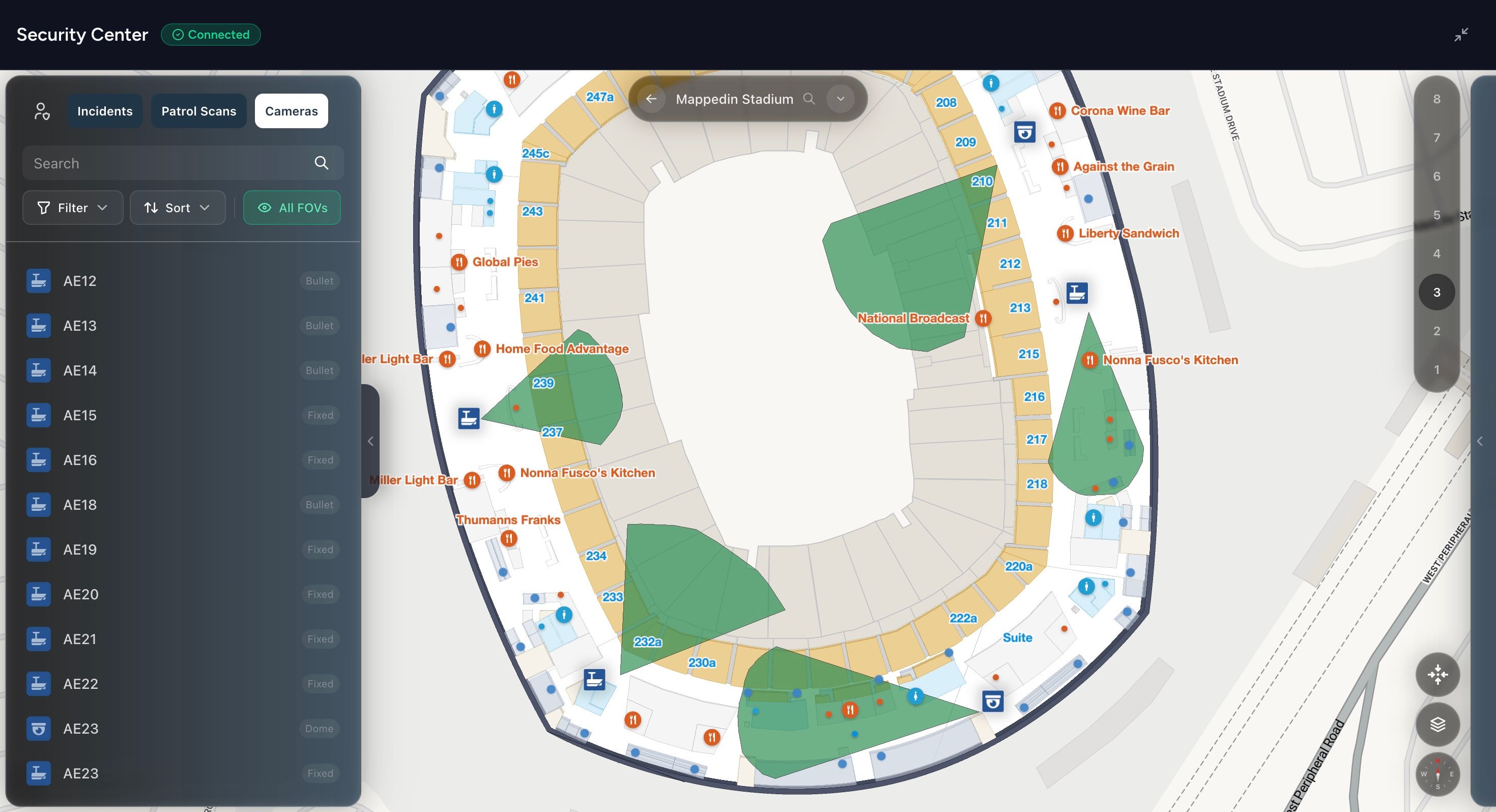
The practical value comes from the connections between those modules. An access denial can automatically pull up the nearest camera, place the event on a floor plan, and attach a relevant clip to the incident timeline. A panic button can show the responder where the alert originated, which entrances are nearby, and which route avoids restricted or congested areas.
Why indoor maps are foundational to physical security software
Indoor maps are particularly important because a camera grid alone rarely communicates location well to someone who doesn't know the venue intimately.
Physical security software can also sit alongside specialist services. For example, a venue reviewing counter-surveillance services may need the findings from a technical sweep represented in its risk records, room inventory, or incident workflow. The buyer lens remains consistent: software should turn separate security inputs into coordinated action, not merely display more dashboards.
Core capabilities inside a modern platform
A modern platform should help security teams answer critical questions at key decision points:
- What is happening?
- Who can enter?
- What changed?
- What action is required?
- Where is the person or asset?
- What record proves the response?
These questions connect software capability to venue-level risk and response time.
The 5 stages of physical security
1. See
See means finding current and recorded video in the context of an event. Video management should connect footage with doors, zones, alarms, and incidents. An operator responding to a door alarm should reach the relevant camera through the mapped location, without first decoding an internal camera label.
2. Admit
Admit covers who may enter a space and under what conditions. Access control should manage credentials, permissions, schedules, zones, anti-passback, contractors, and visitors. A denial becomes more useful when the platform shows the affected entrance, nearby cameras, and the procedure for checking whether the event is accidental or suspicious.
3. Respond
Respond assigns the next action. Incident management should turn an alert into a task, dispatch, escalation, and evidence trail. Keep standard operating procedures inside the workflow so an operator does not have to search a separate document during a crowded-venue incident.
4. Understand
Understand separates an isolated alert from a developing pattern. Analytics may identify line crossing, loitering, unusual crowd density, abandoned objects, license plates, or faces on approved watchlists. These functions reduce passive monitoring, but they require defined privacy rules, human review, retention periods, and escalation paths.
5. Locate
Locate places a person, asset, or event inside the venue. Bluetooth Low Energy, RFID, ultra-wideband, Wi-Fi, and computer vision provide different forms of positioning. Their operational value depends on accuracy in the actual building, including its materials, device density, crowded areas, and installation quality. A vendor demonstration in an empty room simply isn't enough.
Shared data creates operational advantage
The practical gain comes from shared context. An access denial can identify the entrance, retrieve the nearest camera, show the assigned zone on an indoor map, and start an incident record. A sensor event can open the relevant floor, notify the responsible team, and preserve related evidence without separate searches.
Indoor positioning also changes response work. A panic alert tied to a mapped room can show nearby exits, restricted areas, and the route available to the closest responder. The operator spends less time translating device identifiers into venue geography and more time verifying the event.
The importance of physical security software integrations
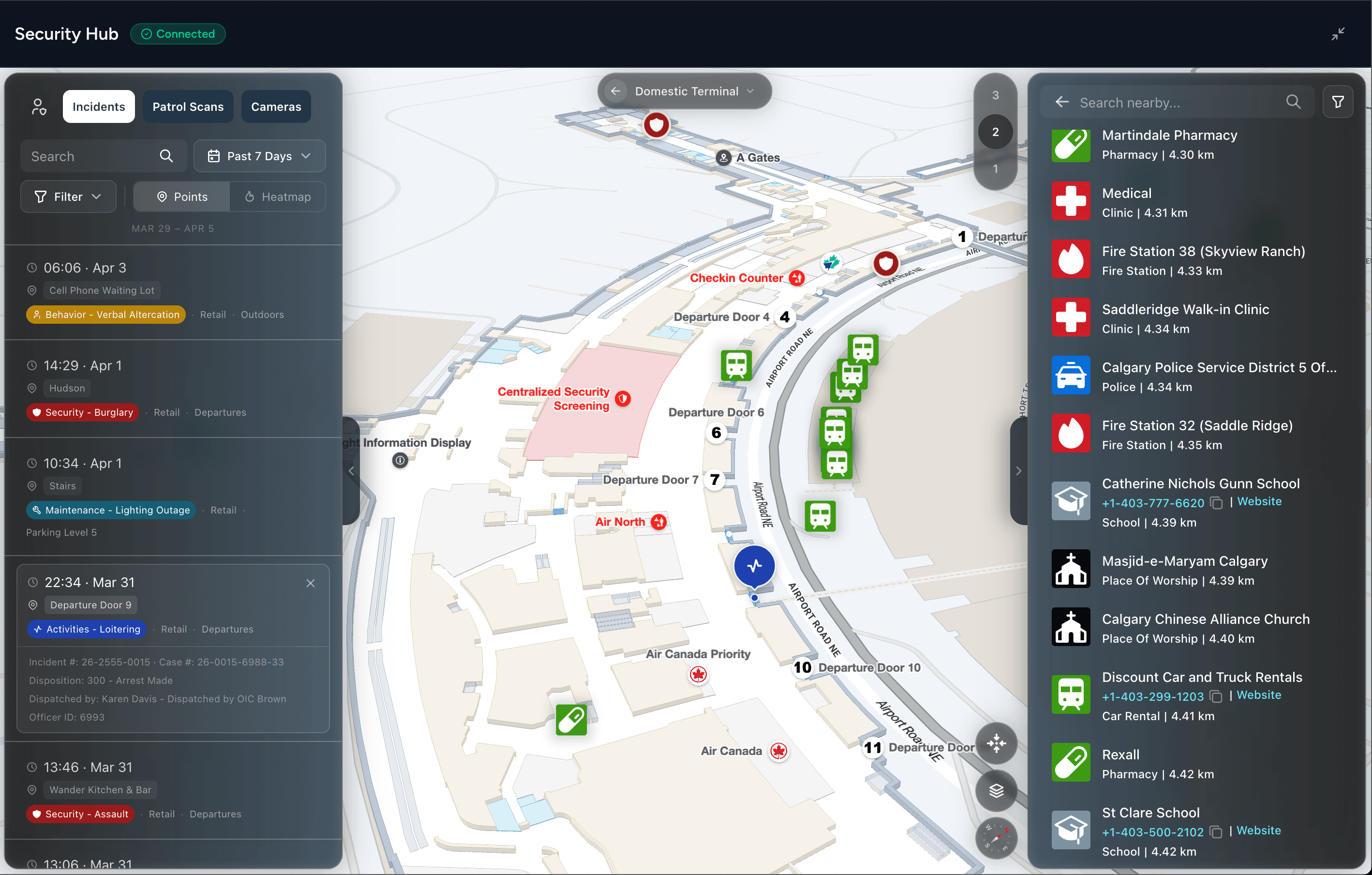
Integration matters when it changes what operators can verify, where responders go, or how quickly teams act. A camera feed with a location label helps. A camera feed connected to a live indoor map, a door event, responder positions, and an incident procedure gives the operator working context during a fast-moving event.
Indoor mapping converts device identifiers into venue geography. Instead of a vague label not tied to physical location, the operator sees the:
- Entrance
- Adjacent corridors
- Nearby cameras
- Restricted zones
- Route available to the closest responder
Positioning can add badge, equipment, or person coordinates, but accuracy depends on the technology, building materials, device density, and installation quality. Those limits belong in acceptance testing, not in a vendor footnote.
IoT integrations extend the same context to door position, glass break, environmental conditions, panic buttons, and other sensors. A PSIM can correlate events across separate subsystems, apply rules, and dispatch actions. The operational test is whether the platform reduces screen changes, shortens verification, and attaches relevant evidence to the incident instead of forcing a later reconstruction.
Procurement teams should test that relationship before shortlisting a platform. Request the event schema, coordinate model, API behavior, failure handling, and expected latency. Then simulate a real venue incident, like a door alarm followed by video verification and responder dispatch.
A polished dashboard can conceal fragmented data underneath it. The shortlist should favor the system that preserves location, identity, status, and procedure throughout the response.


Download the Physical Security Leader's Guide to Indoor Intelligence
Your VMS, PSIM, and patrol platforms all work. But none of them can tell an operator which floor, which corridor, or which camera is actually covering an incident right now. This guide gives Security teams a concrete framework for evaluating the spatial layer your stack is missing.
The benefits and ROI of physical security software
A venue's security software earns its place in the budget by changing operational risk, not by adding another dashboard. The business case should connect measurable changes to costs the venue already tracks, including guard coverage, incident downtime, audit preparation, investigation effort, and disruption to visitors or tenants.
Start with time to verify. If video, access events, and an indoor map share one workflow, an operator can check whether an alert is genuine without searching separate systems.
Mapping adds practical context: the operator can identify the relevant room, floor, access point, and nearby responders before assigning work. Measure alert-to-verification, verification-to-dispatch, and dispatch-to-arrival intervals separately. Faster software does not guarantee faster intervention, especially when procedures, staffing, or radio coverage are weak.
A venue should use its own baseline for comparison and test whether mapped workflows improve actual performance in its buildings.
Translate capabilities into a practical case for budget
- Unified incident handling: Measure the time from the first alert to a closed, documented incident. Faster closure can reduce operator effort and limit disruption.
- Indoor positioning: Record the interval between alert creation and a responder's confirmed location. Floor-aware positioning matters during medical events, unauthorized access, and evacuation support because staff can receive directions to the correct room or zone.
- Standardized audit trails: Count staff hours spent assembling access history, video evidence, approvals, and response records for reviews.
- Analytics in recurring trouble spots: Compare incidents by zone, time, and event type. Use the pattern to adjust patrols, access rules, staffing, or physical infrastructure.
- Portfolio governance: Compare whether sites follow procedures, retain evidence, and report incidents consistently across buildings.
Of course, financial outcomes require careful attribution. Reduced guard hours per square meter or insurance savings tied to demonstrable controls should be reviewed with finance, risk, and insurance teams. The software shouldn't receive credit for a premium change unless the insurer explicitly recognizes the implemented controls.
A digital mapping and response-time framework helps connect spatial context with personnel safety and response measurement. The strongest ROI case has three parts:
- A baseline
- A defined operating change
- A review date
“Better visibility” becomes a metric only when the team records what it can now measure or complete that it could not before.
How to evaluate and choose physical security software vendors
Vendor selection should reflect the venue's operating model and risk profile. A stadium with legacy access panels, temporary event staff, segmented networks, and a central SOC needs a different shortlist from a single office tower.
Start by defining which delays create operational exposure, then test whether indoor mapping and positioning help staff identify the location, nearby devices, and practical response route.
Start with architecture and deployment
Open architecture and documented APIs determine whether a platform can work with existing investments. Ask each vendor to document supported interfaces, event schemas, identity integrations, data export, third-party device maintenance, and ownership of failures between systems.
Deployment also affects response. Hybrid models are becoming a practical middle ground, with 43% of end users expecting hybrid deployments in the next five years, compared with 18% expecting fully cloud and 17% fully on-premises. Choose based on latency, resilience, data policy, local staffing, and IT capability.
Confirm where maps, positions, alerts, and evidence remain available during a network interruption.
Use a proof of concept, not a guided tour
A credible proof of concept uses the venue's own floor plans, device inventory, response zones, and connectivity. Test the workflow with:
- Incident replay: Reproduce an access denial, tailgating alert, panic-button activation, or perimeter event.
- Map response: Measure time from alarm creation to an accurate map pin, relevant camera view, and usable responder route.
- Network loss: Disconnect a relevant link and inspect local behavior, alert queuing, recovery, and evidence integrity.
- Credential lifecycle: Add, change, suspend, and remove users across the expected organizational structure.
- Mobile operation: Test the workflow on the devices and connectivity guards use.
- Scale behavior: Load representative cameras, doors, sites, floor plans, and user roles instead of curated sample data.
Cybersecurity belongs in the shortlist.
— 2025 Physical Security Operations Benchmark Report
Review role-based access, privileged administration, patching, logging, API security, segmentation, encryption, and incident support.
Implementation best practices
A multi-site rollout often slows before the first dashboard is configured. Architectural floor plans may use different names from camera inventories, access schedules may sit in spreadsheets, and each venue may define a restricted area differently. Those inconsistencies affect response time because an alarm cannot guide a guard reliably if the mapped location, device name, or access rule is unclear.
The discovery phase should produce one controlled inventory. Assign a stable identity and location to every camera, reader, sensor, intercom, room, floor, entrance, emergency exit, and response zone. Record the owner, network path, retention requirement, device status, and procedure linked to important events. Validate that each item appears in the correct indoor map position, not merely in an asset register.
Let the pilot expose the uncomfortable parts
Choose a pilot site for learning value. A new building can show that the platform works under ideal conditions. A venue with legacy panels, mixed-network video, dense floor layouts, and active event traffic exposes integration and response problems that a demonstration may avoid.
Test a complete incident workflow:
- Trigger a door or intrusion event and verify the map location.
- Open the nearest live and recorded video.
- Assign the incident to a responder.
- Test the route under normal and degraded connectivity.
- Close the incident and inspect the evidence trail.
- Review the event with security, facilities, IT, and compliance stakeholders.
Indoor positioning considerations
A blue-dot marker may work in an open corridor but drift near structural materials, stairwells, service areas, or crowded concourses.
Confirm whether its accuracy supports dispatch, provides only general orientation, or fails the requirements of a specific response procedure. The answer should determine the workflow.
Change management is operational work, not a training-day checkbox:
- Guards need practice with the console and mobile workflow.
- Supervisors need revised runbooks.
- Facilities teams need agreed ownership for doors, floor plans, and building systems.
- IT needs a support model covering identity, networks, integrations, and patching.
Common pitfalls include scope creep, under-resourced network upgrades, inconsistent site data, and treating indoor mapping as decoration. The live map should show current doors, routes, sensors, and zones. If it doesn't, responders may trust a precise-looking location that sends them to the wrong entrance, floor, or restricted area.
Next steps
A venue should enter a vendor shortlist meeting with agreed scenarios, locations, systems, and response measures. That preparation keeps the demonstration tied to operational risk. It also shows whether indoor mapping shortens the path from an alarm to the right responder, entrance, floor, or restricted area.
Prepare before the demo
Give vendors a working brief rather than a generic request. Include:
- Camera inventory: Site count, camera density, major coverage zones, VMS versions, and retention expectations.
- Access-control schema: Door groups, credential types, schedules, visitor categories, and role structures.
- Network topology: Relevant segments, local processing needs, connectivity constraints, and failover expectations.
- Floor plans: Current drawings with entrances, exits, rooms, restricted areas, stairs, elevators, utility shut-offs, and responder access routes.
- Stakeholder map: SOC operators, guards, facilities, IT, privacy, compliance, event operations, and executive owners.
- Priority scenarios: Unauthorized access, medical response, lost child, crowd congestion, suspicious package, evacuation, and network outage.
Use a real floor plan in the demo, with live or representative venue feeds where possible. Ask the presenter to show the complete sequence: alarm, map pin, nearby video, responder assignment, route, escalation, and evidence record. The test should reveal whether the operator can understand location and context quickly, not merely whether the platform displays data.
Pressure-test the contract and the exit path
Commercial terms affect whether the platform remains usable after deployment. Procurement should clarify:
- Data ownership: Who owns event data, video metadata, maps, configurations, and incident records?
- Export formats: Can the venue retrieve usable records without proprietary dependencies?
- Audit retention: How long are logs retained, and can retention be configured by policy?
- API limits: What are the limits, authentication requirements, versioning practices, and support commitments?
- Service levels: What support response applies to a failed integration, unavailable site, or degraded positioning service?
- Exit clauses: What happens to data, hardware, licenses, integrations, and support when the agreement ends?
Getting started
The physical security market is expanding, while software is growing as organizations replace legacy infrastructure with connected platforms and analytics, according to Grand View Research's physical security market analysis. That growth gives buyers more options, but it also raises the risk of purchasing disconnected tools under one agreement.
A sound decision starts with one pilot, measurable response scenarios, open integration requirements, and a documented path to scale. A pilot should require operators to complete a real response with fewer handoffs and explain what happens during connectivity loss, stale map data, unavailable video, or an unassigned alarm.
Mappedin is a unified platform for venue mapping, used across guest experience, security, facilities and public safety by providing indoor mapping, positioning, portfolio management, APIs, and security-oriented views that can connect locations with cameras, sensors, access points, and incident workflows.
Interested in seeing how this could work for your venue? Contact us to get started.
Related resources:


Share