The indoor mapping and wayfinding market has evolved dramatically as digital-native consumers bring complex, digital-first expectations to every physical space they visit.
Whether your visitors are navigating a sprawling airport terminal, finding a specific product in a multi-level mall, or searching for a doctor’s office in a complex healthcare campus, they now expect the same seamless digital experience they've grown accustomed to in their ride-hailing apps and food delivery services.
— Hongwei Liu, Founder & CEO, Mappedin
For venue decision-makers evaluating indoor navigation solutions, the challenge lies in identifying which solution best aligns with your venue's unique requirements, technical infrastructure, budget and business objectives.
This comprehensive guide examines the leading indoor mapping and wayfinding platforms across multiple verticals, including retail and shopping malls, airports and transportation hubs, stadiums and arenas, healthcare facilities, and corporate campuses. We'll analyze where each platform excels, where they fall short, and most importantly, how to match solution capabilities to your specific needs.
Whether you're a Director of Digital Experience at a major retail property, a CIO at a healthcare system, or a technology leader at an airport authority, this guide provides the framework and insights you need to make an informed platform decision that will serve your organization for years to come.
Looking for an indoor mapping solution to power visitor navigation, simplify operations, and improve venue analytics? Book a custom demo of Mappedin →
Making the case for indoor mapping & wayfinding technology
Making the business case for indoor wayfinding extends far beyond basic visitor convenience.
Real-world data reveals the tangible impact of poor navigation experiences across multiple industries. For example, in healthcare settings:
- 85% of individuals seek assistance and directions, leading to delays in reaching appointments and essential medical services (University of Colorado Anschutz Medical Campus)
- Hospital employees dedicate around 40 hours annually to guiding lost individuals (Becker's Hospital Review)
These statistics translate directly to reduced staff productivity, appointment delays, patient frustration, and potentially compromised care delivery.
The retail environment presents its own navigation challenges with direct revenue implications.
- Up to 40% of shoppers fail to find at least one product they intended to buy in every shopping trip
- 68% of customers say digital signage would make them more likely to buy advertised products
The transportation sector faces possibly the most acute pressure to modernize navigation experiences. As the SITA Passenger Report notes:
This expectation gap between consumer digital experiences and physical navigation represents both a challenge and an opportunity for forward-thinking venue ops teams.
What is indoor mapping & digital wayfinding software?
Before you can evaluate specific vendors, it’s important to first understand the fundamentals of indoor navigation.
Indoor mapping software
Indoor mapping forms the foundation: it’s the visual representation of your physical space that visitors interact with. Modern solutions offer both 2D and 3D rendering capabilities, with varying degrees of detail, customization, and aesthetic appeal. The underlying technology matters significantly: proprietary mapping engines like Mappedin's technology provide greater control and flexibility for complex venues.
Multi-building and multi-level support represents a critical capability often underestimated during initial evaluation. A solution that works well for a simple layout or single-level retail store may struggle with the complexity of a campus with multiple buildings, underground concourses, and skybridge connections.
The platform's ability to handle vertical navigation—helping visitors understand when they need to change floors and how to do it—separates enterprise-grade solutions from simpler alternatives.

Indoor positioning software
Indoor positioning technology determines how accurately you can show visitors where they are on your map—the famous "blue dot" that makes mobile navigation intuitive.
Three primary approaches exist:
iOS Indoor Mapping Data Framework (IMDF) leverages Apple's native indoor positioning capabilities, providing sub-3-meter accuracy without requiring any hardware installation. This approach offers the most cost-effective and maintenance-free positioning solution, though it's limited to iOS devices.
Bluetooth (bluetooth low energy or BLE) beacon networks deploy physical hardware throughout your venue to triangulate device position. While this approach works across both iOS and Android, it requires a longer implementation time, significant upfront hardware investment and ongoing battery maintenance. Solutions like Pointr's beacon approach come with 5-year battery warranties but still require eventual replacement and maintenance protocols.
GPS-hybrid approaches attempt to use GPS signals supplemented with other technologies. While GPS alone can be ineffective for indoor venues, it can work alongside other positioning technologies to offer a streamlined solution especially for indoor-outdoor venues.
— Wendy Albert, VP of Marketing, Miracle Mile Shops
Digital wayfinding software
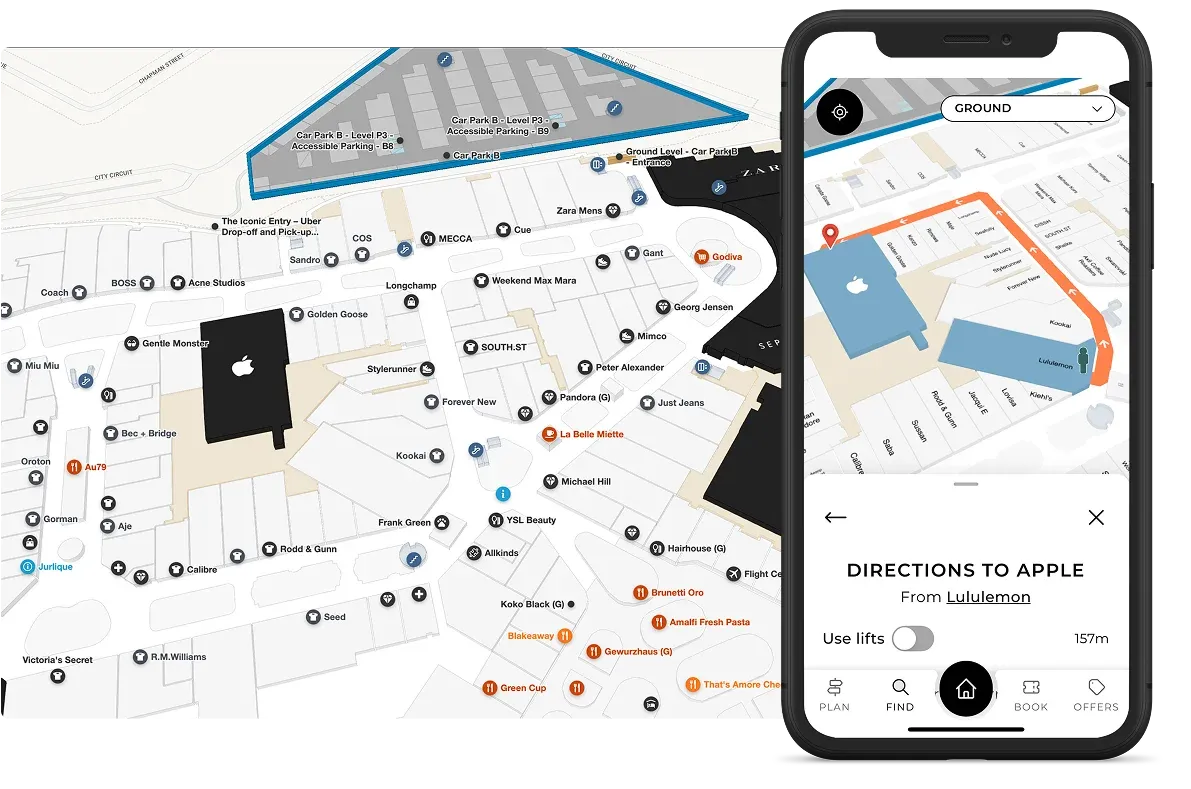
Wayfinding combines the mapping and positioning layers to provide turn-by-turn routing and navigation for visitors—essentialls, it’s the end user experience. The sophistication of routing engines varies dramatically across platforms.
Advanced solutions offer customizable routes, accessibility modes that avoid stairs and escalators, multi-floor navigation with floor change indicators, indoor-to-outdoor transition handling, and even voice guidance.
Content management systems
Content management systems (CMS platforms) are the backend where venue management teams can edit venue maps and maintain up-to-date location information in one place to then be deployed across multiple channels like kiosks, website maps, and venue apps.
The CMS platform in the indoor mapping software you choose determines how easily your team can maintain and update map content after initial deployment. Cloud-based CMS platforms like Mappedin’s allow you to manage POI data, update store directories, modify routing, adjust map styling, and add new buildings or floors without requiring developer resources or vendor involvement for routine changes.
The complete indoor mapping software vendor landscape
Mappedin
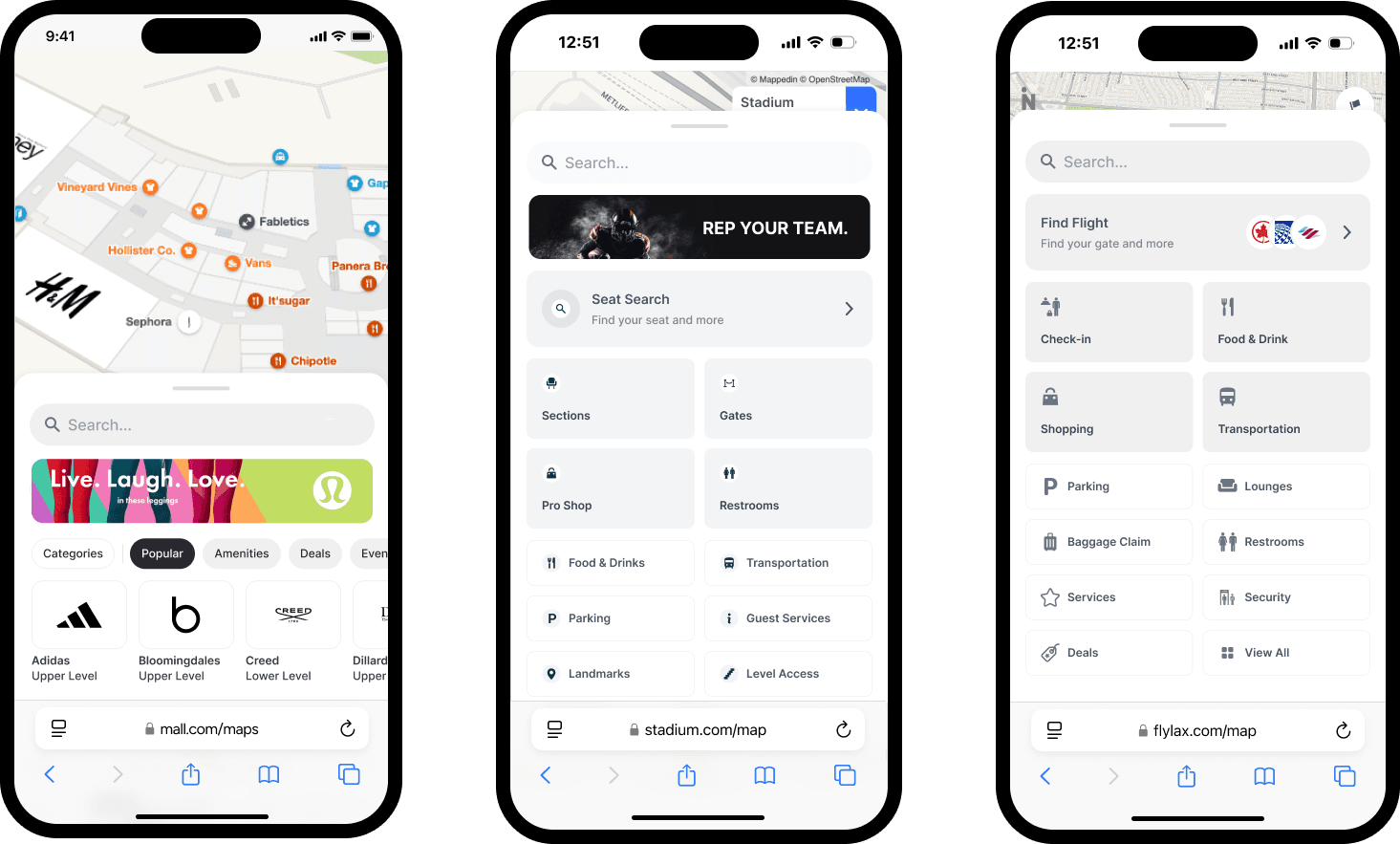
Mappedin is a leading platform for complex, multi-level, multi-building venues. Serving major shopping centers, airports, stadiums, hospitals, workspaces and campuses, Mappedin's proprietary mapping technology provides the foundation for sophisticated wayfinding experiences across web, mobile, and kiosk deployments.
One of Mappedin’s key strengths lies in balancing powerful capabilities with genuine ease of use—a rare combination in enterprise software. Key customers include major retail properties and transportation hubs around the world, like Pittsburgh International Airport, Cadillac Fairview, Simon Properties, and MetLife Stadium.
Pointr
Pointr is another indoor wayfinding software option. Pointr’s technology focuses heavily on indoor positioning technology. Their MapScale AI-powered mapping and beacon-based positioning system represents their core differentiators, though this hardware-dependent approach requires more infrastructure investment and ongoing maintenance compared to software-only alternatives.
Atrius
Atrius is an indoor wayfinding solution provider in the aviation sector. However, their solution is primarily focused on energy reduction/management and sustainability. Atrius pricing typically exceeds newer technologies in the market.
Esri (ArcGIS Indoors)
Esri’s ArcGIS Indoors offers the most comprehensive GIS integration for organizations already invested in the ArcGIS ecosystem. Esri brings enterprise credibility and deep spatial data capabilities. The trade-off comes in complexity: Esri's solutions require extensive training, certification, and typically longer implementation timelines.
Mapsted
Mapsted offers turnkey hardware-free indoor positioning technology to enable indoor navigation, eliminating the need for Bluetooth beacons or other infrastructure that could get costly.
However, their digital maps offer more limited functionality and fewer integrations than some other solutions on the market, causing some challenges for industries like airports where deep integrations with other systems like flight information displays and operational platforms are essential.
22Miles
22Miles is an adaptable visual communications platform serving retail, airports, hospitality, healthcare, and office environments. Its strength lies in robust digital signage and directory software. While 22Miles offers directory hardware integration capabilities, the platform lacks certain features and functionality compared to others in the space.
MapsPeople (MapsIndoors)
With experience mapping 25,000+ buildings, MapsPeople offers an innovative indoor mapping platform. Its main solution, MapsIndoors, is a single professional-services approach, building on Mapbox's enterprise-grade infrastructure, which includes Mapbox platform foundation, 3D floor plans, indoor route networks, custom POIs, 3D objects with optimized batch rendering, and dynamic integrations for live data. However, MapsPeople is limited to only a professional-services, partner-first model requiring long timeframes and dedicated implementation.
Looking for an indoor mapping solution to power visitor navigation, simplify operations, and improve venue analytics? Book a custom demo of Mappedin →
Key decision criteria for choosing indoor mapping software
Mapping software foundation
The underlying mapping technology determines what's possible with your solution long-term. Proprietary mapping engines like Mappedin's technology provide complete control over the map rendering, styling, and capabilities. This choice enables sophisticated features like true 3D visualization, custom map stacking for multi-level venues, and pixel-perfect brand alignment. Organizations can evolve their map experience over time without platform limitations constraining their vision.
On the other hand, platforms built atop third-party mapping services like Mapbox face inherent constraints. While these approaches can accelerate initial deployment, they limit customization possibilities and create dependencies on external roadmaps. For example, when Mapbox changes their styling options or deprecates features, downstream platforms are forced to adapt in their wake.
The 2D versus 3D consideration merits careful thought. While 3D maps create impressive visual experiences, they require more device processing power and can prove challenging for visitors less comfortable with spatial visualization.

The best mapping platforms offer both 2D and 3D modes, allowing visitors to toggle based on preference. This flexibility proves particularly important for accessibility, as some visitors with cognitive or visual impairments find 2D maps easier to interpret.
Multi-building support seems straightforward until you encounter edge cases:
- Can the platform handle underground concourses that connect multiple buildings?
- What about skybridge connections between towers?
- How does wayfinding work when the optimal route crosses from Building A to Building B through a tunnel, then up to Level 3?
These scenarios are common in airports, healthcare campuses, and large retail properties. Platforms that treat each building as an isolated entity rather than as connected nodes in a campus network quickly reveal their limitations.
Indoor positioning accuracy and approaches
The blue dot positioning experience makes or breaks visitor perception of your wayfinding solution. A map that shows visitors in the wrong location erodes trust immediately and often permanently.
iOS integration through IMDF (Indoor Mapping Data Framework) delivers the most accurate, cost-effective positioning. By tapping into the sophisticated sensor fusion Apple already performs—combining WiFi, Bluetooth, cellular signals, barometric pressure, and device motion—IMFV achieves sub-3-meter accuracy without any hardware installation.
Another method, Bluetooth beacon networks, are strong on positioning accuracy but have significant drawbacks. The positioning accuracy typically lands in the 1-3 meter range, but can reach sub-meter or centimeter-level (around 1m or less) with advanced Bluetooth technology, but they come with significant strings attached. Initial hardware costs can run tens of thousands of dollars for large venues—one beacon typically required per 25-50 square meters.
Installation requires careful site surveys, testing, and calibration. Then comes ongoing maintenance: even with 5-year battery warranties, you're scheduling large-scale battery replacement projects and managing beacon failures.
Some vendors claim GPS-only based indoor positioning. While GPS is extremely useful when it comes to showing positioning between buildings in indoor-outdoor venues, it can’t provide visitors with multi-level positioning. So, GPS-only indoor positioning can produce frustrating visitor experiences with inaccurate indoor positioning.
Evaluating an indoor mapping software based on its indoor positioning is all about prioritizing what matters most to your team. For example, one software may not provide sub-meter positioning accuracy, but offers hyper-personalized visitor analytics or advertising integrations. On the other hand, some platforms may lack visibility into certain data but offers extremely precise positioning capabilities.
Content management and operational control
A map is only as good as its information. If it’s out of date or incorrect, it won’t be functional for your guests and may cause more frustration than having no map at all.
The CMS determines whether map updates become a simple five-minute task for your marketing coordinator or a multi-week vendor engagement requiring developer resources and budget approvals.
Cloud-based CMS platforms provide web interfaces where authorized users can manage POI data, update store directories, modify hours and descriptions, upload new logos and images, adjust routing preferences, add promotional callouts, change map styling and colors, create and manage categories, and publish changes instantly across all deployment channels.
This operational control proves particularly critical for retail environments where tenant turnover happens quarterly, promotional campaigns change monthly, and special events require rapid map updates.
Healthcare environments face similar dynamics with physician relocations, departmental moves, and temporary closures for construction. Airports need to update gate assignments, concession changes, and security checkpoint status regularly.
Platforms requiring vendor involvement for routine content updates create operational bottlenecks that grow increasingly frustrating over time. Initial implementations may include a generous bank of included update hours, but these get consumed quickly once you're actively managing your map. The incremental costs and coordination delays of vendor-managed updates often exceed the nominal licensing cost savings that led you to choose that platform initially.
SDK access and developer resources
The Software Development Kit (SDK) determines how well the indoor mapping solution integrates into your broader digital ecosystem. Your website, mobile app, and kiosk deployments all need consistent mapping experiences, but the implementation requirements differ dramatically across platforms.
Comprehensive SDKs provide pre-built components for common use cases—search interfaces, location lists, turn-by-turn navigation panels, floor selectors, and category filters—that developers can implement in hours rather than weeks.
The documentation quality, code examples, and developer support responsiveness separate professional-grade platforms from those treating SDK access as an afterthought.
Avoid platforms that charge additional fees for SDK access or limit functionality in SDK deployments versus their hosted solutions. You're investing in a platform to power experiences across your entire digital presence—artificial limitations that force you into the vendor's preferred deployment model may be a red flag.
API capabilities
REST APIs enable system integrations that extend your mapping platform's value. Importing tenant directories from your lease management system, syncing employee directories from your HR platform, pushing event schedules from your calendar system, integrating with building management systems for real-time status updates, and exporting analytics data to your business intelligence tools all depend on robust API capabilities.
Data portability merits particular attention:
- Can you export your complete map data?
- In what formats can you export?
GeoJSON has emerged as the standard for spatial data interchange, and platforms storing data in this format enable greater flexibility and reduce lock-in risk. Conversely, proprietary data formats that only the vendor can process should concern any enterprise buyer thinking long-term.
White-labeling and brand management
Your indoor mapping experience represents an extension of your brand. Cookie-cutter interfaces with vendor branding undermine the integrated experience you're trying to create.
White-labeling capabilities should extend beyond just swapping logos and colors.
- Can you customize the entire user interface?
- Adjust the visual hierarchy and information architecture?
- Implement brand-specific interaction patterns?
The flexibility here varies enormously across vendors, with some offering merely cosmetic customization while others provide genuine design control.
Deployment and implementation
Implementation timelines vary based on venue complexity, data availability, integration requirements, and chosen platform capabilities.
Self-serve mapping platforms like Mappedin Maker can generate initial maps in minutes from CAD files or simple PNGs or JPEGs, with full deployments possible within weeks for straightforward environments. These accelerated timelines prove attractive for organizations wanting quick time-to-value or piloting the technology before larger rollouts.
Professional services engagements typically run 8-16 weeks for single-building deployments, 3-6 months for multi-building campuses, and can extend to 6-12 months for complex environments requiring extensive integrations, custom development, and phased rollouts.
The quality of your source data dramatically impacts timeline. Clean, accurate CAD files in standard formats enable smooth map production. Conversely, outdated floor plans, inconsistent naming conventions, and incomplete metadata force time-consuming data cleanup that extends every project phase.
Get started for free with Mappedin Maker →
Hardware and infrastructure costs
Beacon-based positioning systems represent the largest variable cost across platforms. A typical large venue deployment might require 200-500 beacons at $50-100 per beacon, totaling $10,000-50,000 in hardware alone. Add installation labor, site surveys, testing, and eventual battery replacement, and beacon infrastructure costs over five years often exceed the software licensing costs.
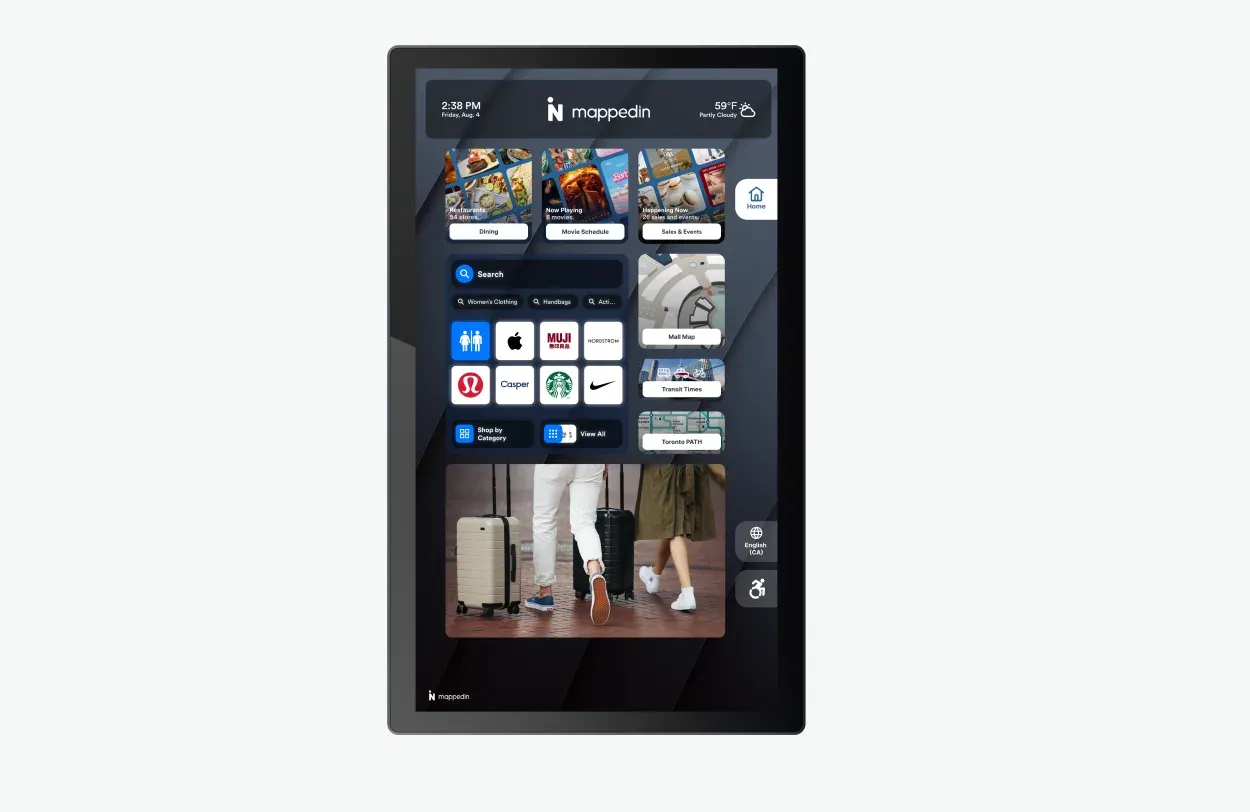
Kiosk hardware for directory deployments ranges from $3,000-10,000 per unit depending on size, durability, and capabilities. A mall with 10 directories faces $30,000-100,000 in hardware investment before the software licensing conversation begins.
Network infrastructure sometimes requires upgrades. If you're depending on WiFi for positioning, ensuring comprehensive, high-quality coverage throughout your venue may necessitate additional access points. If deploying many kiosks, you'll need network drops or reliable wireless connectivity at each location.
Software comparison: Which is the best indoor mapping software for your venue?
Mappedin: Flexible, enterprise-level indoor mapping software for complex, multi-building venues with customers around the world
Mappedin has established itself as the leading solution for venues requiring sophisticated capabilities without sacrificing ease of use. The proprietary mapping technology provides complete control over map visualization, enabling pixel-perfect brand alignment and the flexibility to handle the most complex multi-building, multi-level environments.
Indoor positioning
Mappedin’s Indoor Positioning features deliver real-time, “blue dot” location tracking that works seamlessly inside complex venues, much like GPS does outdoors. Leveraging a combination of visual positioning, Wi-Fi signals, and device sensors, Mappedin’s infrastructure-free approach enables fast, cost-effective deployment and reliable zone-level accuracy (without the need for extensive hardware or beacons).
The system is optimized for multi-floor navigation, smooth indoor-to-outdoor transitions, and works directly in web browsers or iOS apps, requiring no downloads.
For visitors, this means instant, intuitive wayfinding: they can see their live position on a digital map, receive turn-by-turn directions, and even save their location (like a parking spot) for easy return. Venue operators benefit from enhanced visitor experiences, actionable analytics on movement patterns, and the ability to optimize layouts and operations based on real usage data—all without the maintenance burden of traditional beacon-based systems.
Accessibility
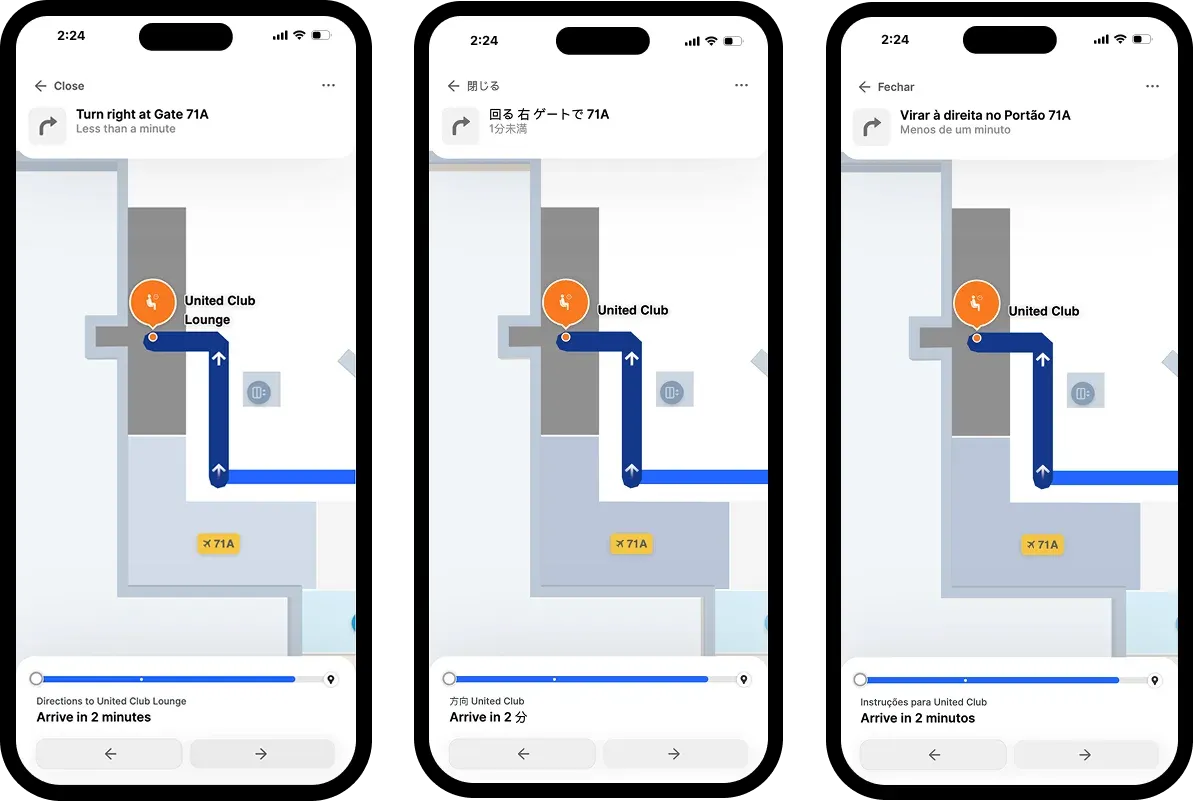
Accessibility compliance at WCAG 2.1 AA level ensures the solution serves all visitors, not just the fully able. This full compliance matters particularly in healthcare and public venues where accessibility represents both a regulatory requirement and ethical imperative.
Digital directory/kiosk software
Mappedin's Directory delivers best-in-class digital directory experiences combining wayfinding with promotional content, store categories, event information, and sophisticated search capabilities. The 68% of customers who say digital signage makes them more likely to buy advertised products represents a direct revenue opportunity that integrated directory and mapping solutions enable.
— Kim McNulty, Head of Marketing & Communications, Blanchardstown Centre
CMS
Mappedin's cloud-based CMS empowers marketing and operations teams to manage content independently: updating POIs, modifying store information, adjusting routes, and publishing changes instantly without vendor involvement or developer resources. This operational control proves critical in environments with frequent changes like retail tenant turnover, healthcare department relocations, or airport concession updates.
Analytics
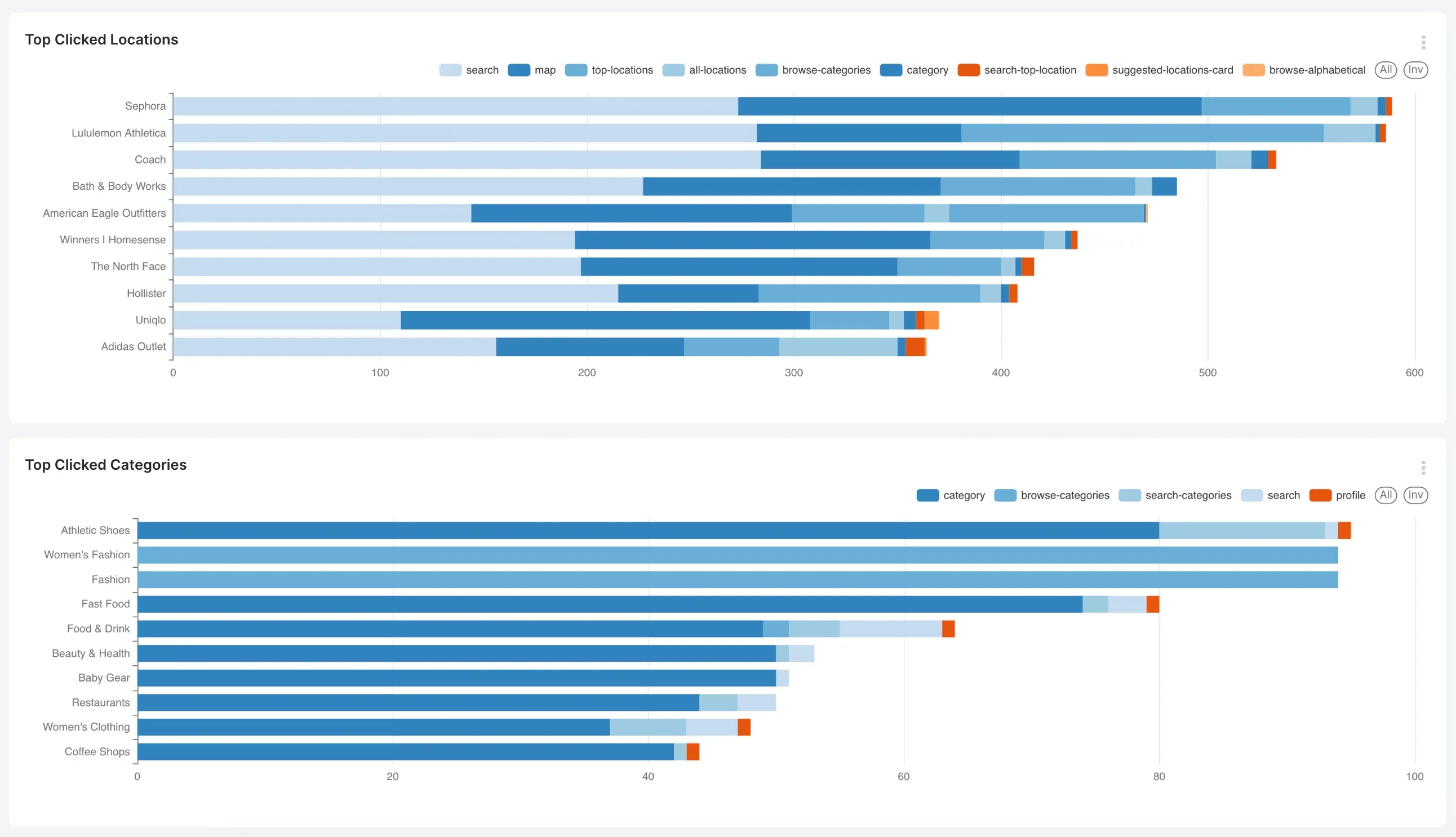
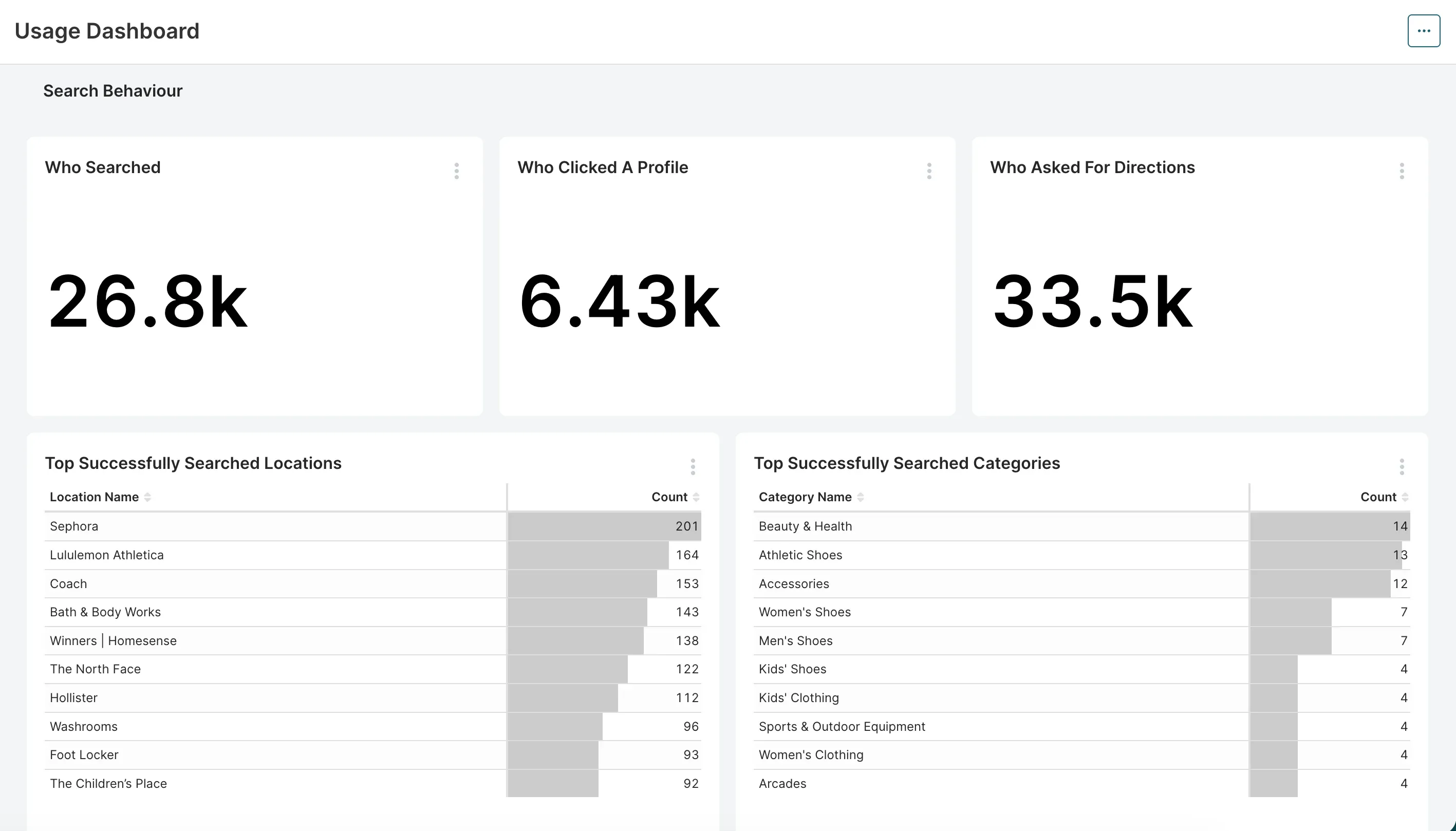
Mappedin’s Analytics transforms indoor mapping into a strategic asset by providing detailed, actionable insights on how visitors interact with your venue. Through its intuitive Analytics Dashboard, Mappedin tracks key metrics such as search queries, top destinations, navigation patterns, session duration, and digital directory usage, allowing venue operators to visualize visitor behavior and space utilization in real time.
The platform supports filtering by venue, organization, and time period, and offers exportable reports for deeper analysis or integration with business intelligence tools like Snowflake, Power BI, or Tableau.
All analytics are anonymized and privacy-first, focusing on spatial patterns and trends rather than individual identities. These insights empower organizations to optimize layouts, improve marketing strategies, justify leasing decisions, and enhance the overall visitor experience—ultimately driving increased foot traffic, operational efficiency, and revenue growth.
Primary venue types Mappedin serves:
- Retail and shopping centers
- Airports and transportation hubs
- Stadiums and arenas
- Healthcare facilities
- Corporate campuses and workspaces
- College & university campuses
- Convention centers
- Entertainment venues
Venues use Mappedin for...
- Multi-level wayfinding for shoppers seeking specific stores or products
- Airport passenger navigation from terminal entry to gates, with revenue-driving integrations for parking, retail, and dining
- Stadium seat-finding and concourse navigation on game days
- Public safety and operations teams to visualize key areas such as entry points, exits, traffic flow, and critical locations like utility shut-offs, enhancing security and enabling rapid emergency response
- Track assets like inventory, personnel, production materials, and forklifts at warehouses
- Corporate campus navigation for employees and visitors across multiple buildings
Pointr: Indoor positioning platform for venues requiring sub-meter accuracy through hardware infrastructure
Pointr is a solid option for venues needing sub-meter positioning accuracy and don’t mind a longer implementation timeline with added costs around positioning hardware. Pointr focuses heavily on indoor positioning technology, and this specialization shows in their beacon-based positioning system's sophistication.
However, total cost of ownership including beacon infrastructure, installation, and maintenance often narrows or eliminates nominal licensing advantages. The accessibility compliance gap—Pointr addresses WCAG partially while Mappedin achieves full AA compliance—matters increasingly as regulatory and legal pressure intensifies.
Learn more about Mappedin vs. Pointr →
Atrius: Indoor mapping and energy reduction software for airports
Atrius brings deep aviation heritage with an established presence at major airports. While it offers a range of software from spatial intelligence to building performance, Atrius’s wayfinding technology lacks some features and functionality that drive revenue and growth at venues, such as advertising, tenant promotion, parking upsells and service merchandising.
Non-aeronautical revenue now makes up roughly 40% of an airport’s income, so lagging behind on the experiential features a more modern platform like Mappedin may offer could set airports behind.
ArcGIS Indoors: Complex indoor mapping software best for existing ArcGIS customers
Esri is a well-known, established solution provider in the GIS space. For venues with existing ArcGIS infrastructure, the GIS integration represents genuine value. Spatial data flows seamlessly between systems, facility management connects to wayfinding, asset tracking integrates with navigation, and work order systems tie to location data automatically.
However, ArcGIS Indoors’ complexity represents the overwhelming limitation for straightforward wayfinding projects. Most organizations simply want employees and visitors to find conference rooms, stores, gates, offices, and amenities easily; they don't need comprehensive spatial data ecosystems for these use cases.
Mapsted: Industry-agnostic, hardware-free location tech
Mapsted positions themselves as a location technology. They offer a hardware-free positioning technology as their flagship feature, so there’s no need for Bluetooth beacons or other infrastructure to enable indoor navigation. This approach requires significantly lower deployment costs and no ongoing maintenance compared to beacon-dependent solutions like some of the others we’ve mentioned.
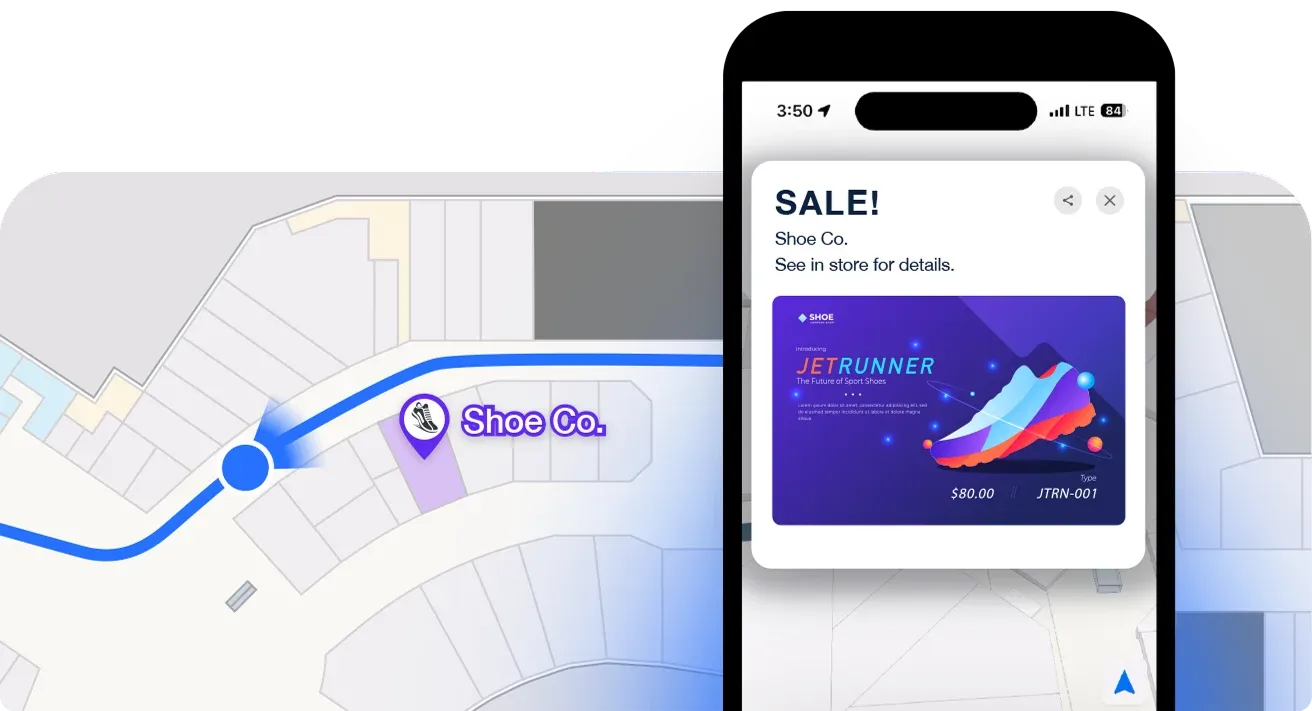
The platform also emphasizes location-based marketing capabilities, allowing venues to trigger targeted messages, promotions, and advertisements based on visitor position and movement patterns.
For organizations seeking IoT solutions beyond basic wayfinding (like asset tracking, environmental monitoring, or advanced analytics), Mapsted creates and sells proprietary hardware to support these use cases, providing a single-vendor solution for organizations wanting to consolidate their indoor technology stack.
However, customers who choose Mapsted may miss the industry-specific expertise like system integrations and customization capabilities—particularly in verticals like airports where deep integration with airline systems, flight information displays, and operational platforms proves essential. Their platform also lacks the sophisticated APIs and pre-built connectors that specialized competitors offer for complex enterprise environments.
22Miles: Digital signage software for hardware-integrated kiosks
For companies seeking a digital signage-first platform with some wayfinding capabilities, 22Miles is a solid option.
For venues like workspaces, hospitals, and retail, 22Miles offers wayfinding as one capability within a broader digital signage and content management ecosystem. Their strength lies in directory hardware integration, offering coordination between kiosk hardware and wayfinding software. Their custom enterprise packaging offers flexibility for organizations with complex procurement requirements or vendor management needs.
The primary drawback is that wayfinding represents just one feature among many rather than the core platform focus, so its mapping and navigation capabilities may lag behind specialized platforms like Mappedin.
Organizations expecting to manage map content internally may find 22Miles' tools more challenging than others in the space, and pricing typically runs higher than indoor mapping competitors while delivering less sophisticated mapping capabilities.
MapsIndoors by MapsPeople: Google-dedicated indoor mapping software
MapsIndoors, an indoor mapping platform by MapsPeople, is another option in the mapping space. It differentiates itself through a strong Google partnership and integration, offering seamless connections with Google GIS and leveraging Google's positioning infrastructure. This makes it appealing for organizations deeply embedded in Google's ecosystem who want their indoor navigation to integrate naturally with Google Maps and related services.
For customers that need responsive map management, quick deployments, or aren’t prepared to invest in extended service engagements, however, MapsIndoors likely isn’t the ideal solution. The platform’s long implementation timelines and limited ability for admins to make structural map updates may hinder orgs looking to get up and running quickly without hassle.
Learn more about Mappedin vs. MapsPeople →
How to choose the best indoor mapping software
Step 1. Define your requirements for indoor mapping and wayfinding software.
The first step in successful indoor mapping platform selection begins with an honest assessment of what you're trying to accomplish and why it matters to your organization. When defining your requirements, follow this playbook:
Document the primary use cases
- Visitor wayfinding focuses on intuitive interfaces, accurate positioning, clear routing, and accessibility compliance.
- Analytics and business intelligence priorities favor comprehensive event tracking, heatmap visualization, journey analysis, and API access for data export.
- Advertising and revenue generation requires promotional content integration, location-based targeting, and impression tracking.
- Operational efficiency emphasizes self-service content management, integration with building systems, and real-time status updates.
For most organizations, it’s a combination of many use cases. But it's important to identify the primary and secondary drivers to focus your evaluation on what matters most.
Assess venue complexity
Honestly assessing your environment's complexity prevents expensive surprises when your "simple" venue proves more challenging than anticipated.
- Single-building, single-level venues can potentially succeed with simpler platforms.
- Multi-level buildings require vertical navigation capabilities.
- Multi-building campuses need seamless routing across properties.
- Mixed indoor-outdoor environments demand outdoor map integration.
- Underground connections, skybridge networks, and parking structure integration compound complexity further.
Understand visitor/user base characteristics and preferences
Who are your visitors? How do they navigate? Are they tech-savvy? Understanding who will be leveraging the technology every day informs the right feature prioritization and UI design needs.
- Tourist destinations serve international visitors requiring multilingual support.
- Healthcare facilities accommodate elderly and disabled populations needing enhanced accessibility.
- Corporate campuses serve tech-savvy employees comfortable with sophisticated features.
- Retail environments attract broad demographic ranges requiring universal usability.
Catalog integration requirements
Integration capabilities are essential for large, complex venues serving multiple use cases. Catalog your integration requirements early to prevent discovering critical needs too late in vendor evaluation.
- Mobile apps require SDK integration.
- Websites need embeddable map components.
- Kiosks demand full-screen interfaces optimized for touch and public use.
- Digital signage throughout your venue might display context-relevant map views.
- Building management systems could provide real-time status updates.
- CRM platforms might personalize experiences based on visitor profiles.
Step 2. Prioritize what matters most to your venue.
With requirements defined, establish relative priorities across decision dimensions. Not every factor carries equal weight for your situation.
- Technology: Determine how critical certain tech capabilities are to your venue. How critical, for example, is sub-meter positioning? Are you willing to invest in beacon hardware and maintenance?
- Budget: What’s your total cost of ownership budget over 3-5 years? How about 10? Initial licensing may fit the budget easily while infrastructure, integration, and ongoing costs create problems. Or perhaps you have capital budget for infrastructure but constrained operating budgets for licensing and maintenance.
- Timeline: Do you have an immovable deadline driving launch date? Retail grand openings, sporting events, major conferences, or executive mandates sometimes create hard deadlines that eliminate slower-to-deploy options regardless of other merits.
- Support and strategic partnership: Some organizations prefer hands-off SaaS tools they can implement independently with minimal vendor involvement. Others value consultative partnerships where vendors provide strategic guidance, best practices, and ongoing optimization support. Often, though, teams prefer a mix of the two—a strategic partnership to offer consultation as needs evolve, but a platform easy enough to manage on your own day-to-day.
Step 3. Shortlist platforms and evaluate.
With priorities established, shortlist 2-4 platforms and dig deeper into capabilities and fit.
Request customized demos
Generic vendor demos showcase platforms at their best but may not address your specific requirements or use cases. Request personalized demos using your floor plans or similar venue types. Ask vendors to demonstrate specific use cases critical to your success. Bring key stakeholders so you're not filtering vendor responses—let decision-makers see capabilities and limitations firsthand.
During these sessions, ask challenging questions about scenarios where you expect difficulties:
- How does the platform handle your unique routing challenges?
- What happens when you need to make urgent content updates?
- How do you accomplish that complex integration you've been worried about?
Get a personalized demo of Mappedin →
Assess vendor stability and roadmap
When you make a technology investment, you’re betting on the vendor's trajectory over the following years and decades. Ask about product roadmap and investment priorities. Where is the development focus going? Does that align with your future needs? Review employee growth trends on LinkedIn.
Finally, assess other customers’ reviews and case studies to understand the outcome of the solution for fellow large venues.
FAQs about indoor mapping software
What is the best indoor mapping software?
Mappedin is the leading indoor mapping software for complex, multi-level venues, offering proprietary mapping technology, full WCAG 2.1 AA accessibility compliance, and a cloud-based CMS that enables instant content updates without developer resources. The platform serves major airports, shopping centers, stadiums, and healthcare facilities worldwide with enterprise-grade capabilities and genuine ease of use.
What's the difference between Mappedin and ArcGIS Indoors?
Mappedin offers intuitive, purpose-built wayfinding for venues requiring straightforward navigation without GIS complexity, while ArcGIS Indoors provides comprehensive spatial data ecosystems ideal for organizations with existing ArcGIS infrastructure. Mappedin delivers faster implementation timelines and self-service content management, whereas ArcGIS Indoors requires extensive training and longer deployment cycles but offers deeper GIS integration capabilities.
Which wayfinding software is best for airports?
Mappedin is the leading wayfinding software for airports, serving major transportation hubs like Schiphol and Pittsburgh International Airport with comprehensive passenger navigation, revenue-driving integrations for parking and concessions, and real-time operational updates.
Unlike alternatives like Atrius that lack revenue-generating features, Mappedin addresses the critical need for non-aeronautical revenue through advertising, tenant promotion, and service merchandising capabilities.
Can indoor mapping software integrate with existing systems?
Yes, enterprise-grade indoor mapping platforms offer REST APIs and SDKs that enable integration with lease management systems, HR directories, building management systems, CRM platforms, and business intelligence tools like Snowflake, Power BI, or Tableau.
Mappedin provides comprehensive SDK access with pre-built components and robust API capabilities for importing tenant data, syncing employee directories, and exporting analytics without additional fees or artificial limitations.
Do I need beacons for indoor wayfinding?
No, modern platforms like Mappedin offer infrastructure-free indoor positioning through iOS IMDF that delivers positioning accuracy without any hardware installation or ongoing maintenance. While Bluetooth beacon networks provide cross-platform positioning with sub-meter accuracy, they require significant upfront investment, installation labor, site surveys, and eventual battery replacement that often exceeds software licensing costs.
What's the difference between 2D and 3D wayfinding?
2D wayfinding maps display floor plans in traditional overhead view that's easier to interpret for visitors with cognitive or visual impairments, while 3D maps create immersive visual experiences that require more device processing power and can be challenging for some users.
The best platforms offer both 2D and 3D modes with user toggle capability, providing flexibility for different comfort levels with spatial visualization while maintaining accessibility compliance.
Which indoor mapping platform is easiest to use?
Mappedin balances powerful enterprise capabilities with genuine ease of use through its cloud-based CMS that empowers marketing and operations teams to update POIs, modify store information, adjust routes, and publish changes instantly without vendor involvement or developer resources.
This operational control proves critical for environments with frequent changes like retail tenant turnover, healthcare department relocations, or airport concession updates where competitors require multi-week vendor engagements for routine updates.
Can visitors use wayfinding without downloading an app?
Yes, modern indoor wayfinding platforms like Mappedin work directly in web browsers without requiring app downloads, providing instant access through venue websites with real-time blue dot positioning and turn-by-turn navigation. SDK integration also enables seamless embedding into existing mobile apps, kiosks, and digital signage for consistent experiences across all touchpoints.
How often can indoor maps be updated?
Cloud-based platforms like Mappedin enable instant map updates that publish across all deployment channels immediately, allowing venue teams to manage content changes in minutes rather than waiting for multi-week vendor engagements.
Self-service CMS capabilities mean marketing coordinators can update tenant information, promotional content, store directories, and routing preferences in real-time without developer resources or budget approvals.
What analytics are available for indoor mapping?
Indoor mapping analytics provide actionable insights including search queries, top destinations, navigation patterns, session duration, heatmap visualization, journey analysis, and digital directory usage, with exportable reports for integration with business intelligence tools.
Mappedin's privacy-first analytics track anonymized spatial patterns that enable venue operators to optimize layouts, improve marketing strategies, justify leasing decisions, and measure foot traffic while enhancing overall visitor experience and driving revenue growth.
Next steps: Selecting the best indoor mapping software for your venue
The indoor mapping and wayfinding market is evolving fast. The platforms separating themselves from the pack are doing it by combining sophisticated technical capabilities with ease of use. The best platforms are able to balance powerful features with accessible interfaces, and treat customers as strategic partners rather than transactions.
Your venue deserves a navigation experience matching the expectations visitors bring from their smartphone apps and digital services. The right platform makes that vision reality while generating operational efficiencies and revenue opportunities that exceed the investment.
Choose thoughtfully, implement deliberately, and watch your venue's digital and physical experiences converge into the seamless journey modern visitors expect.
Related resources:


Share