Start Here
Airport wayfinding systems combine digital maps, indoor positioning technology, interactive kiosks, and mobile apps to guide passengers through complex terminal environments from curb to gate. These systems integrate with flight information displays, security checkpoints, and retail platforms to provide real-time directions, reduce passenger stress, and help airports increase non-aeronautical revenue. Modern airport wayfinding platforms like Mappedin use AI-powered mapping tools to create and maintain digital terminal layouts while providing actionable analytics on passenger flow patterns.
Airports are among the most complex indoor environments people navigate.
Multiple terminals, security checkpoints, gate changes, and time pressure make it challenging for a passenger to find their way on time and with minimal stress.
An airport wayfinding system brings together digital maps, interactive kiosks, mobile apps, and real-time data to guide passengers from curb to gate with less confusion and fewer missed flights.
In this guide, we’ll cover the technology behind modern airport wayfinding, the different solution types available today, and practical steps for implementation and design.
Looking for an indoor mapping solution to power airport passenger wayfinding, power digital kiosks, simplify operations, and improve venue analytics? Book a custom demo of Mappedin →
What is an airport wayfinding solution?
An airport wayfinding system is a combination of digital maps, signage, kiosks, and mobile tools that help passengers navigate terminals, find gates, and locate amenities. These systems pull together interactive maps, real-time flight data, and turn-by-turn directions so travelers can move through complex airport environments with less stress and fewer wrong turns.
Modern airport wayfinding goes far beyond the static signage that once sufficed.
Today's systems show live gate assignments, display security checkpoint wait times, and offer personalized routes based on a passenger's destination. For airport operators, wayfinding software can also serve as an operational tool by:
- Centralizing location data
- Reducing repetitive staff questions
- Offering methods to share real-time safety communications
- Providing detailed analytics to show how passengers actually move through the space
Key technology components of airport wayfinding systems
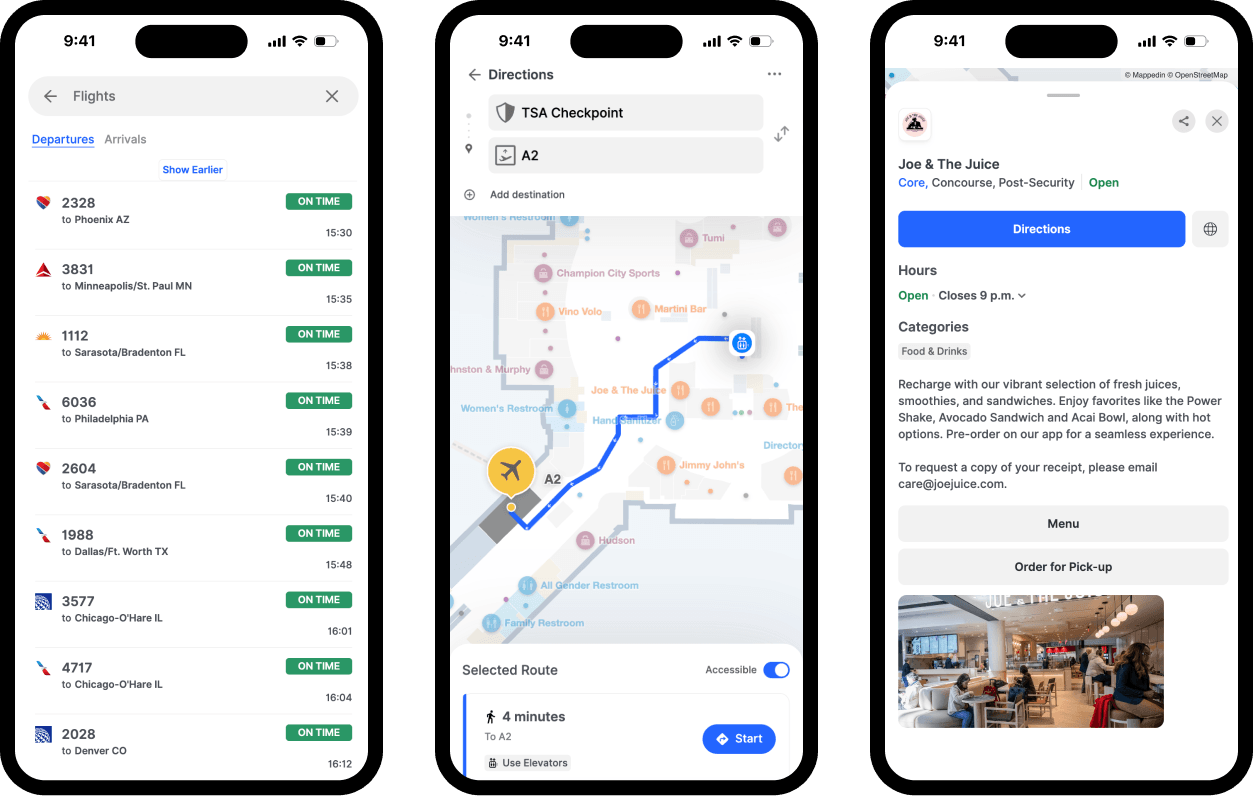
Indoor mapping software
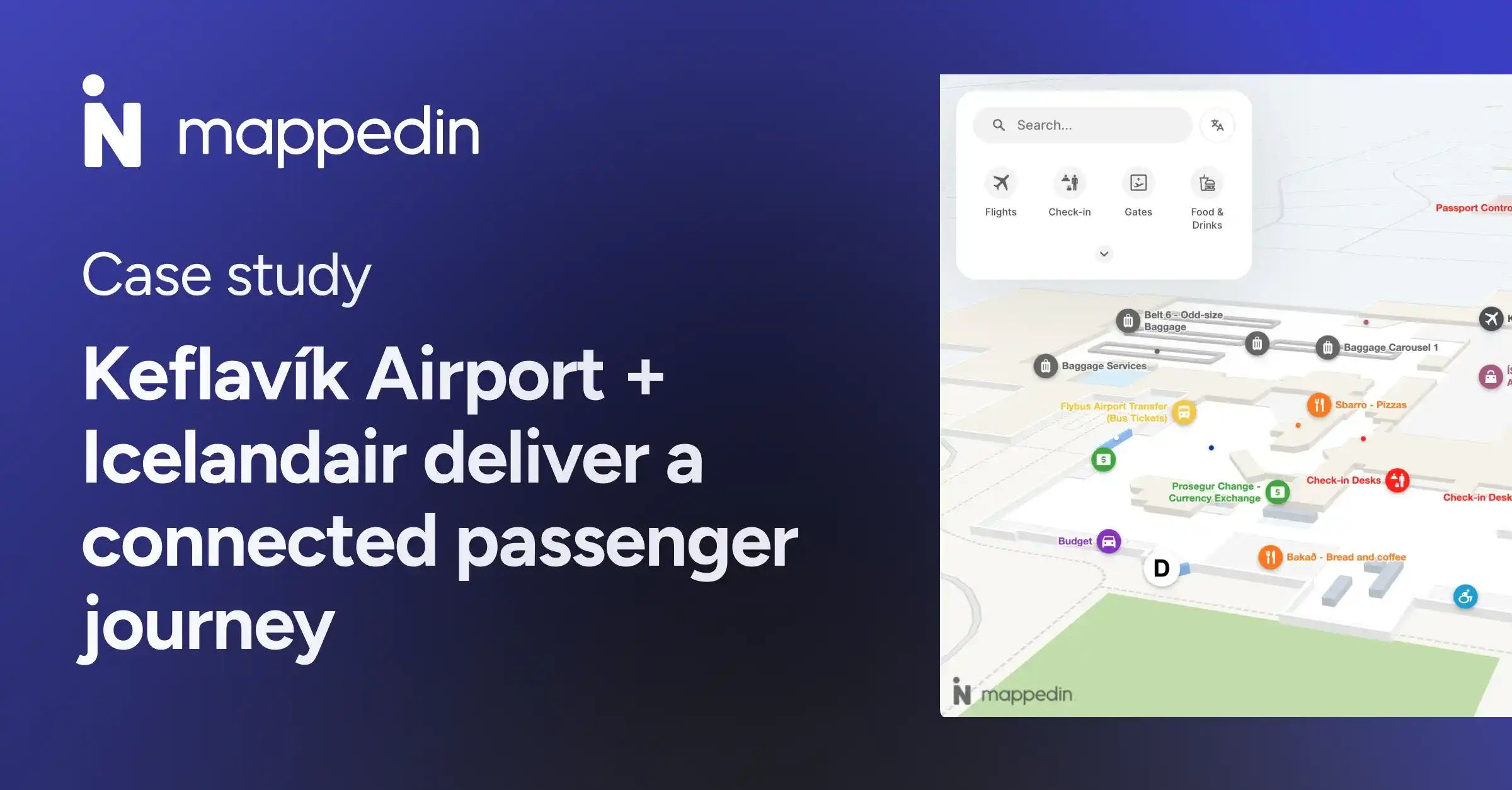
Indoor mapping software like Mappedin creates and manages the digital representation of terminal layouts. Every gate, restroom, shop, and walkway lives in this system. The best platforms use AI-powered mapping tools to convert CAD floor plans into interactive maps in minutes rather than weeks – a big deal when airports change constantly due to new tenants, gate reassignments, or construction.
– Sigurour Petur Oddsson, Commercial & Airport Development, Keflavík Airport
Indoor positioning technology
GPS doesn't work reliably indoors, so airports rely on indoor positioning to locate passengers within the terminal.
A few common approaches:
- Bluetooth beacons: Small devices placed throughout the terminal that communicate with smartphones to pinpoint location
- Wi-Fi triangulation: Uses existing Wi-Fi infrastructure to estimate position based on signal strength from multiple access points
- Ultra-wideband (UWB): Offers higher accuracy (within centimeters) for applications requiring precise positioning
These technologies enable "blue dot navigation,” the familiar experience of watching your location move on a map as you walk.
Digital signage and airport wayfinding kiosks
Interactive touchscreen kiosks give passengers a self-service option at key decision points: near security, at terminal intersections, by baggage claim. Travelers can search for destinations, view maps, and get directions without pulling out their phones.
Some digital directory and wayfinding software solutions can connect to flight information display systems (FIDS) to show real-time gate assignments and departure times. Some can print directions for passengers who want a physical reference.

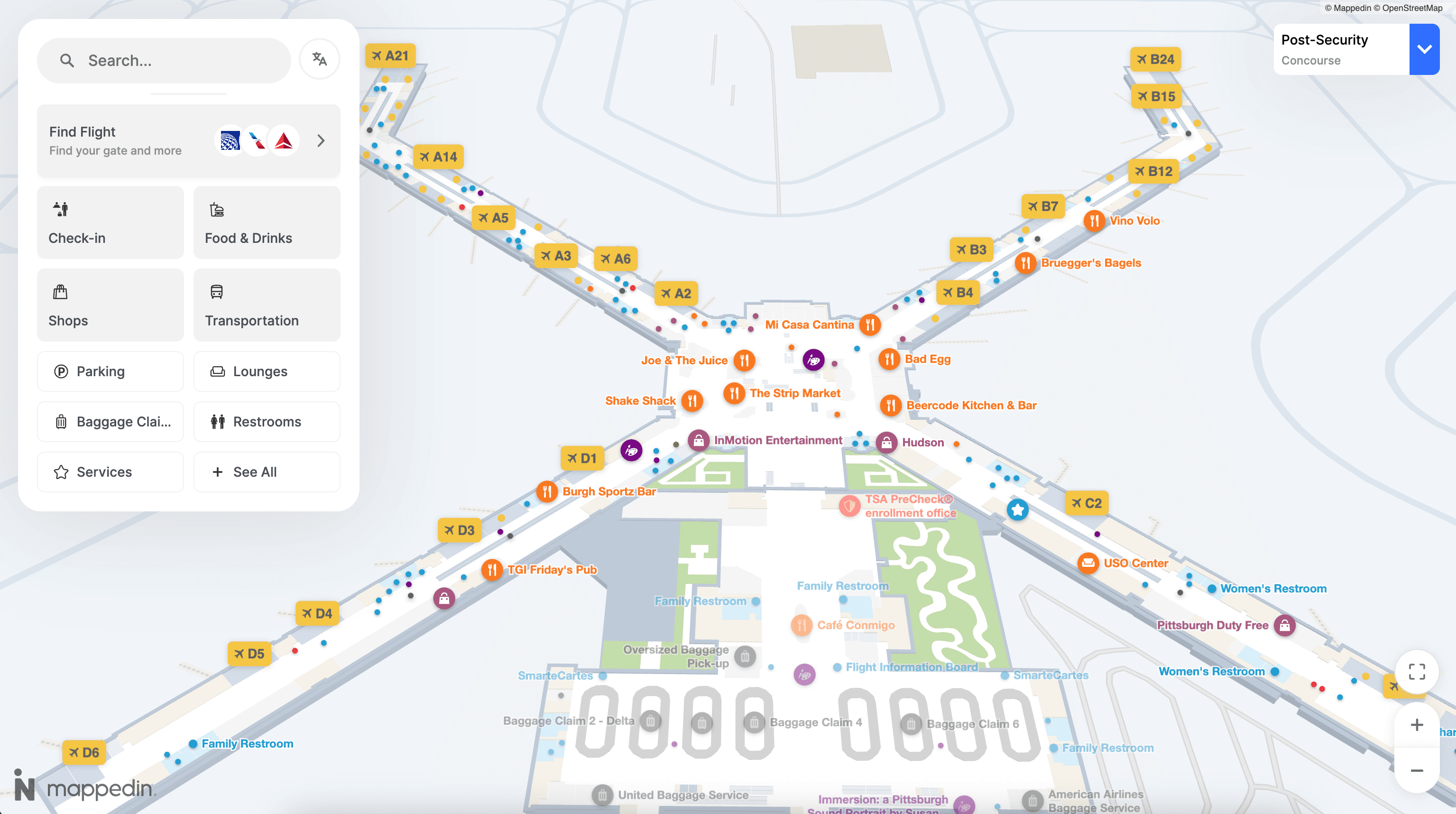
Mobile and web-based airport wayfinders
Smartphone apps and browser-based maps put wayfinding directly in passengers' hands. These tools offer turn-by-turn directions, estimated walk times, and the ability to save favorite destinations.
Web-based maps require no download, making them ideal for infrequent travelers. Dedicated apps, on the other hand, can store preferences, work offline, and integrate with boarding pass data for personalized routing.
Integration APIs and SDKs
Behind the scenes, APIs (application programming interfaces) and SDKs (software development kits) connect wayfinding systems to other airport platforms. These developer tools allow airports to embed maps into their own apps, sync with flight data, and build custom passenger experiences.
For example, an airline app might use an airport's wayfinding API to show passengers exactly how to get from their current location to their gate without ever leaving the airline's interface.
Mobile wayfinding apps
Dedicated airport apps offer the richest experience, and they’re on the rise with passengers:
Passengers can save their gate, set accessibility preferences, and receive notifications if their gate changes. Offline functionality keeps the app working even in areas with spotty connectivity.
Web-based airport maps
Browser-based maps provide instant access without a download. Airports often embed these on their websites and link to them from confirmation emails. They're especially useful for travelers who visit an airport only once or twice a year.
Interactive wayfinding kiosks
Kiosks remain essential for accessibility. They serve passengers who don't own smartphones, those unfamiliar with digital tools, and anyone who prefers a larger screen. The best kiosks offer multilingual interfaces and ADA-compliant designs.
Digital and static airport wayfinding signage
Physical signage still plays a critical role, especially for passengers moving quickly through familiar areas. Digital airport wayfinding signage adds flexibility: screens can update instantly when gates change, highlight promotions, or display emergency information.
The most effective airports combine static signs for consistent landmarks with digital displays for dynamic information.
Augmented reality airport navigation
AR navigation overlays directional arrows and labels onto a passenger's camera view. While not yet widespread, several airports are piloting AR features within their mobile apps to help travelers navigate complex terminals.
Airport wayfinding system integrations
Flight information display systems
When wayfinding integrates with FIDS, passengers get directions to the correct, always up-to-date gate. If a gate changes, the wayfinding system updates automatically.
This integration also enables smart routing. A passenger with a tight connection might see a faster path, while someone with time to spare could be routed past shops and restaurants, increasing opportunity for non-aeronautical revenue generation.
Parking and ground transportation
Of course, airport wayfinding doesn't stop at the terminal doors. Integrated systems guide passengers to parking structures, rental car facilities, rideshare pickup zones, and public transit connections. Some airports even show real-time parking availability.
Retail and concession platforms
Airports generate significant revenue from retail and dining. Wayfinding systems can highlight concessions along a passenger's route, promote deals, and help travelers discover amenities they might otherwise miss.
And it’s not just common sense – there’s data-backed evidence that DOOH airport advertising works:
Source: Ipsos
Security and emergency response systems
During emergencies, wayfinding systems can display dynamic evacuation routes and direct passengers to the nearest safe exits. Integration with security systems allows airports to close off certain paths and reroute traffic in real time.
For day-to-day operations, displaying security checkpoint wait times helps passengers choose the fastest line and reduces congestion at busy checkpoints.
How to implement an airport wayfinding system
1. Define passenger needs and airport goals
Start by identifying the specific challenges your airport faces:
- Are passengers frequently missing connections?
- Is the staff overwhelmed with directional questions?
- Are certain areas underutilized?
- Are there missed opportunities for non-aeronautical revenue?
Setting measurable objectives—like reducing missed flights or cutting wayfinding-related inquiries—helps guide technology decisions.
2. Select an airport wayfinding software vendor
Look for platforms that offer end-to-end capabilities: map creation, real-time updates, multi-channel deployment, and robust integrations. Scalability matters too, especially if you're planning terminal expansions or multi-airport rollouts.
Mappedin for Airports is designed to be your single airport map for both passenger experience and back-end operations. Trusted by the world’s largest airports like LAX, Schipol and Melbourne Airport, Mappedin powers modern passenger wayfinding, tenant and amenity discovery, and operations. Learn more about Mappedin for Airports →
— Bart Smith, General Manager, Corporate Services and IT Business Partner at the Calgary Airport Authority, YYC Calgary International Airport
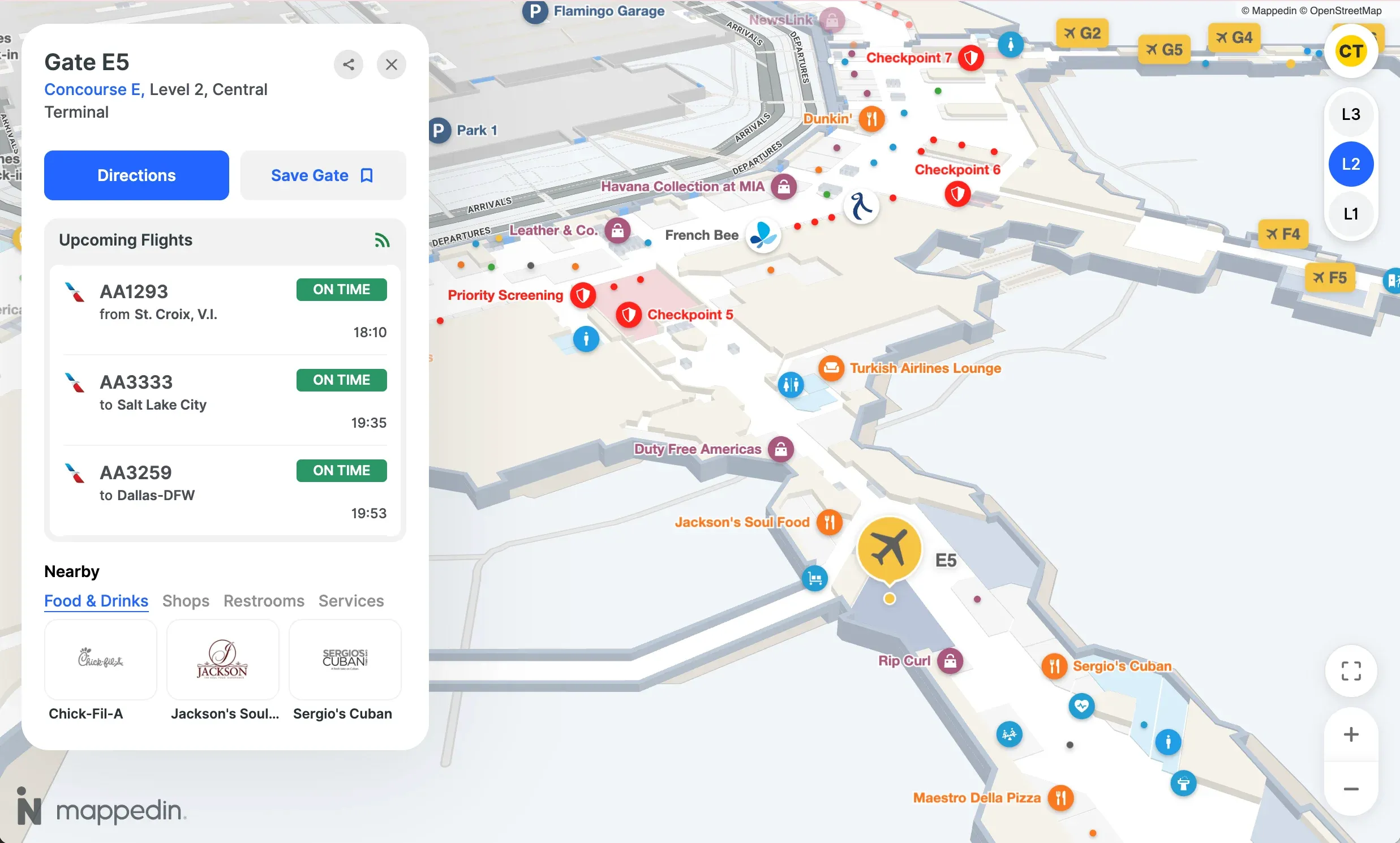
3. Create indoor maps
Airport wayfinding software that leverages AI-powered mapping dramatically accelerates the process of converting floor plans into functional digital maps. What once took weeks of manual work can now happen in minutes, freeing your team to focus on customization and testing.
4. Design the passenger wayfinding experience
User experience makes or breaks a wayfinding system. Clear iconography, intuitive search, and logical route suggestions all contribute to a system passengers will actually use. Testing with real travelers—including those with accessibility needs—before launch helps catch issues early.
5. Integrate with existing airport systems
Connecting your wayfinding platform to FIDS, parking management, retail systems, and security creates a more useful experience for passengers. The more data flows between systems, the more helpful wayfinding becomes.
6. Deploy across all passenger touchpoints
Launching on mobile apps, your website, kiosks, and digital signage simultaneously creates a consistent experience. Passengers can start on one device and continue on another without confusion.
7. Establish ongoing map maintenance workflows
Airports never stop changing. Clear workflows for updating maps when tenants change, construction begins, or gates get reassigned keep your wayfinding system accurate. Centralized editing tools make this manageable even for large, complex terminals.
Best practices for airport wayfinding design
Prioritize accessibility and inclusive routes
Effective wayfinding serves all passengers. Systems can automatically calculate accessible routes that avoid stairs and escalators, highlight elevators, and mark accessible restrooms. This supports travelers using wheelchairs, pushing strollers, or navigating visual impairments.
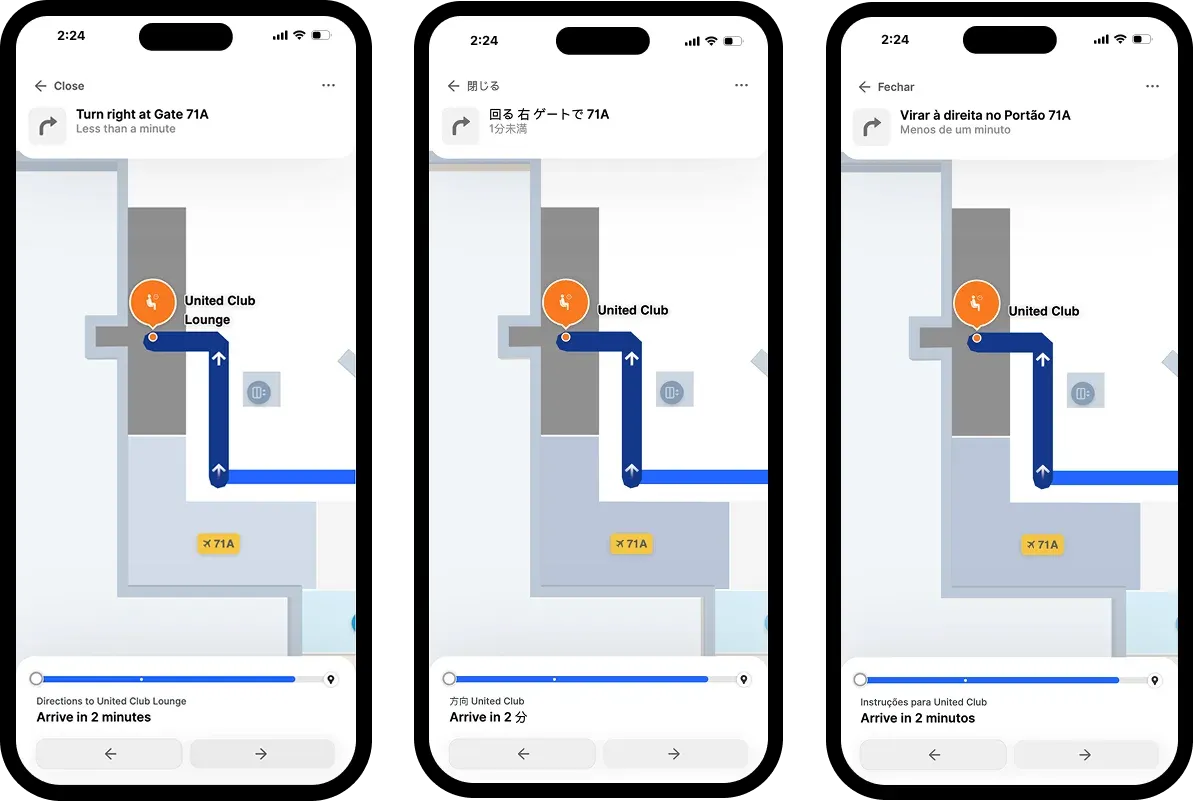
Support multi-language navigation
International airports serve travelers from around the world. Wayfinding systems typically support 40+ languages, and thoughtful iconography helps transcend language barriers entirely.
Enable real-time map updates
Outdated information erodes passenger (and staff) trust quickly. If a passenger follows directions to a closed restaurant or a relocated gate, they're unlikely to use the system again. Real-time updates keep maps accurate and passengers confident.
Design for passenger stress and time constraints
Airports are high-stress environments. Wayfinding that shows estimated walk times, distance remaining, and clear progress indicators helps passengers feel in control. Avoiding information overload keeps the experience manageable.
Maintain consistency across all channels
The same map data powering your app, website, kiosks, and signage prevents conflicting directions. A single source of truth simplifies maintenance and builds passenger trust.
Benefits of airport wayfinding systems
Reduced passenger stress and fewer missed flights
Clear navigation reduces anxiety. When passengers know exactly where to go and how long it will take, they have time to relax, grab a coffee, or browse the shops—rather than sprinting to their gate.
Lower staff workload for directional assistance
Self-service wayfinding handles repetitive "where is my gate?" questions, freeing staff to assist with more complex issues.
Improved accessibility and ADA compliance
Digital wayfinding can calculate accessible routes automatically, ensuring passengers with mobility needs receive accurate, helpful directions without having to ask.
Centralized location data across touchpoints
One platform managing all map data ensures consistency and simplifies updates. When a tenant changes or a gate moves, you update it once and it reflects everywhere.
Increased non-aeronautical revenue opportunities
Wayfinding systems can drive greater non-aero revenue opportunities by promoting concessions along passenger routes, highlighting limited-time offers, and guiding travelers to amenities they might otherwise miss.
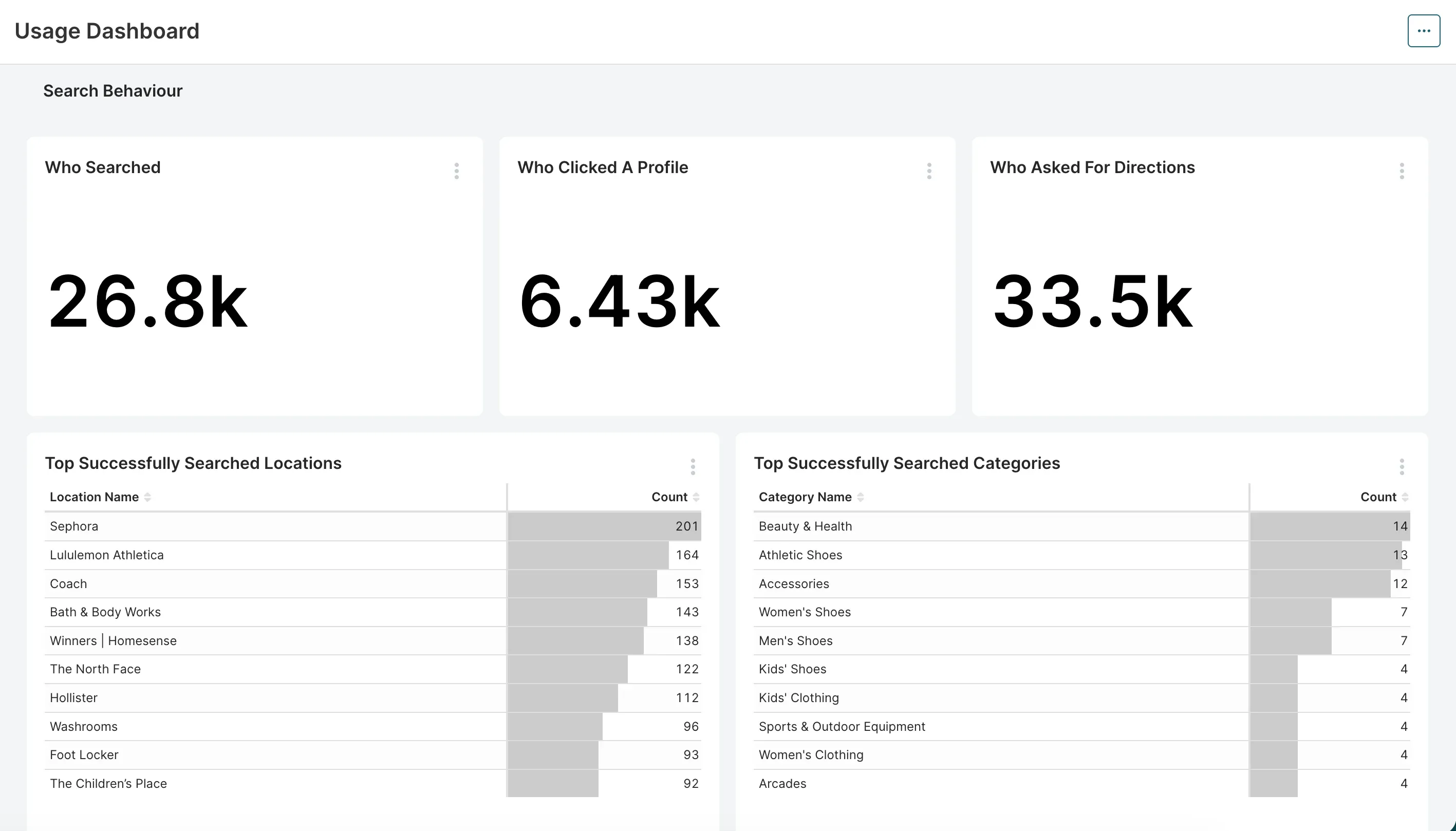
Actionable insights from passenger flow data
Passenger analytics reveal how passengers move through your airport: where they linger, which routes they prefer, and where congestion builds. These insights inform operational decisions, from staffing to signage placement.
How to choose the right airport wayfinding platform
When evaluating wayfinding platforms, a few criteria stand out:
- Scalability: Can the platform handle multiple terminals and future expansion?
- Integration capabilities: Does it connect with FIDS, retail, parking, and security systems?
- Map maintenance: How easily can staff update maps without technical expertise?
- Deployment options: Does it support mobile apps, web, kiosks, and digital signage?
- Analytics: What insights does the platform provide on passenger behavior?
- Accessibility: Does it support accessible routing and multilingual interfaces?
Platforms like Mappedin offer AI-powered mapping, flexible SDK and API options, and proven deployments at airports including Los Angeles International, Pittsburgh International, and Keflavík International Airport.
The right partner helps you move from floor plans to functional wayfinding quickly, and keeps maps accurate as your airport evolves.
FAQs about airport wayfinding systems
How much does an airport wayfinding system cost?
Costs vary based on airport size, number of terminals, deployment channels, and integration requirements. Most vendors provide custom quotes after assessing specific needs.
How often should airport wayfinding maps be updated?
Maps benefit from updates whenever tenant changes, construction, or gate reassignments occur. Many airports update maps weekly or in real time, depending on their platform's capabilities.
What indoor positioning technology works best for airports?
Bluetooth beacons and Wi-Fi triangulation are most common. The best choice depends on accuracy requirements, existing infrastructure, and budget.
How do airport operators measure wayfinding system success?
Common metrics include app downloads, kiosk interactions, reduction in missed flights, passenger satisfaction scores, and volume of directional questions to staff. Many airport wayfinding systems offer built-in analytics to help airport operators understand passenger behavior, kiosk usage, navigation bottlenecks and more.
Can airport wayfinding systems support emergency evacuations?
Yes. Modern systems can display dynamic evacuation routes, close off affected areas, and direct passengers to the nearest safe exits during emergencies.
How do airports encourage passengers to navigate an airport with digital wayfinding tools?
Promotion through boarding passes, QR codes on signage, integration with airline apps, and staff recommendations all help drive adoption.
Related resources:


Share