
Start Here
Mappedin SDKs are a family of five general-access web and mobile software development kits – Mappedin JS, React SDK, iOS SDK, Android SDK, and React Native SDK – that let engineering teams embed interactive 3D indoor maps, wayfinding, and Blue Dot live positioning directly into custom applications. Built under VenueOS, Mappedin’s indoor operating platform, every SDK draws from the same live map data via Mappedin Venue Format (MVF) so map updates published once in Mappedin Editor propagate across every connected app in real time.
Most venues maintain separate map files for their public website, native mobile apps, and lobby kiosks. Every time a tenant moves, a gate closes, or a wing undergoes renovation, engineering teams get pulled into manual updates across disconnected codebases – and guests end up staring at conflicting directions.
The Mappedin SDK family eliminates that drift. As a core pillar of VenueOS, Mappedin’s indoor operating platform, our five general-access SDKs let developers embed interactive 3D indoor maps, turn-by-turn wayfinding, and Blue Dot live positioning directly into custom web and mobile applications.
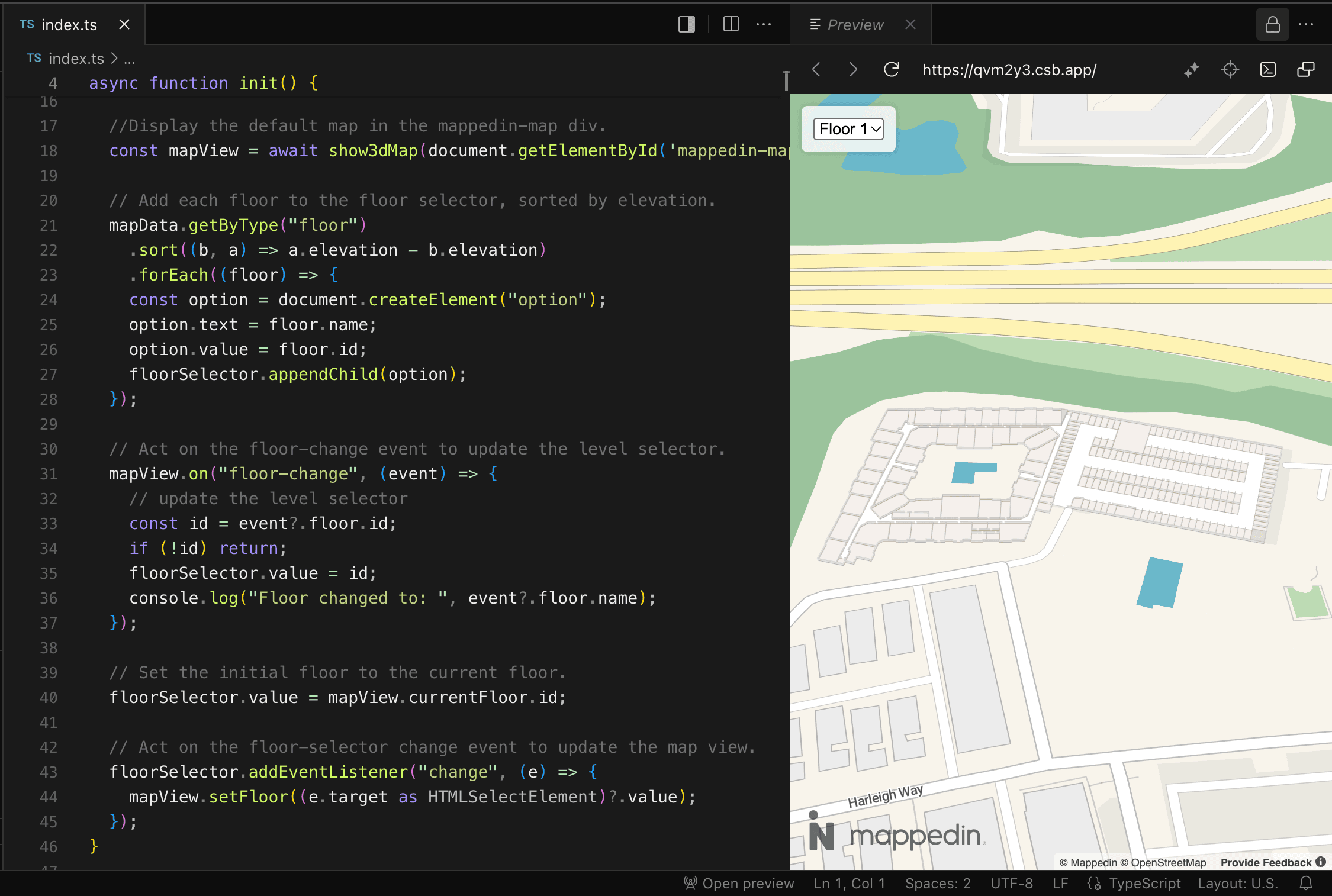
Wayfinding is where visitors start, yet it is only part of what an embedded map does. When you ground custom UI, live occupancy feeds, or operational alerts in verified indoor geometry, your map stops acting like a static picture and starts working as live digital infrastructure for your building.
Skip the basemaps and layers. Build any map experience with our SDKs and APIs, in the languages you love. Start for free →
How Mappedin SDKs connect your apps to one living map
In a typical venue tech stack, the web team, mobile app team, and facilities team all work off different representations of the same floor plan. Mappedin replaces those parallel workflows with a single data pipeline:
- Author once in Mappedin Editor and the CMS: Operations or mapping teams build and maintain the venue’s floor plans, points of interest, and routing paths in one central workspace.
- Stream via Mappedin Venue Format (MVF): Published map data flows to every connected SDK through MVF, keeping geometry, labels, and routing logic synchronized across platforms.
- Update everywhere without app store releases: When a retailer relocates or a hallway closes for maintenance, changes published in Maker reach your web and mobile apps immediately – without forcing your developers to ship a new build.
The five Mappedin SDKs at a glance
All five Mappedin SDKs are in general access and connect to the same underlying VenueOS map data:
- Mappedin JS (Web SDK): JavaScript SDK for any front-end framework or vanilla JS build.
- React SDK (Web SDK): Declarative React wrapper built for React 18+, Next.js, and Vite.
- iOS SDK (Mobile SDK): Native iOS SDK for Swift and Objective-C applications.
- Android SDK (Mobile SDK): Native Android SDK for native Android applications.
- React Native SDK (Mobile SDK): Cross-platform mobile SDK for shared iOS and Android codebases.
Web SDKs: Custom browser experiences and React components
Mappedin offers two web SDKs that render high-performance 3D maps directly in the browser using WebGL, giving front-end engineers full control over camera angles, styling, and user interactions.
Mappedin JS for framework-agnostic web applications
Mappedin JS is our core JavaScript SDK for teams building custom web map experiences on any stack – including Vue, Angular, vanilla JavaScript, or a no-build CDN setup.
- Core capabilities: High-performance 3D web rendering, programmatic camera and state control, custom markers, labels, and interactivity, wayfinding and navigation APIs, and BlueDot live positioning support.
- Common venue types: Corporate and workplace campuses, retail and malls, airports and transit hubs, and healthcare facilities.
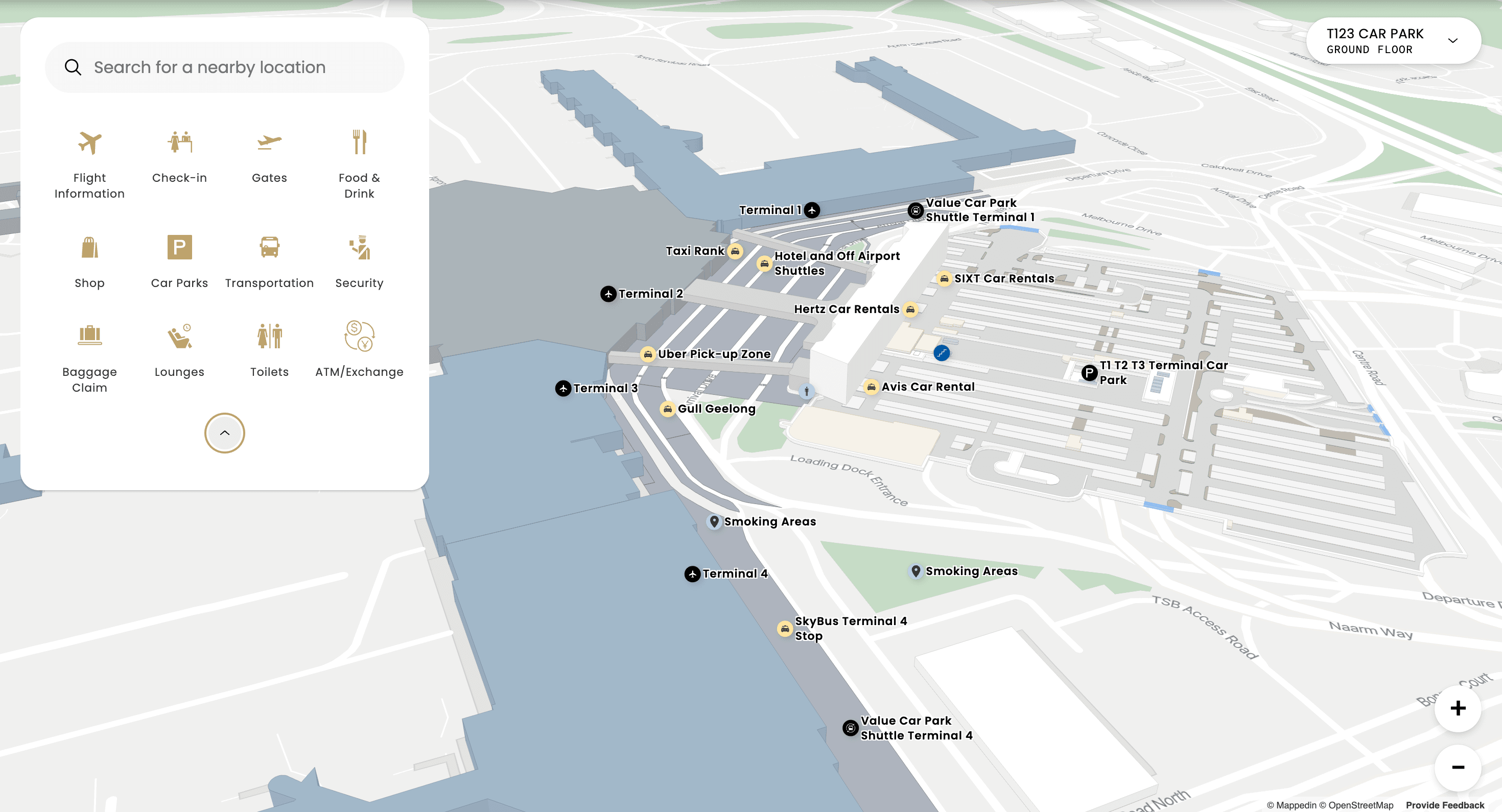
React SDK for declarative React, Next.js, and Vite builds
React SDK is a React wrapper around Mappedin JS that lets you embed interactive 3D indoor maps using familiar component patterns while keeping full access to every underlying Mappedin JS API.
- Core capabilities: Component-based embedding, idiomatic hooks including, in-browser 3D WebGL rendering, wayfinding and navigation APIs, BlueDot live positioning, and out-of-the-box TypeScript support across React 18+, Next.js, and Vite projects.
- Common venue types: Corporate and workplace campuses, retail and malls, airports and transit hubs, and healthcare facilities.
Mobile SDKs: Native iOS, native Android, and cross-platform apps
Whether your mobile roadmap prioritizes native OS performance and offline reliability or single-codebase velocity, Mappedin supports both paths.
iOS SDK for native Swift and Objective-C performance
iOS SDK delivers native iOS integration for embedding interactive 3D indoor maps into flagship Swift and Objective-C apps.
- Core capabilities: Native rendering powered by Metal, the MPIMapView component for embedding 3D maps, turn-by-turn wayfinding and navigation, BlueDot live positioning support, offline map support, and customizable markers and UI.
- Developer workflow: Integrates cleanly with both UIKit and SwiftUI, with distribution via CocoaPods and Swift Package Manager.
- Common venue types: Retail and malls, healthcare, airports and transit, and events and conferences.
Android SDK for native Android navigation
Android SDK provides native Android indoor mapping and routing for organizations maintaining dedicated Android applications.
- Core capabilities: Native Android rendering, turn-by-turn wayfinding, customizable markers and UI, and offline map support for reliable navigation in areas with weak cellular coverage.
- Common venue types: Retail and malls, healthcare, and airports and transit.
React Native SDK for shared iOS and Android codebases
React Native SDK brings cross-platform mobile maps to React Native applications so teams can ship indoor navigation across iOS and Android from a single codebase.
- Core capabilities: Shared iOS and Android codebase, indoor wayfinding and directions, BlueDot positioning, custom markers, labels, and points of interest, plus event hooks for map interactions.
- Common venue types: Retail and malls, healthcare, stadiums and venues, and airports and transit.
Build your custom indoor map experience. Start for free →
How to choose the right Mappedin SDK for your stack
Use your application architecture and target devices to select the right starting point:
Choose Mappedin JS if...
You need a custom web map on Vue, Angular, vanilla JS, or a no-build CDN setup.
Choose React SDK if...
You are building in React, Next.js, or Vite with declarative components and hooks.
Choose iOS SDK if...
You need native iOS performance with Metal, UIKit, or SwiftUI.
Choose Android SDK if...
You are building a dedicated native Android application.
Choose React Native SDK if...
You want one mobile codebase for both iOS and Android.
Shared capabilities across the SDK family
While each SDK is tailored to its runtime environment, the Mappedin SDK family shares a consistent foundation of core mapping capabilities:
- 3D map rendering: Hardware-accelerated WebGL 3D rendering in the browser for web SDKs, native Metal rendering on iOS, and native rendering on Android.
- Wayfinding and navigation: Multi-floor, turn-by-turn routing supported across the entire SDK family.
- Blue Dot live positioning: Real-time indoor location tracking supported across Mappedin JS, React SDK, iOS SDK, and React Native SDK.
- Offline map support: Explicitly supported on the native iOS SDK and Android SDK so visitors stay oriented in underground parking garages, concrete hospital wings, and high-density stadiums.
Frequently asked questions
What is the difference between Mappedin JS and the React SDK?
Mappedin JS is Mappedin’s core JavaScript SDK that works with any front-end framework or vanilla JavaScript. The React SDK is a React wrapper built around Mappedin JS that exposes all of the same underlying APIs while adding declarative React components like <MapView/> and hooks like useMapData() and useMap().
Do Mappedin’s mobile SDKs support offline maps?
Yes. Offline map support is built into Mappedin’s native iOS SDK and Android SDK, allowing mobile apps to cache venue map data and maintain navigation when cellular or Wi-Fi connectivity drops.
How do map updates reach apps built with Mappedin SDKs?
All five Mappedin SDKs pull map data from Mappedin Editor and the CMS via Mappedin Venue Format (MVF). When your team publishes a layout change, new tenant, or route detour in Maker, connected web and mobile apps receive the updated map automatically without requiring a new app build.
Build your next experience on one source of truth
Your engineering team should spend its time building features unique to your guests and operators – not maintaining duplicate floor plans across web and mobile repositories. With Mappedin SDKs and VenueOS, you own the application layer while one living map keeps every screen accurate.


Build your custom indoor map experience.
Skip the basemaps and layers. Build any map experience with our SDKs and APIs, in the languages you love.
Get startedShare